


Making Tax Digital (MTD) for Income Tax is now live in the UK. From 6 April 2026, sole traders and landlords earning above £50,000 must keep digital records and send quarterly updates to HMRC using compatible software. The annual Self Assessment tax return is being phased out. If you’re not ready, you risk penalty points, fines, and last-minute scrambling when deadlines hit.
This guide explains exactly what MTD means for you, whether you’re affected right now, and what to do next.
What Is Making Tax Digital?
Making Tax Digital is HMRC’s programme to move UK tax reporting from annual paper-based returns to a fully digital system. It started with VAT in 2019. MTD for Income Tax Self Assessment — often written as MTD ITSA — is the next stage. It replaces the SA100 Self Assessment return with quarterly digital updates and a Final Declaration submitted through HMRC-approved software.
The aim is to reduce errors, close the UK’s tax gap (estimated at £39.8 billion in 2022/23), and give both HMRC and taxpayers a more accurate, real-time view of income and tax owed.
Who Needs to Use MTD for Income Tax?
MTD for Income Tax applies to sole traders and landlords whose qualifying income exceeds the relevant threshold for a tax year.
Income Thresholds and Start Dates
| Start Date | Who Is Affected |
|---|---|
| 6 April 2026 | Sole traders and/or landlords with qualifying income above £50,000 |
| 6 April 2027 | Qualifying income above £30,000 |
| 6 April 2028 | Qualifying income above £20,000 |
HMRC estimates around 864,000 taxpayers fall into the first wave. By 2028, the number rises to roughly 2.9 million.
What Counts as Qualifying Income — and What Doesn’t
This catches a lot of people out. Qualifying income is gross self-employment income plus gross property income. That means income before expenses, not profit.
Counts toward the threshold:
- Self-employment turnover (sole trader income)
- Rental income from UK and overseas property
Does not count:
- Employment income (PAYE)
- Dividends
- Bank interest
- Pension income
- Capital gains
So if you earn £35,000 as an employee and £20,000 from a buy-to-let, you are not in scope for 2026. Your qualifying income is £20,000 from property only. But from April 2028, that same landlord will need to comply.
What’s Actually Changing?
Right now, most self-employed people and landlords file one Self Assessment return per year, by 31 January. MTD scraps that rhythm.
Under the old system:
- Collect records throughout the year (often in a shoebox)
- File once, by 31 January following the tax year end
- Pay any tax owed in January and July
Under MTD:
- Keep digital records of income and expenses throughout the year using compatible software
- Send four quarterly updates to HMRC — a summary of income and expenses per income source
- Submit a Final Declaration by 31 January to confirm the figures and claim any reliefs or allowances
- Pay tax on the same schedule as before
The quarterly updates are not tax payments. They are digital submissions that keep HMRC informed. Think of them as quarterly check-ins rather than bills.
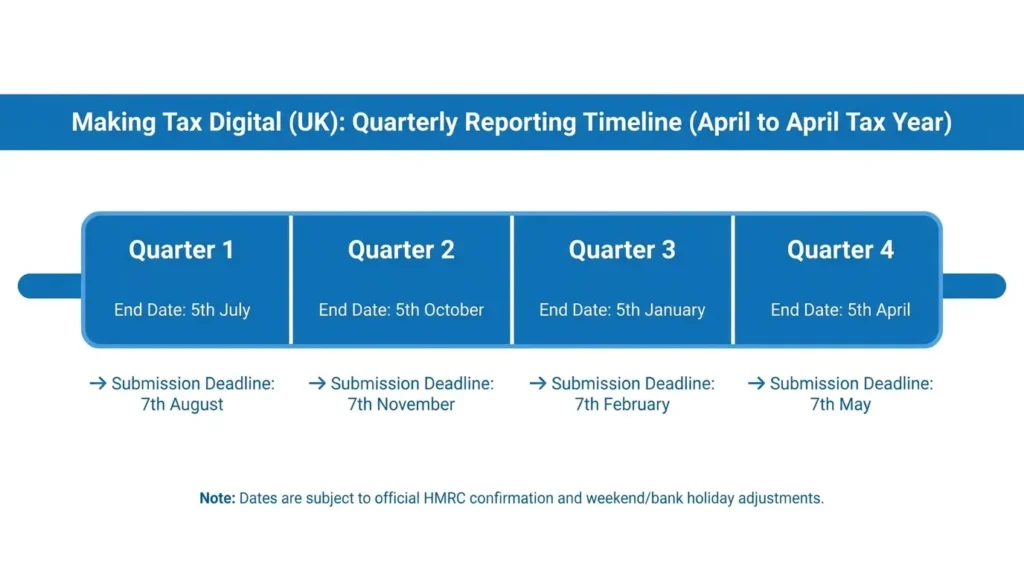
The MTD Rollout Timeline
Here are the four quarterly update deadlines that apply in a standard MTD tax year (6 April to 5 April):
| Quarter | Period Covered | Submission Deadline |
|---|---|---|
| Q1 | 6 April – 5 July | 5 August |
| Q2 | 6 July – 5 October | 5 November |
| Q3 | 6 October – 5 January | 5 February |
| Q4 | 6 January – 5 April | 5 May |
After all four updates, you submit your Final Declaration by 31 January — the same deadline as the old tax return.
How to Prepare for Making Tax Digital: 6 Steps
Step 1 — Check Whether You’re In Scope
Add up your gross self-employment income and gross rental income for the 2024/25 tax year (the one HMRC uses to assess your 2026/27 obligations). If the combined total exceeds £50,000, you need to be compliant now.
If you’re unsure, check your last Self Assessment return. Your turnover figure — not profit — is what matters.
Step 2 — Register with HMRC for MTD
You need to sign up for MTD for Income Tax through GOV.UK before you can start filing. You can sign up yourself or ask your accountant or tax agent to do it on your behalf. If you use an agent, they must also be registered for MTD agent services.
Don’t wait for HMRC to contact you. Sign up as soon as possible if you’re in the first wave.
Step 3 — Choose HMRC-Compatible Software
You cannot use MTD without software that connects directly to HMRC’s systems. HMRC maintains a list of approved products on GOV.UK under “Find software for Making Tax Digital for Income Tax.”
Options include Xero, QuickBooks, Sage, FreeAgent, and several smaller providers. Choose software that:
- Is listed as MTD ITSA compatible on GOV.UK
- Handles your specific income types (self-employment, property, or both)
- Fits your technical comfort level
- Fits your budget (more on this below)
Pair this with building a solid digital workflow for your small business so the software becomes part of a routine rather than a chore.
Step 4 — Start Keeping Digital Records
From your MTD start date, all income and expense records must be kept digitally. Paper receipts, spreadsheets you fill in once a year, and memory are no longer sufficient on their own.
You need to record, digitally and in real time (or close to it):
- Date of each transaction
- Description
- Amount
- Category (income or expense type)
Your software will typically handle this through manual entry, bank feeds, or receipt scanning. Setting up a shared digital folder system for your business documents alongside your accounting software keeps everything accessible and organised.
Step 5 — Know Your Quarterly Update Deadlines
Put all four deadlines in your calendar now. Missing them repeatedly leads to penalty points. Four points triggers a £200 fine — and another £200 for each subsequent late submission on top of that.
For the 2026/27 tax year, HMRC has confirmed a grace period. No penalty points will be issued for late quarterly updates this year. But the Final Declaration is not included in this grace period — miss 31 January and penalties apply in full.
Using free time tracking tools for UK small businesses can help you stay on top of quarterly admin if you run a service-based business where income fluctuates week to week.
Step 6 — File Your Final Declaration
The Final Declaration replaces your Self Assessment tax return. It’s submitted through your MTD software after the end of the tax year. This is where you confirm your total income, claim reliefs (like the trading allowance or property allowance), declare any other income sources not covered by quarterly updates, and finalise your tax bill.
The deadline is still 31 January following the end of the tax year.
Choosing MTD-Compatible Software
Free vs Paid Options
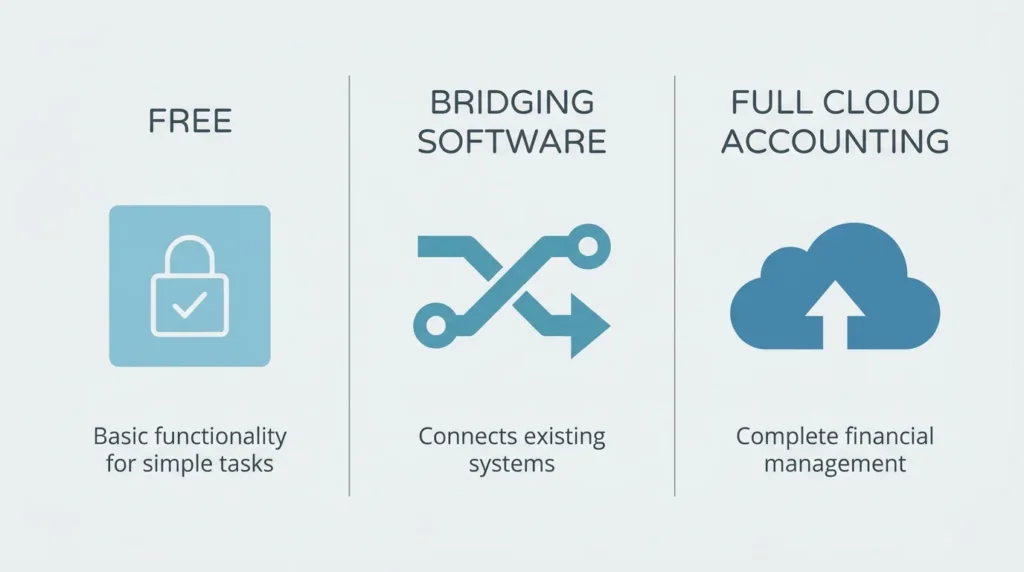
HMRC lists free software options on GOV.UK. These are typically limited to simpler setups — one income source, no VAT, basic record-keeping. If you have a mix of self-employment and rental income, or you’re VAT registered, a free tool may not cover everything.
Paid options (Xero, QuickBooks, Sage, FreeAgent) start from around £12–£35 per month. FreeAgent is included free with some business bank accounts. It’s worth checking whether your bank account already includes it.
What Is Bridging Software?
Bridging software sits between a spreadsheet and HMRC’s systems. It takes data from your existing spreadsheet records and submits it to HMRC in a compliant format. It doesn’t eliminate the spreadsheet — it just connects it to HMRC digitally.
This works for some, but it adds an extra step. If you’re setting up from scratch, purpose-built MTD software is usually simpler.
MTD Penalties — and the 2026/27 Grace Period
MTD uses a points-based penalty system for late quarterly updates.
- Each missed quarterly deadline = 1 penalty point
- 4 points = £200 fine
- Each additional late submission after that = another £200
- Points reset after a sustained period of on-time filing
For the 2026/27 tax year only, HMRC will not issue penalty points for late quarterly updates. This is a soft landing to give taxpayers and accountants time to adjust. It does not apply to the Final Declaration — miss 31 January and the standard late-filing penalties kick in.
Interest charges apply on any unpaid tax, regardless of whether you’re in the grace period.
Who Can Be Exempt From MTD?
HMRC allows exemptions in specific circumstances. You can apply for an exemption if:
- You are digitally excluded — for example, due to age, disability, or a health condition that prevents digital record-keeping
- You live in a remote area with no internet access
- Your religion prohibits using computers (a recognised exemption under existing HMRC policy)
- There is another exceptional reason that makes digital filing unreasonable
Exemptions are not automatic. You need to apply to HMRC directly and explain your circumstances. If granted, you can continue filing by post.
Frequently Asked Questions
Does partnership income count toward the MTD threshold?
Not yet. Partnerships are not currently included in the MTD rollout. HMRC has confirmed this separately. Only sole trader and property income counts toward the qualifying income threshold.
Do I still need to file a Self Assessment return?
No — not once you’re on MTD. The Final Declaration replaces the SA100. However, if you have income sources outside of MTD (such as dividends, capital gains, or employment income requiring adjustment), you’ll declare those within the Final Declaration rather than a separate return.
Can I still use spreadsheets?
You can use a spreadsheet for your own records, but it must be connected to HMRC’s systems via bridging software or exported to your MTD-compatible tool. A standalone spreadsheet with no digital link to HMRC is not compliant.
MTD Preparation Checklist
Use this before your first quarterly deadline:
- [ ] Confirm your qualifying income exceeds the relevant threshold
- [ ] Sign up for MTD for Income Tax on GOV.UK (or ask your agent to do it)
- [ ] Choose and set up HMRC-compatible software
- [ ] Connect your bank account to your software (if using bank feeds)
- [ ] Start logging income and expenses digitally from your MTD start date
- [ ] Add all four quarterly deadlines to your calendar
- [ ] Confirm your accountant or agent is registered for MTD agent services
- [ ] Check whether you need to apply for a digital exclusion exemption
Making Tax Digital is a significant operational change — but for most sole traders and landlords, the core shift is simple: move from annual record-keeping to a running digital log, and submit four times instead of once. Start the software decision now. The technology side is straightforward. The risk is leaving it until the quarter has already passed.