
Feature Image (Header):
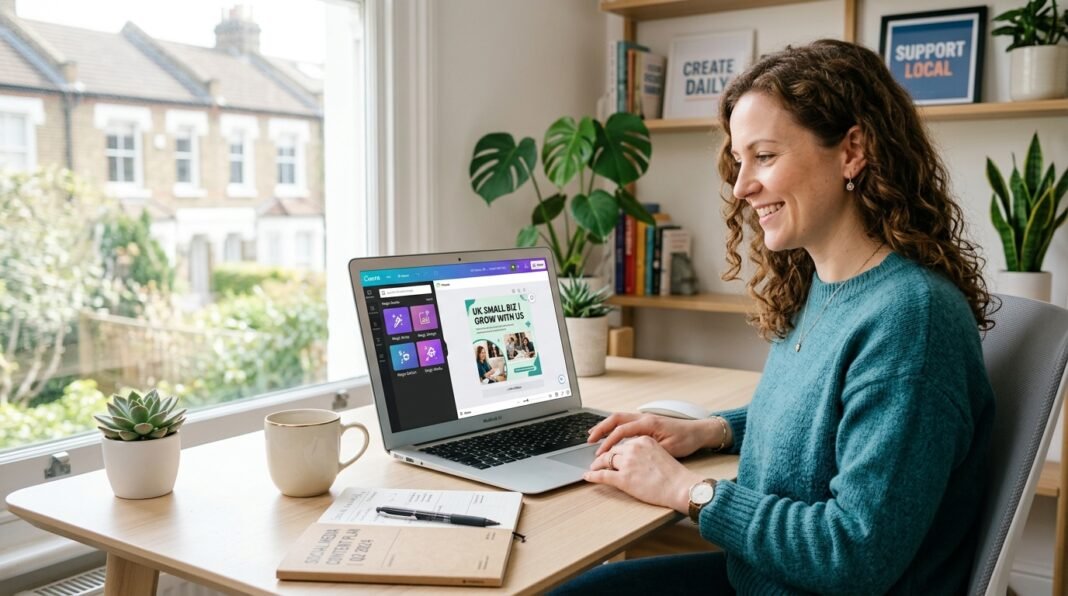
- Prompt: A bright, modern workspace showing a laptop displaying Canva’s interface with Magic Studio tools visible. A UK small business owner sits at desk, designing social media content. Soft natural lighting, minimalist desk setup with coffee cup and notebook. Professional, approachable tone. Size 1200x630px.
- Name: canva-ai-magic-studio-uk-small-business.jpg
- Caption: Canva Magic Studio makes professional design accessible to UK small business owners without design experience.
- Alt Text: UK small business owner using Canva AI design tool on laptop with Magic Studio features visible
Section 2 Image (Features Breakdown):
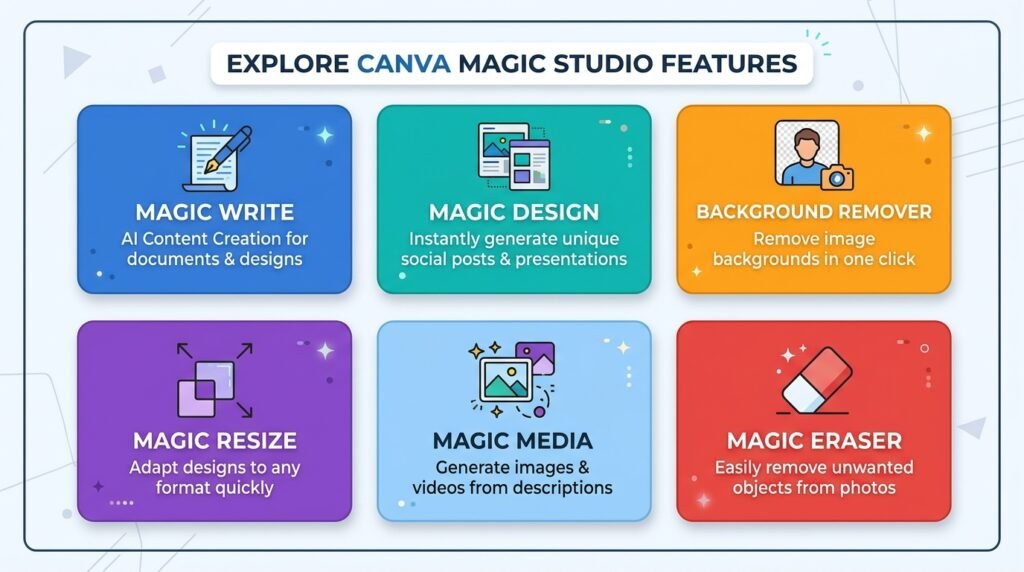
- Prompt: Flat design infographic showing 6 colorful squares in a grid layout, each representing a Canva Magic Studio feature: Magic Write (text icon), Magic Design (layout icon), Background Remover (photo icon), Magic Resize (resize arrows), Magic Media (image/star icon), Magic Eraser (eraser icon). Clean, modern style with UK color palette. Size 1200x600px.
- Name: canva-features-infographic-2026.jpg
- Caption: The 6 most valuable Canva Magic Studio AI features for UK small business owners.
- Alt Text: Infographic showing 6 Canva AI features: Magic Write, Design, Background Remover, Resize, Media, Eraser
Section 4 Image (ROI/Decision Framework):
- Prompt: Simple decision tree flowchart showing business types (estate agent, restaurant, freelancer, e-commerce, accountant, occasional user) with yes/no branches pointing to Canva Pro recommendation or Free plan. Clean white background, professional color scheme, easy to follow. Size 1200x700px.
- Name: canva-pro-worth-it-decision-tree.jpg
- Caption: Quick decision framework: Should your UK business upgrade to Canva Pro?
- Alt Text: Decision tree showing which UK business types benefit from Canva Pro subscription
Canva AI for UK Small Businesses 2026: Is It Worth the £10.99/Month?
Running a UK small business means wearing multiple hats. You’re juggling operations, customer service, sales—and somehow you’re also expected to create professional marketing materials. Social media posts need fresh graphics. Client presentations need polish. Email campaigns need eye-catching headers. Most small business owners don’t have time (or budget) for a freelance designer at £50+ per hour.
This is where Canva comes in. Over 200 million people worldwide use Canva to create professional visuals without design experience. But the real question isn’t whether Canva is good—it’s whether Canva’s new AI features (Magic Studio) are worth paying £10.99/month for when the free version exists.
This review tests every Canva AI feature on real UK small business workflows. We’re honest about what works, what doesn’t, and who should actually upgrade to Pro.
Our verdict: Canva is the most accessible design tool for UK SMBs. The AI features add genuine value—but only if you’re creating content regularly.
What Is Canva AI? And Why Should UK Small Businesses Care?
Canva is a cloud-based design platform founded in Australia in 2013. It’s become the default tool for small businesses, freelancers, and non-designers who need professional visuals without Adobe costs or a design degree.
In the UK specifically, you’ll find Canva in use across estate agencies (property listings), accountancy practices (client reports), restaurants (menus and social posts), hairdressers, tradespeople, and any business producing regular marketing content.
Canva AI—branded as Magic Studio—is a suite of over 25 AI-powered tools baked into the Canva editor. These aren’t bolted-on features. They’re integrated directly into your design workflow. You’re building a social media post, and Magic Write suggests copy in real time. You’re editing a photo, and Magic Eraser removes unwanted objects with a click.
The key difference from competitors: Canva’s AI tools are contextual, not separate. You don’t switch apps. You stay in the design editor and let AI handle the repetitive parts.
The 6 Most Valuable Canva Magic Studio Features for UK Businesses
Magic Write — AI Text Generation
What it does: Generates marketing copy, social captions, email headlines, and short-form text.
Real use case: You’re creating an Instagram post for your restaurant. You upload a food photo, and Magic Write suggests three caption variations in seconds. One reads: “Fresh sourdough, made this morning from heritage grains. Stop by before we sell out 🍞” —much better than “New bread available.”
Honest assessment: Output is decent for first drafts but needs editing. It won’t match your brand voice immediately. Free plan gets limited uses; Pro gives 500 monthly AI credits (Magic Write costs 8 credits per use, so roughly 60 generations/month).
Who benefits: Estate agents writing property descriptions. Accountants drafting client-facing explanations. Small e-commerce businesses writing product descriptions. Anyone tired of staring at a blank page.
Time saved: 15–30 minutes per week if you’re posting 3+ times weekly.
Magic Design — Instant Layout Generation
What it does: Creates complete design layouts from a text prompt or uploaded image.
Real use case: You describe what you want: “Instagram carousel post for a fitness studio summer promotion.” Magic Design generates 8 complete, ready-to-customize design variants in 20 seconds. Pick one. Swap colors. Add your branding. Done.
Why it matters: Blank canvas anxiety is real. Even with templates, small business owners get stuck deciding layout, hierarchy, color. Magic Design removes that friction entirely.
Output quality: Good. Not premium, but absolutely client-ready for social media and marketing emails.
Time saved: 30–60 minutes per design if you’d normally start from scratch.
Background Remover — One-Click Photo Cleanup
What it does: Removes the background from any photo with 99% accuracy.
Why UK businesses love this:
- Estate agents: Remove messy backgrounds from property photos. Your client’s garden doesn’t need that wheelie bin visible.
- Product-based businesses: Remove white walls, shelves, cluttered spaces from product shots. Instant professional look.
- Headshots: Clean up LinkedIn profile photos without hiring a photographer.
- Restaurant menus: Isolate food from busy kitchen backgrounds.
Honest assessment: The accuracy is genuinely impressive, even on complex hair, fur, or fine details. It’s better than most Photoshop alternatives.
Cost: Included on Pro and above; limited uses on free (you hit limits quickly—usually after 2–3 uses).
Time saved: 5 minutes per photo vs. 30+ minutes with manual editing or Photoshop.
Magic Resize — Reformat for Every Platform in One Click
What it does: Takes your design and automatically reformats it for different dimensions—Instagram, Facebook, LinkedIn, Twitter, Pinterest, email headers, etc.
Real workflow: You design a square Instagram post (1080x1080px). One click later, you have:
- Instagram Stories (1080×1920)
- Facebook cover (820×312)
- LinkedIn post (1200×627)
- Twitter header (1500×500)
- Email header (600×200)
- Pinterest pin (1000×1500)
All formatted. All with smart text/image positioning (not stretched or broken).
Why it matters: Managing multiple platforms manually means recreating designs 4–5 times. Magic Resize does it once.
Time saved: 45–90 minutes per week if you’re managing 3+ social channels.
Pro only: Not available on the free plan.
Magic Media — AI Image Generation
What it does: Creates custom images from text descriptions.
Real use case: You’re a boutique owner. You describe: “Modern UK fashion boutique storefront at sunset, warm lighting, minimalist window display.” Magic Media generates custom images you can use for social posts, website headers, or ads.
Honest assessment: Quality sits between basic and Midjourney. Good for social media. Not professional enough for print or premium campaigns.
When to use: Quick social graphics, blog headers, backgrounds for infographics, product mockups.
When not to use: Client-facing print materials, portfolio work, anything requiring photorealistic quality.
Cost: Consumes credits quickly (roughly 25 credits per generation). You’ll hit monthly limits if using this daily.
Magic Eraser & Magic Grab — Object Editing
What it does: Magic Eraser removes unwanted objects (stray customers in a shop photo, car in property background). Magic Grab lets you move objects within a photo as if they were separate layers.
Real example: You’re photographing your salon interior for Instagram. A client’s car is visible in the window reflection. Magic Eraser removes it in one click. Clean shot. Professional look.
Quality: Excellent. Works on complex backgrounds without obvious blurring or artifacts.
Limitation: Works best on smaller objects or simple backgrounds. Large object removal can leave obvious patches.
[INSERT IMAGE HERE: Canva-features-infographic showing all 6 features]
Canva Pricing Breakdown for UK 2026
Canva offers GBP pricing for UK customers. Here’s what you actually pay:
| Plan | Price | Best For | AI Credits/Month | Key Features |
|---|---|---|---|---|
| Free | £0 | Occasional DIY users | Limited (lifetime cap) | 5GB storage, basic templates, limited Magic Studio use |
| Pro ★ | £10.99/month | Regular content creators | 500 AI credits | Everything free + full Magic Studio access, Background Remover, Magic Resize, 500GB storage |
| Business | £119/month (team) | Teams, agencies | Higher AI allowance | Team collaboration, advanced brand management, real-time ad analytics |
Key detail: Free plan AI credits are a lifetime cap, not monthly. Once you hit the limit, you wait until next month (or upgrade). Pro resets monthly (500 new credits, every month).
Annual discount: Pay yearly and save 20-25% on both Pro and Business plans.
30-day free trial: Test the Pro plan fully before paying.
Is Canva Pro Actually Worth £10.99/Month? Decision Framework
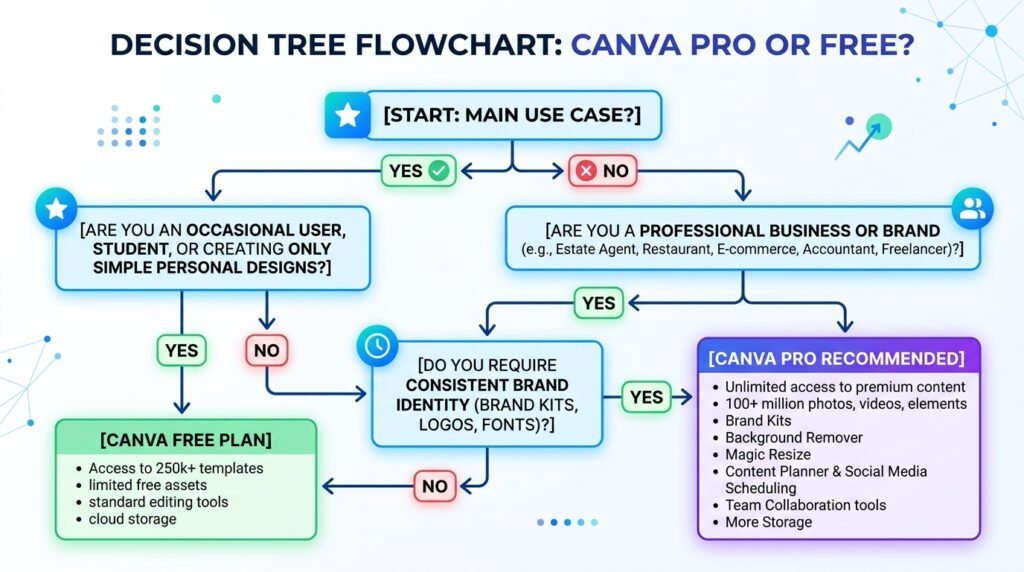
Here’s who should upgrade to Pro, and who shouldn’t:
✅ Upgrade to Pro if you:
- Create 4+ pieces of visual content per week (social posts, graphics, presentations, flyers)
- Use multiple social platforms (Instagram, Facebook, LinkedIn, Pinterest, TikTok)
- Would otherwise hire a freelance designer (even 4 hours/month at £35/hour = £140 value; Canva Pro = £10.99)
- Need to protect your time (Magic Resize alone saves 1–2 hours weekly on multi-platform management)
- Produce regular marketing materials for clients or internal use
⏸ Stick with Free if you:
- Create designs once a month or less
- Only need static templates, not AI features
- Work on a single platform
- Have generous freelance budget and prefer outsourcing
Quick ROI Math:
- Estate agent: 8 property listings/week × 15 minutes per listing with AI = 2 hours saved = £70 value vs. £10.99 cost. Pro wins.
- Accountant: 1 client presentation + 2 social posts/month + quarterly reports. Maybe 2–3 hours saved/month = £70–105 value. Pro wins.
- Freelancer (occasional branding): 1–2 designs/month. 30 minutes saved. £15 value vs. £10.99. Borderline—test free first.
Pros and Cons: The Honest Truth
[INSERT IMAGE HERE: canva-pro-worth-it-decision-tree showing when to upgrade]
✓ What Canva Does Well
- Genuinely affordable — £10.99/month is less than a single freelance design hour
- Zero learning curve — Non-designers can create professional designs immediately
- 25+ AI tools integrated — Not bolted-on features; they’re part of the workflow
- Mobile-first design — Works seamlessly on phone, tablet, desktop
- Multi-platform support — Magic Resize removes the need to manually reformat for every platform
- Huge template library — 100M+ templates means you rarely start from scratch
- Brand Kit — Keep your colors, fonts, logos consistent across all designs
- Works across platforms — Slack, HubSpot, Google Drive, Instagram, Facebook integrations
✗ What Canva Doesn’t Do Well
- Free AI is limited — Credit caps hit fast. Not practical for heavy users staying on free plan
- Image generation quality ≠ Midjourney — Good for social; not for professional photography
- Magic Write needs editing — Output is generic; you’ll rewrite for brand voice
- Credit system feels opaque — Different features cost different amounts; counting credits is annoying
- Premium templates cost extra — Some higher-end templates have paywalls even on Pro
- Not a document editor — Doesn’t replace Word or Google Docs for long-form writing
- Complex designs slow down — Heavy files with many layers can lag on older devices
Canva vs. Competitors: How It Stacks Up
| Tool | Best For | Price | Learning Curve | AI Quality | Why Choose |
|---|---|---|---|---|---|
| Canva | Quick social + marketing | £10.99 | None | Good | Speed + ease + affordability |
| Adobe Creative Cloud | Professional design | £50+/month | Steep | Integrated | Industry standard, premium output |
| Figma | UI/UX design, teams | £12/month+ | Medium | Limited | Collaboration, design systems |
| Midjourney | AI image generation | £10/month+ | Low | Excellent | Photo-quality AI images |
Real talk: You’re not choosing between Canva and these tools in most cases. Here’s when you’d use each:
- Canva → Social media, marketing materials, quick graphics, non-designers
- Adobe → Professional print, complex branding, client-facing deliverables
- Figma → Design team collaboration, app/website UI
- Midjourney → Premium AI images (pair it with Canva for execution)
Most UK SMBs should start with Canva Pro. Only upgrade to Adobe if you’re doing regular professional design work that Canva can’t handle (and honestly, 80% of small business needs are within Canva’s scope).
Real-World Use Cases: Which UK Business Types Benefit Most?
Estate Agents
How they use Canva:
- Property listing graphics (before/after renovations)
- Social media posts (new listings, market updates, open house announcements)
- Email campaign headers
Specific features they love:
- Background Remover (clean up messy property photos)
- Magic Resize (one design for Instagram, Facebook, email, LinkedIn)
- Magic Design (generate layout ideas for unfamiliar property types)
Time savings estimate: 3–5 hours/week, £105–175/week in freelancer costs avoided.
Verdict: Pro is a no-brainer.
Restaurants & Cafés
How they use Canva:
- Menu design and printing
- Promotional graphics (daily specials, events, seasonal menus)
- Social media content (food photography, behind-the-scenes, staff spotlights)
- Email newsletters
Specific features they love:
- Magic Write (menu descriptions, social captions)
- Background Remover (isolate food from busy kitchen backgrounds)
- Templates (80% of restaurant design needs are covered by templates; customize with your photos and colors)
Time savings estimate: 2–3 hours/week.
Verdict: Pro is essential if posting regularly
Freelancers & Consultants
How they use Canva:
- Proposal covers and templates
- Client presentation slides
- LinkedIn branding and graphics
- Email signatures and templates
Why it matters: Canva makes you look professional without hiring a designer for each client. Clients perceive higher value.
Time savings: 1–2 hours/week on branding/presentation work.
Verdict: Pro is worth it if taking on 5+ client projects/month.
Product-Based E-Commerce
How they use Canva:
- Product photography cleanup (Background Remover)
- Social media product posts
- Email marketing graphics
- Packaging labels (if printing)
Specific win: Background Remover lets you photograph products on your desk or floor and look like a professional studio without hiring a photographer.
Time savings: 1–2 hours/week on product content.
Verdict: Pro pays for itself in photography cleanup alone.
Accountants & Bookkeepers
How they use Canva:
- Client-facing reports and presentations
- Social media content (tax tips, compliance updates)
- Email newsletters
- Website graphics and infographics
Real example: An accountant creates a weekly tax tip post. Canva template + Magic Write suggestion + client photo = 10 minutes vs. 45 minutes with design software or hiring someone.
Time savings: 1–2 hours/week.
Verdict: Pro is worthwhile if producing regular content.
When NOT to Use Canva
Be honest: Canva isn’t the right tool if:
- You need complex, custom design work — Complex brand identities, packaging, advertising campaigns where every pixel matters. Use Adobe or hire a professional designer.
- You’re building a design portfolio — Canva work won’t showcase design skill. Use professional design tools or hire a designer to work with you.
- You need print-quality color accuracy — Canva’s print settings are basic. Professional printing uses CMYK profiles. Desktop design software handles this better.
- Your brand requires pixel-perfect consistency — Canva’s brand kit is good, but not as granular as professional design systems.
Does Canva Integrate With Your Existing Tools?
Here’s the practical question: Can you use Canva in your actual workflow?
Native integrations that work:
- Slack — Share designs directly to Slack channels
- HubSpot — Connect Canva designs to email campaigns
- Google Drive — Save and sync designs to Drive automatically
- Instagram & Facebook — Direct posting (schedule or post immediately)
- Email platforms — Mailchimp, Klaviyo, etc. (export and embed)
Workflow example:
- Design Instagram post in Canva
- Click “Post to Instagram”
- Schedule or post immediately
- Save to Google Drive automatically
Simple. No manual exporting and re-uploading.
Limitation: Some integrations require manual export (download design, upload to another tool). Not seamless, but workable.
Common Questions Answered
Can Canva replace a professional designer? For 80% of UK small business needs? Yes. For complex branding, packaging, professional print? No. Think of Canva as your in-house junior designer—fast, cheap, capable. Not a replacement for professional designers on brand-critical work.
Which AI features actually save time? In order of time savings: (1) Magic Resize, (2) Background Remover, (3) Magic Design, (4) Magic Write, (5) Magic Media. Skip the rest unless you have specific needs.
What happens after my 30-day free trial? You’re charged £10.99/month if you don’t cancel. No surprise billing—Canva’s clear about this upfront. You can cancel anytime.
Can I use Canva for client work if I’m a freelancer? Yes. You own the designs you create. No licensing restrictions. (Check Canva’s terms for your specific use case, but generally: yes.)
How many AI credits will I actually use? Depends on your workflow. 500 credits/month (Pro):
- Magic Write (8 credits each): ~62 uses
- Magic Design (15 credits each): ~33 uses
- Magic Media (25 credits each): ~20 uses
- Magic Resize (5 credits each): ~100 uses
Most users stay comfortably under 500. Only heavy creators hit the cap.
Is Canva GDPR compliant for UK businesses? Yes. Canva has data processing agreements and complies with GDPR. Data residency varies, but UK businesses can use Canva without compliance issues.
Our Final Verdict
Canva is the best value AI design tool for UK small businesses producing regular visual content.
The AI features in Magic Studio are genuinely useful—not marketing hype. They speed up real work: writing captions, resizing for multiple platforms, cleaning up photos, generating layout ideas.
At £10.99/month, Canva Pro is cheaper than one hour of freelance designer time. If you’re creating more than 2–3 pieces of content per week, the Pro plan pays for itself in time savings alone.
The free plan is good for occasional users. But if you’re posting to social media, sending email campaigns, or creating regular marketing materials, the Pro plan is worth every penny.
Start here:
- Try the 30-day free trial. Test Magic Studio features with your actual content.
- Measure time saved. Track how long designs take before and after.
- Decide based on your numbers. Does time saved × hourly rate justify £10.99/month for you?
For most UK SMBs, the answer is yes.