

AI accounting software automates the repetitive parts of bookkeeping — reconciling transactions, reading receipts, chasing invoices — so you spend less time on admin and more time running your business. For UK businesses, the tool also needs to handle Making Tax Digital (MTD), HMRC recognition, and GDPR properly, which is where a lot of software falls short.
Key takeaways
- AI accounting software automates reconciliation, invoicing, bill processing, receipt capture, and forecasting.
- UK software must support Making Tax Digital, be HMRC-recognised, use Open Banking-secured feeds, and meet GDPR requirements.
- No single tool does everything perfectly — most businesses pair a core platform (Sage, Xero, QuickBooks) with a specialist capture tool (Dext, Hubdoc, AutoEntry).
- Sole traders, growing SMEs, and accounting practices need different features, so “best” depends on your business size.
What Is AI Accounting Software?
AI accounting software is accounting software that uses machine learning to automate tasks a bookkeeper would otherwise do by hand — categorising transactions, matching bank feeds to invoices, extracting data from receipts, and flagging errors before they become problems.
It’s different from older cloud accounting tools in one key way: it learns. Traditional software applies fixed rules you set up once. AI-driven software watches how you correct its categorisation and adjusts over time, so the number of transactions it gets wrong drops the longer you use it.
It’s worth being clear about what it isn’t. It’s not a replacement for your accountant, and it won’t make judgment calls about tax planning or business strategy. It handles the mechanical, repetitive work — freeing up time for the parts of accounting that actually need a human.
IMAGE SUGGESTION
Name: ai-vs-traditional-accounting-software-comparison.jpg
AI Image Prompt: Simple side-by-side infographic-style illustration comparing traditional rule-based accounting software (gears, static rules icon) versus AI-powered accounting software (brain/learning icon, adaptive workflow), flat design, blue and white colour scheme, clean UK business aesthetic
Caption: AI accounting software learns from corrections, unlike traditional rule-based tools.
Alt Text: Infographic comparing traditional accounting software to AI-powered accounting software
How AI Actually Helps With UK Accounting
AI accounting tools automate six core areas of bookkeeping: bank reconciliation, invoicing, bill processing, expense capture, forecasting, and error detection. Each one saves a specific chunk of admin time.
Bank Reconciliation and Transaction Matching
AI matches your bank transactions to invoices and bills automatically, rather than you manually ticking off each line. Over time it learns how you code recurring suppliers, so routine transactions get categorised without you touching them. Most tools also flag anomalies — duplicate payments, missing invoices, amounts that don’t quite match — so problems surface before month-end rather than during it.
Invoicing and Accounts Receivable
Once your invoicing rules are set, AI can generate invoices on schedule and send payment reminders automatically. Some platforms go further and identify customers with a history of late payment, applying stricter follow-up to them while leaving reliable clients alone. If you’re setting this up for the first time, our guide on how to automate invoicing for a UK small business walks through the setup in more detail.
Bills and Accounts Payable
AI reads incoming bills, pulls out the date, amount, and VAT, and codes them based on similar past transactions before routing them for approval. This is also where duplicate-bill detection matters most — catching a bill that’s already been paid before it goes out twice protects cash flow.
Receipt and Expense Capture
Photograph a receipt and the software extracts the date, amount, and VAT, then updates your records automatically. It checks the claim against your expense policy as it processes it, so anything out of line gets caught before approval rather than after reimbursement. Two tools that dominate this space in the UK are compared directly in our Dext vs Hubdoc comparison.
Cash Flow Forecasting
AI uses predictive analytics on your sales, invoices, and seasonal patterns to forecast cash flow weeks or months ahead. Forecasts update automatically as new transactions come in, and most tools will alert you to a projected shortfall before it happens rather than after.
Anomaly and Fraud Detection
Beyond flagging duplicate payments, AI can cross-check transactions at a speed no human reviewer can match — catching unusual patterns, mismatched amounts, or transactions that break from a supplier’s normal behaviour.
IMAGE SUGGESTION
Name: ai-accounting-automation-features-overview.jpg
AI Image Prompt: Flat vector icon set showing six accounting automation features — bank reconciliation, invoicing, bills, receipt scanning, forecasting chart, and fraud alert shield — arranged in a clean grid layout, professional blue and grey palette
Caption: The six core areas AI accounting software automates.
Alt Text: Icon grid showing six AI accounting software automation features
UK Compliance Checklist Before You Buy
AI accounting software used in the UK must support Making Tax Digital, be HMRC-recognised, use Open Banking-secured connections, and meet GDPR data protection requirements. Skipping this check is the most common mistake businesses make when choosing a tool.
| Requirement | What to check |
|---|---|
| Making Tax Digital (MTD) | Software supports digital record-keeping and submits VAT returns in HMRC’s required format |
| HMRC recognition | The tool appears on HMRC’s list of MTD-compatible software — not all “MTD-friendly” tools are officially recognised |
| Open Banking feeds | Bank connections run through FCA-regulated Open Banking, not screen-scraping |
| GDPR compliance | Clear data policies, encryption, and UK/EEA data storage |
| CIS support | Needed if you work in construction and handle subcontractor payments |
MTD for Income Tax is being phased in for sole traders and landlords with qualifying income above set thresholds, so if you’re self-employed, it’s worth checking your software roadmap against the rules for registering for Self Assessment and confirming your accounting records meet the sole trader record-keeping requirements in the UK.
Data protection matters just as much as tax compliance. Before signing up, check the vendor against a proper UK GDPR compliance checklist for small business, and confirm whether you need to complete an ICO data protection fee registration yourself as the data controller. If you’re evaluating AI tools more broadly for compliance risk, the UK AI Act guide for small business is a useful starting point.
Best AI Accounting Software for UK Businesses
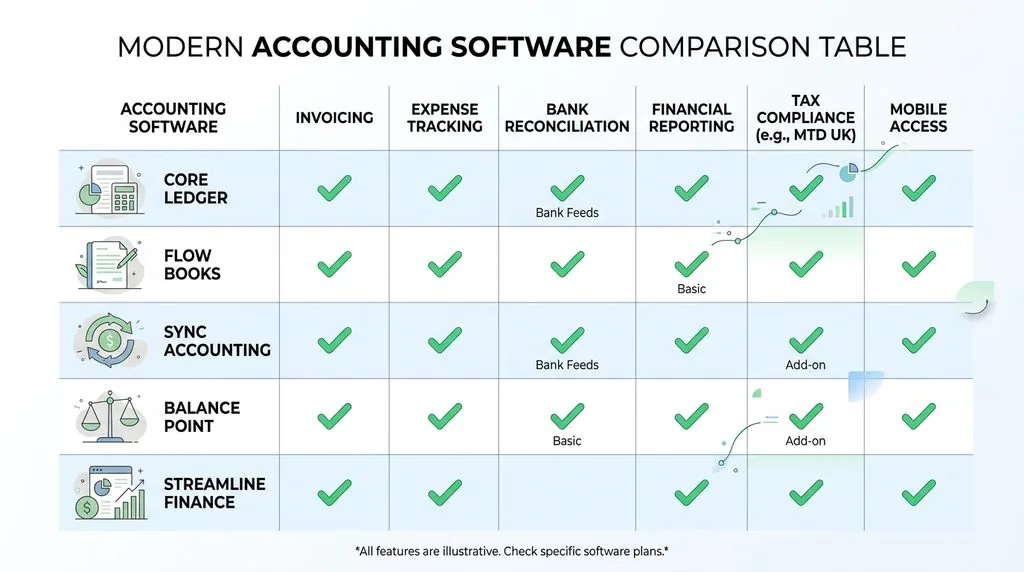
There’s no single best AI accounting tool — the right one depends on your business size and whether you need a full ledger or a capture tool that feeds into one.
| Tool | Best for | Key AI feature | MTD-ready |
|---|---|---|---|
| Sage Accounting (Sage Ai/Copilot) | Established UK SMEs, payroll | AI-powered data capture, Copilot assistant | Yes |
| Xero (JAX) | Cloud-native small businesses | Automated reconciliation, JAX finance assistant | Yes |
| QuickBooks | Freelancers and sole traders | Receipt capture, smart categorisation | Yes |
| Dext / Hubdoc / AutoEntry | Receipt and invoice capture add-on | OCR data extraction, publishing to ledger | Feeds MTD-ready software |
| Silverfin | Accounting practices | Compliance workflow automation | Yes (practice-focused) |
| Fathom / Syft Analytics | Forecasting and reporting | Scenario planning, predictive dashboards | N/A (reporting layer) |
Sage has the deepest UK payroll and HMRC integration of the major platforms, backed by decades of UK-specific development — a strong fit if payroll and CIS filing sit alongside your accounting. Xero leans cloud-first, with its JAX assistant automating reconciliation and bill coding, and works well for businesses that live in a browser rather than desktop software. QuickBooks suits sole traders who want something simpler, with lower complexity than the practice-grade platforms.
Dext, Hubdoc, and AutoEntry aren’t full accounting platforms — they’re capture tools that sit on top of Xero, QuickBooks, or Sage and handle the receipt/invoice extraction those platforms don’t do as thoroughly on their own. Silverfin is built for accounting practices managing multiple clients rather than a single business. Fathom and Syft add forecasting depth that most core platforms lack out of the box.
How to Choose the Right Tool for Your Business
The right AI accounting software depends on whether you’re a sole trader, a growing SME, or an accounting practice managing multiple clients — each needs a different feature set.
Sole traders and freelancers need MTD for Income Tax readiness, simple receipt capture, and low monthly cost more than deep forecasting or multi-user access. QuickBooks or a lighter Xero plan usually covers this without overpaying for features you won’t use.
Growing SMEs benefit most from full reconciliation automation, payroll integration, and forecasting — this is where Sage or Xero’s mid-tier plans, often paired with Dext or Hubdoc for capture, earn their cost. If you’re also automating other parts of the business, it’s worth reviewing our broader AI for UK small business guide and the best AI tools for UK small business roundup.
Accounting practices need workflow and compliance tools built for multiple clients, not just one set of books — this is where Silverfin fits, alongside AutoEntry or Dext for high-volume document processing across a client base.
How to Implement AI Accounting Software in 30 Days
- Set clear goals. Decide whether you’re targeting faster reconciliation, less manual data entry, or quicker month-end reporting, and pick one or two metrics to track.
- Clean up your data first. AI learns from your existing coding — tidy your chart of accounts before switching on automation, not after.
- Connect bank feeds and test. Link your bank via Open Banking and run a handful of transactions through before relying on it fully.
- Set basic rules. Assign standard codes to your regular suppliers so the AI has a starting point to learn from.
- Train your team and your accountant. Walk staff through the new workflow and tell your accountant what’s changed so they can adjust how they review your books.
- Review exceptions weekly for the first month. Correct anything flagged, and check user permissions are set correctly.
- Measure against your original goals. Compare time saved and error rates after 30 days, then decide whether to expand automation further.
Where AI Accounting Software Still Falls Short
AI accounting tools are good at pattern-matching, not judgment. They can miscategorise unusual transactions, especially one-off purchases that don’t resemble anything in your history, and they’ll confidently apply the wrong code rather than flag genuine uncertainty. Prepayments and capital assets are common failure points — many tools default everything to a standard expense unless you’ve explicitly set up rules to catch them.
Data privacy is worth taking seriously too. You’re handing financial records to a third-party system, so check where data is stored and whether the vendor meets GDPR requirements before you connect live bank feeds. Over-reliance is the other risk — AI reduces the volume of manual checking needed, but it doesn’t remove the need for a human to review exceptions and sign off on anything unusual.
Will AI Replace Accountants?
No — AI automates repetitive bookkeeping tasks, but it can’t provide strategic tax advice, interpret new regulation, or understand the context behind unusual figures in your accounts. It handles data entry, categorisation, and reconciliation. It doesn’t decide how to structure a transaction for tax efficiency or advise on a business decision.
Most UK accountants now use AI to clear the admin faster, which frees up time for the advisory work that actually needs their judgment. If you’re already using AI tools elsewhere in the business, it’s worth reading how they compare in our ChatGPT for business UK SME guide or the Notion AI UK small business guide for wider context on where AI genuinely saves time versus where it doesn’t.
FAQs
Is there an AI tool for accounting?
Yes. Most major UK accounting platforms — Sage, Xero, QuickBooks — now include AI features, and standalone tools like Dext and Hubdoc add AI-powered receipt and invoice capture on top.
Can AI do full bookkeeping in the UK?
No, not on its own. AI handles categorisation, reconciliation, and data capture, but you still need to review exceptions, approve unusual transactions, and make judgment calls it can’t make.
Does AI accounting software meet MTD requirements?
Many do, but not all. Check that the specific tool is on HMRC’s official list of MTD-recognised software rather than assuming “AI-powered” means compliant.
How much does AI accounting software cost in the UK?
Pricing varies by platform and business size, typically starting from around £10–£15 a month for basic sole trader plans and rising for multi-user SME or practice-level plans with payroll and forecasting included.
Is AI accounting software safe and GDPR-compliant?
It can be, but this depends entirely on the vendor. Check their data storage location, encryption standards, and GDPR documentation before connecting live bank feeds or client data.