

Google Workspace and Microsoft 365 both do the same basic job: email, documents, spreadsheets, video calls and cloud storage in one subscription. The real difference for a UK small business is not features on a page. It’s which one matches how your team already works.
Quick Verdict: Google Workspace or Microsoft 365?
Google Workspace is the better fit if your team collaborates in real time, works mostly in a browser, and wants the simplest possible setup. Microsoft 365 is the better fit if anyone on your team relies on advanced Excel work, you need stronger built-in security at a lower price tier, or you’re already inside the Windows and Microsoft ecosystem.
Neither platform is objectively “better.” They’re built on different assumptions about how a business works, and that’s the decision you’re actually making.
- Choose Google Workspace if you want fast, browser-first collaboration and minimal IT admin.
- Choose Microsoft 365 if you need desktop-grade Word, Excel and PowerPoint, or tighter security bundled in at a lower price.
Google Workspace vs Microsoft 365 at a Glance
| Category | Google Workspace | Microsoft 365 |
|---|---|---|
| Core apps | Docs, Sheets, Slides, Gmail, Meet | Word, Excel, PowerPoint, Outlook, Teams |
| Starting price (GB) | From £5.90/user/month | From £4.60/user/month |
| Entry storage | 30GB pooled per user | 1TB per user |
| Collaboration style | Real-time, browser-first | Desktop-first, improving online |
| AI assistant | Gemini | Copilot |
| Offline work | Limited, needs Chrome setup | Native, works by default |
| Best suited for | Fast-moving, remote-first teams | Spreadsheet-heavy, security-conscious teams |
Pricing Compared (GBP, 2026)
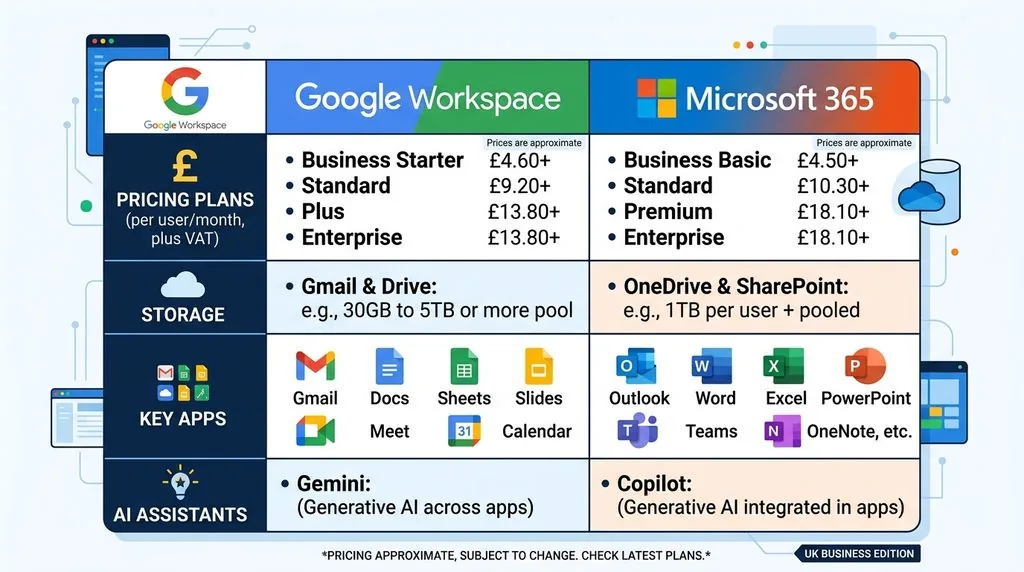
Google Workspace and Microsoft 365 both use tiered, per-user monthly pricing, billed annually for the lowest rate. Prices below are current UK list prices at the time of publishing and should be checked against the official Google Workspace and Microsoft 365 pricing pages before you buy, since both vendors adjust pricing periodically.
Google Workspace pricing:
| Plan | Price per user/month | Storage | Meeting size |
|---|---|---|---|
| Business Starter | £5.90 | 30GB | 100 participants |
| Business Standard | £11.80 | 2TB | 150 participants, recording |
| Business Plus | £18.40 | 5TB | Larger meetings, eDiscovery, advanced security |
Microsoft 365 pricing:
| Plan | Price per user/month | Storage | Notable inclusions |
|---|---|---|---|
| Business Basic | £4.60 | 1TB | Web apps only, Teams, SharePoint |
| Business Standard | £9.60 | 1TB | Full desktop Office apps |
| Business Premium | £16.90 | 1TB | Adds Intune, threat protection, identity security |
If you want a closer breakdown of what each Microsoft AI tier actually costs on top of these plans, see our guide to Microsoft 365 Copilot pricing for UK small business.
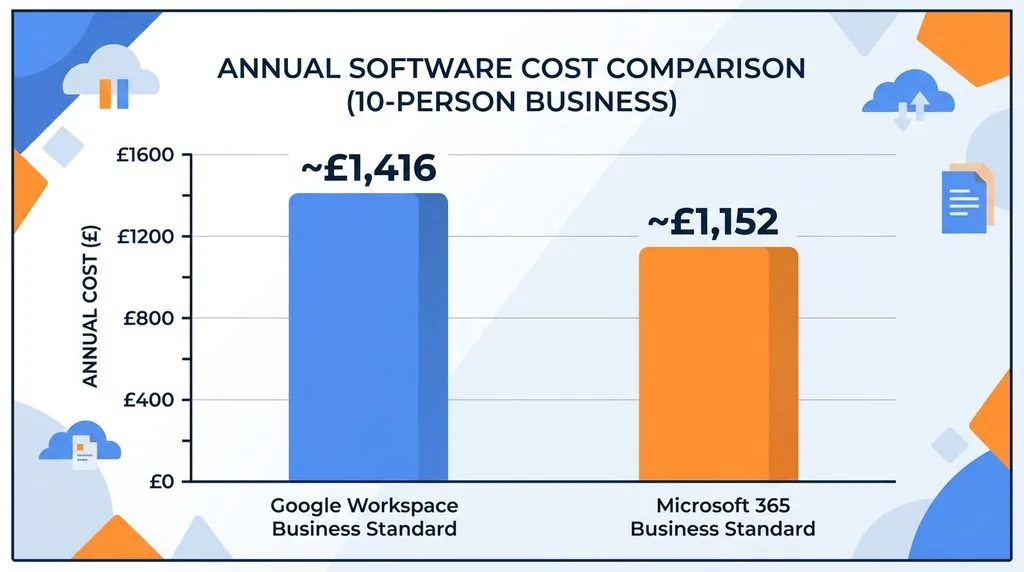
Worked example: 10-person team, one year
For a small UK business with 10 staff, here’s what a mid-tier plan costs annually:
- Google Workspace Business Standard: £11.80 × 10 × 12 = £1,416/year
- Microsoft 365 Business Standard: £9.60 × 10 × 12 = £1,152/year
At this tier, Microsoft 365 is cheaper, but Google Workspace includes far more pooled storage (2TB per user vs 1TB per user). If your business stores large files — video, design assets, scanned documents — that storage gap matters more than the price difference.
Core Apps and Everyday Productivity
Documents, spreadsheets and presentations
Google Docs, Sheets and Slides were built for the browser from day one. Multiple people can edit the same file at once, see each other’s cursors, and comment without saving a new version.
Word, Excel and PowerPoint were built as desktop applications first. The online versions have improved a lot, but they still function as a lighter version of the desktop app rather than a native web experience.
The one area where this matters most is Excel. If your finance person builds pivot tables, complex formulas, or financial models, Excel is still ahead of Google Sheets. For everyday budgets, trackers and shared lists, Sheets is more than capable and easier for a team to co-edit.
Email: Gmail vs Outlook
Gmail’s search is genuinely strong — it finds old emails fast, even with vague search terms. Outlook’s organisation tools are more granular: Focused Inbox, rules, and categories give power users more control over a busy inbox.
Both include a custom business email address on your own domain, spam filtering, and calendar integration as standard.
Collaboration and Remote Work
Google Workspace is built around real-time co-editing. If your team frequently works on the same document, spreadsheet or presentation at the same time, this is where Google has a clear edge.
Microsoft Teams is the collaboration hub for Microsoft 365, combining chat, video calls and file sharing in one app. It’s more structured than Google’s approach, which suits teams that like defined channels and formal processes over free-flowing shared docs.
If video calls and messaging are your main concern rather than document editing, it’s worth comparing the tools directly: see our comparisons of Slack vs Microsoft Teams and Zoom vs Google Meet for UK businesses.
Storage and File Management
Google Workspace pools storage across your whole organisation, starting at 30GB per user on Business Starter and rising to 2TB per user on Business Standard. Files live in Google Drive, with strong search and simple sharing permissions.
Microsoft 365 gives every user 1TB of OneDrive storage on every business plan, including the cheapest one. Team files typically live in SharePoint, which offers more advanced permissions and document governance than Google Drive, but takes longer to learn.
For most small teams under 20 people, either platform provides more storage than you’ll use in the first year or two. The real question is whether you need SharePoint-style governance (Microsoft) or Drive-style simplicity (Google).
Security, Privacy and Compliance for Small Business
Both platforms include baseline protections as standard: encrypted data in transit and at rest, admin controls, audit logs, and either two-step verification or multi-factor authentication.
Microsoft 365 Business Premium (£16.90/user/month) bundles Microsoft Defender for Office 365, Intune device management, and conditional access policies. This is a genuinely strong small-business security package included at a mid-range price point.
Google Workspace Business Plus (£18.40/user/month) includes Vault for data retention and eDiscovery, enhanced endpoint management, and data loss prevention for Drive. Some of Google’s more advanced threat protection features are reserved for Enterprise-tier plans.
If security and compliance are a priority — which they should be for any UK business handling client data — it’s worth reading our UK GDPR compliance checklist for small business and confirming your ICO registration status alongside whichever platform you choose. Setting up two-factor authentication properly across your team matters more than which platform you’re on. Many UK small businesses also use platform choice as a starting point for working towards Cyber Essentials certification, which both Google Workspace and Microsoft 365 can support.
AI Tools: Gemini vs Copilot
Google’s AI assistant, Gemini, is built into Docs, Sheets, Gmail and Meet. It’s particularly strong at handling long documents in one pass — summarising a long contract, drafting a first pass of a proposal, or pulling insights out of a big spreadsheet.
Microsoft’s Copilot works across Word, Excel, Outlook and Teams, and it’s designed to plug into structured business processes: summarising a meeting in Teams, drafting a reply in Outlook, or automating a repetitive Excel task.
For a small business, the practical difference shows up in daily tasks rather than technical specs:
- Drafting a client email or proposal: both handle this well.
- Summarising a long report or contract: Gemini’s larger context window is an advantage.
- Automating repetitive spreadsheet work: Copilot in Excel is more mature.
- Turning a meeting recording into action items: Copilot in Teams currently has the edge, since it’s built directly into the meeting tool.
If you’re weighing up AI tools beyond just the two big suites, our guides to ChatGPT for UK SME business use and the best AI tools for UK small business cover options that work alongside either platform.
Integrations and Third-Party Apps
Google Workspace integrates natively with Google’s own tools and connects easily to popular third-party apps through the Workspace Marketplace. If your team already uses tools like Asana or Trello for task management, or Notion AI for notes and docs, Google’s browser-first approach tends to fit more naturally alongside them.
Microsoft 365 integrates deeply with Teams, SharePoint, Power Automate and the wider Azure ecosystem. If your business already runs on Windows machines or uses Microsoft-specific tools, this is the more natural fit.
Both platforms connect to common small-business tools regardless of which you choose — payment systems like Stripe or PayPal, analytics through GA4, and most VoIP phone systems. The integration advantage only really matters if you’re deep into one ecosystem’s native tools already.
Which One Is Right for Your Small Business?
Choose Google Workspace if:
- Your team edits documents and spreadsheets together in real time.
- You want the simplest possible admin experience with minimal IT overhead.
- Your workflows are entirely browser-based.
- You don’t have heavy, complex spreadsheet or financial modelling needs.
- You’re running the business from home or a small shared space and want low setup friction.
Choose Microsoft 365 if:
- Anyone on your team needs full desktop Excel, Word or PowerPoint.
- You want strong security features bundled in without paying for the top tier.
- You need device management (Intune) included in your subscription.
- You’re in a regulated industry that requires data retention or compliance tooling.
- You already use Windows PCs, Teams, or other Microsoft/Azure tools.
Switching and Migration Considerations
Moving between platforms is more manageable for a small team than for an enterprise, but it’s not instant. Before switching, plan for:
- Email migration — moving mailboxes, contacts and calendars without losing history.
- File migration — transferring documents from Drive to OneDrive/SharePoint, or the reverse.
- Retraining time — even a simple interface change costs a few hours of productivity per employee.
- Domain and DNS changes — updating MX records for your business email during the switch.
- A short overlap period — running both platforms briefly reduces the risk of lost data or missed emails.
For most small businesses already running smoothly on one platform, the switching cost outweighs the marginal benefit of the other suite. Switch because you’ve hit a specific limitation — not because a comparison article told you to.
FAQs
What’s the main difference between Google Workspace and Microsoft 365?
Google Workspace is built for real-time, browser-first collaboration. Microsoft 365 is built around desktop-grade apps like Excel and Word, with deeper security and device management options.
Which is cheaper for a small business, Google Workspace or Microsoft 365?
At entry level, Microsoft 365 Business Basic (£4.60/user/month) is cheaper than Google Workspace Business Starter (£5.90/user/month). At mid-tier, Microsoft 365 Business Standard is also cheaper than Google Workspace Business Standard, though Google includes more pooled storage.
Is Google Workspace secure enough for a small business handling client data?
Yes, for most small businesses. Google Workspace includes encryption, two-step verification and data loss prevention on paid plans. Businesses with stricter compliance needs may prefer Microsoft 365 Business Premium’s bundled security tools.
Can I use Google Workspace and Microsoft 365 together?
Yes. Some businesses run both temporarily during a migration, or use Gmail while adopting Microsoft Teams for internal communication. It adds cost and complexity, so it’s usually a short-term rather than permanent setup.
Which platform is better for AI tools, Gemini or Copilot?
It depends on the task. Gemini handles long documents and large-scale analysis well. Copilot is more mature for automating structured tasks inside Excel, Outlook and Teams meetings.
Final Verdict
There is no universal winner between Google Workspace and Microsoft 365 — only a better fit for how your business actually works.
If your team is small, remote-friendly, and lives in a browser, Google Workspace will feel faster and easier from day one. If your business depends on serious Excel work, wants stronger security bundled in at a lower price, or is already tied into Windows and Microsoft tools, Microsoft 365 is the more practical choice.
Pick based on your team’s actual habits, not on which platform a comparison article happens to prefer.