

Wrong CRM choice costs more than just money. When UK businesses pick the wrong platform, they lose 18 months to failed implementation, burn through £50,000–£150,000 on wasted setup costs, and watch teams refuse to use the system. Research shows 63% of CRM projects fail—not because the software is broken, but because companies chose the wrong one for their situation.
This happens because most comparisons skip the real question: what will this actually cost over three to five years?
HubSpot and Salesforce are both excellent platforms. They’re just solving for different businesses. Salesforce dominates enterprise—companies with 200+ employees, complex workflows, and budgets to match. HubSpot leads for growth companies and SMBs. For a team under 100 people, they’re not even close on cost.
HubSpot vs Salesforce at a Glance
| Metric | HubSpot | Salesforce |
|---|---|---|
| Starter Price (GBP) | £18/user/month | £25/user/month |
| 3-Year TCO (50 users) | ~£177,000 | ~£595,000 |
| Admin Required | 14% of teams | 95% of teams |
| Implementation Time | 36 days average | 17 days*† |
| Marketing Tools Included | Yes | Separate (£1,250+/mo) |
| Setup Complexity | Low | High |
| G2 Ease of Use Rating | 8.7/10 | 8.0/10 |
| Best For | SMBs under 200 employees | Enterprise 200+ employees |
*Salesforce claims 17 days for “tech live” — business-ready takes 2–6 months. †Includes consultant costs; HubSpot self-implementation feasible.
Bottom Line: HubSpot wins for most UK teams under 100. Salesforce wins for enterprises needing deep customisation and compliance certification.
Pricing Breakdown—What You Actually Pay in GBP
List Pricing: The Number That Doesn’t Matter
HubSpot pricing looks simple because it is. You pick a tier—Starter, Professional, Enterprise—and you know the cost.
HubSpot UK Pricing (February 2026):
- Starter Sales Hub: £18/user/month (minimum 2 users = £36/month)
- Professional Sales Hub: £396/month (up to 5 users)
- Enterprise Sales Hub: From £1,200/month
Marketing Hub runs separately if you need it. Professional tier costs £780/month for 3 seats and 2,000 contacts. Bundle all hubs (sales, marketing, service) at Professional level for £1,130/month covering 5 seats.
Salesforce pricing is more fragmented. Sales Cloud starts at £85/user/month for Enterprise, but most small businesses begin with Starter Suite at £25/user/month. Here’s the trap: that £25 tier has limits. You get 10 users maximum and it lacks the reporting depth most teams need.
When you add realistic requirements—service tools, marketing automation, proper reporting—Salesforce becomes modular. Each module costs separately.
The Hidden Costs Nobody Mentions
List price is maybe 40% of year-one spend. The other 60% includes implementation, training, admin time, migration, and setup.
HubSpot Hidden Costs:
- Partner-led implementation: £2,500–£40,000 (most common: £5,000–£15,000)
- DIY setup: 20–40 hours of internal time
- Data migration: £2,000–£25,000 depending on source system
- Training: Included free (HubSpot Academy) or £90–£200/hour for custom agency training
- Ongoing support: £800–£2,000/month if you use a partner
Salesforce Hidden Costs:
- Implementation: £25,000–£80,000+ for mid-market (requires certified consultants)
- Data migration: £5,000–£50,000 (more complex than HubSpot)
- Training: Often £150–£300/hour beyond included support
- Ongoing support: Premium tier (typically required) adds £1,000–£3,000/month
The real difference? Most Salesforce implementations demand a dedicated admin. HubSpot doesn’t.
The Admin Tax: The Single Largest Cost Difference

This is where three-year TCO swings from close to massive.
A Salesforce administrator in the UK costs between £35,000 and £80,000 per year in salary. Some companies hire part-time (£20,000–£40,000). Others use consultants (£100–£200/hour).
Whichever path, Salesforce almost always requires this role. 95% of mid-market Salesforce deployments have a dedicated admin.
HubSpot? 86% of teams manage the platform with existing staff. Your marketing manager, operations person, or sales lead can handle it alongside their other duties. No specialist salary needed.
Over three years, this single difference creates a 2–3× cost advantage for HubSpot.
Real Example: 50-User Setup
HubSpot Professional (all hubs): £1,130/month × 12 months × 3 years = £40,680 software Add implementation (£10,000), training (£3,000), migration (£5,000) = £58,680 first year Year 2–3: software + £1,500/month partner support = £40,680 + £36,000 = £76,680 per year Total 3-year cost: ~£177,000
Salesforce Enterprise (sales + service + marketing): £165/user × 50 users = £8,250/month = £99,000/year software cost Add implementation (£50,000), training (£10,000), migration (£20,000) = £179,000 year one Years 2–3: Software £99,000/year + admin salary £50,000/year + support £24,000/year = £173,000/year Total 3-year cost: ~£595,000
That’s 3.4× more for Salesforce in a standard mid-market scenario.
Implementation & Time-to-Value
One stat keeps appearing in Salesforce’s marketing: “17-day implementation.”
It’s technically true. The software goes live in 17 days on average.
What they don’t say: that’s when the tech works. Business readiness—where your team actually uses it—takes much longer. Most Salesforce projects run 2–6 months before the business is truly “live.”
HubSpot Implementation Timeline:
- Days 1–5: Setup, integrations, basic configuration
- Days 6–15: Data import, customisation, team training
- Days 16–36: Ramp-up, optimisation, adoption support
- Real productive use: Week 6–8 for most teams
Most of this happens without external help. Your team can do it.
Salesforce Implementation Timeline:
- Month 1: Discovery, planning, consultant onboarding
- Month 2–3: Configuration, custom coding (if needed), testing
- Month 4–6: User training, parallel running with old system, final cutover
- Real productive use: Month 5–7 after go-live
This requires certified consultants nearly every step. You’re paying £100–£200/hour for months.
Why the difference? HubSpot is built for self-service. The interface guides you through setup. Salesforce is built for bespoke customisation, which demands specialist expertise.
If you’re a marketing team that needs email automation in weeks, not months—HubSpot wins. If you’re a regulated business needing complex compliance workflows—Salesforce’s implementation timeline is justified, but it costs.
Features That Matter for Small Business
Both platforms do sales, marketing, and service. The differences are in depth and packaging.
Sales Management
Both handle pipeline, deal tracking, forecasting, and activity logging equally well. Salesforce offers more customisation for complex deal structures. HubSpot’s sales interface is more intuitive—reps spend less time clicking, more time selling.
Verdict: Tie for most SMBs. Salesforce wins if you need territory management and hierarchical accounts.
Marketing Automation (The Big Differentiator)
This is where HubSpot and Salesforce genuinely diverge.
HubSpot includes marketing automation in every sales tier. Email campaigns, lead nurturing, A/B testing, ABM tools, and content management are bundled. You don’t pay extra.
Salesforce splits marketing across two products: Marketing Cloud (starting £1,250/month for 10,000 contacts) or Pardot (Account Engagement, also £1,250+/month). Neither is included in Sales Cloud. You buy them separately, set them up separately, and manage data flows between them.
For a UK small business considering Salesforce, this is the hidden cost shock. Sales Cloud looks affordable until marketing asks, “Where’s our automation?” Then you’re adding £15,000/year for tools HubSpot includes at no extra cost.
Verdict: HubSpot wins decisively for SMBs. If you’re doing sales + marketing with under 500 contacts, HubSpot’s bundled approach saves time and money.
Customer Service / Support Hub
HubSpot includes a service hub with ticket management, knowledge base, and live chat. Salesforce has Service Cloud, which is a separate purchase or add-on.
Both are solid. HubSpot’s is simpler; Salesforce’s is more configurable.
Verdict: HubSpot wins on cost. Salesforce wins on depth if you’re managing 100+ support tickets daily.
AI Assistants (Breeze vs Agentforce)
This is where both platforms are moving.
HubSpot Breeze includes 20+ pre-built AI agents for sales, marketing, and service. Breeze Copilot helps reps draft emails and spot buying signals. Breeze Prospecting Agent automates outreach. Breeze Customer Agent handles routine support questions. Setup takes days. Cost is roughly £1 per AI conversation.
Salesforce Agentforce is more powerful but complex. It uses Einstein AI to handle multi-step tasks across systems. One deployment resolved 84% of 380,000+ customer interactions without human escalation. But setup requires months, an AI architect, and Enterprise+ licensing. Cost is roughly £2 per conversation plus setup overhead.
For a small business without a dedicated AI team, Breeze is usable today. Agentforce is powerful but overkill and slower to implement.
Verdict: HubSpot wins for SMBs. Salesforce wins for enterprises with proper AI governance.
Ease of Use & Adoption
Here’s where good intentions meet reality. Powerful software that nobody uses is expensive software.
G2 ratings show HubSpot at 8.7/10 for ease of use; Salesforce at 8.0/10. That looks close on paper. In practice, it’s a chasm.
HubSpot adoption reality: Reps learn the basics in 2–3 weeks. Full productivity takes 6–8 weeks. Adoption rates in well-run teams exceed 90%.
Salesforce adoption reality: Reps need 6–8 weeks just to be comfortable. Full productivity takes 3–4 months. Adoption regularly stalls at 40–60% without dedicated change management.
Why the gap? HubSpot is designed around how reps actually work. Salesforce is designed for flexibility—which means configuration burden lands on the user.
Real sales teams often bypass Salesforce. They maintain their own spreadsheets because it’s faster. That’s not a Salesforce problem; it’s a complexity problem. For enterprises with 100+ reps and mandated compliance, that overhead is worth it. For SMBs, it’s waste.
Customer service ratings:
- HubSpot: 8.7/10 rated for support quality; support included
- Salesforce: 8.0/10 rated for support quality; premium support costs extra
HubSpot includes 24/7 phone, chat, and email support in every tier. Salesforce charges for anything beyond email on lower tiers.
Scalability: What Happens as You Grow?
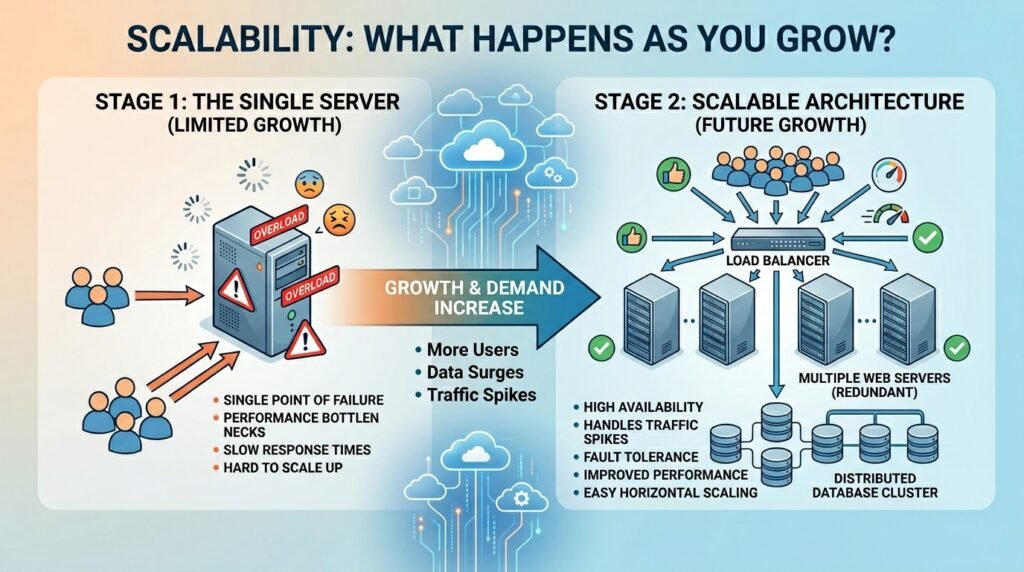
A smart strategy starts here: can this platform grow with us, or will we outgrow it?
HubSpot’s Scaling Story: HubSpot genuinely scales to 500+ employees. Bigger enterprises use it. The limiting factors are industry-specific (healthcare, financial services needing compliance certifications) and custom object count (unlimited custom fields, but performance degrades beyond 50-70 custom objects per model).
As you grow, your RevOps team stays lean. You stay on 1.5–2 FTE of blended marketing ops and CRM admin. Your costs rise with users and contact volume, but not structurally.
Salesforce’s Scaling Story: Salesforce is built for unlimited scale. Custom objects, complex relationships, hierarchical accounts, and deep integration—all possible. But as you grow, your admin burden grows too. Mid-market teams run 2–3 FTE; large enterprises run 6+ FTE dedicated to CRM administration.
Your ecosystem spend grows. Middleware connectors, custom development, specialist consultants. By enterprise scale, your CRM operations team looks like an IT department.
When does HubSpot become limiting?
- Manufacturing: Custom quoting (CPQ) isn’t built-in; you integrate a specialist
- Healthcare: HIPAA compliance, while possible, requires Salesforce’s certifications
- Financial services: Regulated industries prefer Salesforce’s audit trail and custom permissions
- 200+ territory sales reps needing sophisticated territory management and forecasting
When does Salesforce become necessary? If you hit any of these:
- 200+ employees across multiple departments
- Regulated industry (healthcare, finance, insurance)
- Complex ERP integration
- Unlimited custom objects and bespoke workflows
Most SMBs under 100 people never hit these limits.
Real Customer Data: Who Switched & Why
This is where marketing claims meet actual behaviour.
HubSpot Switchers from Salesforce (Documented Cases):
85% of teams that switched from Salesforce to HubSpot report higher productivity. 72% report higher CRM adoption rates. 75% spend less time managing data and integrations.
Average 3-year cost savings: £200,000–£350,000 for mid-market companies.
Why did they switch?
- Implementation took 6+ months and cost more than budgeted
- Teams refused to use Salesforce because the UI felt clunky
- Admin overhead became an unexpected full-time job
- Marketing tools required a separate product (Pardot) costing £15K+/year
Real case: a 40-person software company spent £120,000 implementing Salesforce over 9 months. After 18 months, adoption was 35%. They migrated to HubSpot over 8 weeks, cost £18,000, and hit 85% adoption in 6 weeks.
Salesforce Switchers from HubSpot (Documented Cases):
202 documented cases exist of companies moving from HubSpot to Salesforce. Why?
- Outgrew HubSpot’s custom object limits (rare for SMBs)
- Needed regulated industry certifications (healthcare, financial services)
- Acquired another company already on Salesforce
- Became enterprise requiring territory management and complex forecasting
These switches are usually from companies at 200+ employees or in regulated sectors. Under 100 people? These cases are statistically rare.
Why 63% of CRM Projects Fail:
It’s not the software. Research shows failure happens because of these reasons, in order:
- Chose wrong platform for their business model (most common)
- Underestimated implementation complexity
- Underestimated training and adoption effort
- Picked based on feature spreadsheet, not fit
So Which One Should You Pick? Your Decision Framework
Stop reading comparisons. Answer these five questions honestly:
If You Answer These…
Question 1: How many employees do you have?
- Under 50 → HubSpot
- 50–150 → Probably HubSpot
- 150–300 → Could be either; depends on industry
- 300+ → Salesforce
Question 2: Are you in a regulated industry?
- Healthcare, financial services, insurance → Salesforce
- Retail, SaaS, professional services, e-commerce → HubSpot
- Manufacturing with complex contracts → Salesforce (CPQ needs)
- Most others → HubSpot
Question 3: What’s your budget (3-year)?
- Under £100K → HubSpot (non-negotiable)
- £100K–£300K → HubSpot
- £300K–£600K → Could be either
- £600K+ → Salesforce
Question 4: Do you have IT staff or will you?
- No, and don’t plan to → HubSpot
- Yes, part-time → HubSpot works
- Yes, dedicated → Could be Salesforce
- Yes, dedicated CRM admin → Salesforce
Question 5: How quickly do you need this live?
- Weeks → HubSpot
- Months → Either
- Long-term project → Salesforce (months OK)
Your Verdict
Choose HubSpot if:
- Team under 100 employees
- Budget under £300K over 3 years
- Want all-in-one (sales + marketing + service in one database)
- Need it working in weeks, not months
- Don’t have a dedicated IT team
- Not in heavily regulated industry
- Want predictable costs
Choose Salesforce if:
- Team 200+ employees
- Budget £600K+ over 3 years
- Regulated industry (healthcare, finance, insurance)
- Need unlimited custom objects and complex data relationships
- Have or will hire dedicated CRM admin
- Need to integrate deeply with other enterprise systems
- Want maximum long-term flexibility
The Mid-Market Option (150–250 employees):
Some companies run a hybrid. HubSpot for sales and marketing, Salesforce Service Cloud for support. Or use HubSpot with best-of-breed add-ons rather than monolithic Salesforce. This costs more to manage but delivers the best of both.
Migration Considerations (If You’re Switching)
Planning to move from Salesforce? Or switching platforms entirely?
Data Migration Costs & Risks
Salesforce-to-HubSpot migration typically costs £5,000–£15,000 for mid-market companies. Timeline: 4–8 weeks.
Why not more expensive? HubSpot’s simpler data model makes mapping straightforward. You lose some Salesforce-specific customisation (which is often bloat anyway), but core data comes across clean.
Cost drivers:
- Data volume (contacts, accounts, deals)
- Number of custom fields
- Integration complexity
- Whether you clean data during migration (recommended)
Parallel Running Period
Most companies run both systems for 2–4 weeks. Old system stays live while new one ramps. This costs extra (doubling software costs briefly) but reduces risk.
If something breaks in HubSpot, you’re not dead in the water. You revert to Salesforce.
Hidden Switching Costs
- User re-training: 40–80 hours of internal time
- Process changes: Some workflows might need redesign for HubSpot’s approach
- Integration rework: Zapiers and webhooks might need reconfiguration
- Data cleanup: 10–20% of data usually needs manual fixing
Most companies find the pain manageable. The time investment is real, but one-time.
ROI & Payback Period
When does the investment pay off?
HubSpot ROI Timeline:
- Year 1: Payback in 6–8 months through reduced admin overhead and faster sales cycles
- Year 2: Compounding: better data quality, higher adoption, faster onboarding for new reps
- Year 3: Full ROI clear; typically 2–3× return on investment
Salesforce ROI Timeline:
- Year 1: Usually still in red; implementation costs are high
- Year 2: Breakeven as the system stabilises
- Year 3: ROI positive, but smaller percentage return than HubSpot due to higher baseline cost
The break-even point is crucial. If you’re a startup or SMB, HubSpot’s faster payback is material.
Common Questions Answered
Do we really need a Salesforce admin?
If you have 20+ Salesforce users, almost certainly yes. That person manages configuration, training, data quality, security, integrations. Cost: £35K–£80K per year.
For HubSpot? Most teams under 500 users self-manage. Your marketing ops person or sales operations lead handles it part-time.
Can HubSpot handle our growth to 500 employees?
Yes. Genuine limits appear around 500+ employees in complex organisations, or if you need regulatory certifications HubSpot doesn’t have built-in.
Is the Salesforce learning curve really that bad?
Yes. Your reps will need 6–8 weeks to be comfortable vs 2–3 weeks with HubSpot. Some teams never fully adopt. This isn’t opinion; it’s reflected in G2 adoption scores.
What if we start with HubSpot and outgrow it?
Migration from HubSpot to Salesforce is straightforward. Cost: £5K–£20K. Timeline: 6–10 weeks. Your Salesforce implementation partner can do this in their sleep.
Does Salesforce really cost 3× more?
Over 3–5 years, yes, when you include the admin salary. Just the software license? Maybe 1.5–2×. But people costs are real costs. You can’t ignore them.
Can we negotiate Salesforce pricing?
Yes. Most companies can negotiate 20–30% off list price. HubSpot is less negotiable but offers startup discounts (75–90% off year 1 if eligible).
Final Recommendation
For UK small businesses under 100 employees, HubSpot delivers more value at lower cost.
For enterprises 200+ employees or regulated industries, Salesforce is the stronger choice.
The decision isn’t about which software is “better.” Both are excellent. It’s about fit: choosing the right tool for your size, budget, and complexity.
Start with HubSpot’s free CRM to test-drive the platform. Run for 30 days. If it works, you’ve found your answer cheaply. If you need Salesforce later, migration is manageable.
The worst choice is picking based on marketing claims or “everyone uses X.” Pick based on your reality: team size, budget, timeline, and growth plans.
That’s how you avoid being part of the 63% of CRM projects that fail.
Next Steps
If HubSpot fits: Sign up for the free CRM (genuinely usable, no credit card). Test it for a month. Upgrade to Starter (£18/user/month) if it works.
If you need Salesforce: Budget for a 4–6 month implementation with certified consultants. Plan for £50K–£100K in costs. Hire or designate a CRM admin before go-live.
If you’re unsure: Download a pricing spreadsheet and model your 3-year cost. Include software, implementation, admin salary, and training. The numbers often tell the story your gut is sensing.
CRM choice isn’t forever. You can switch. But switching costs money and time. Getting it right the first time is worth the thinking.