
Your customer data is scattered across spreadsheets, emails, and notebooks. You’re losing leads because nobody remembers to follow up. Your team spends hours logging contact details instead of selling. If this sounds familiar, you’re not alone—but it’s also costing you money every single day.
A CRM system fixes this. It’s the foundation that turns lead chaos into revenue.
This guide breaks down the best CRM options for UK small businesses in 2026. We’ve looked at pricing in GBP, ease of use, GDPR compliance, integration with Xero and Sage, and how well each platform actually performs for growing teams. No fluff. Just what works.
Why Your Small Business Needs a CRM in 2026
The Cost of Manual Lead Management
Without a CRM, your business operates on friction. A lead comes in through an email. Someone writes it down. It gets forgotten. Meanwhile, another lead came in through a form on your website. That’s in a different system. A third came through a call. That’s in someone’s calendar.
By the time your sales team gets organized, 30% of those leads have gone cold.
Research shows that small businesses lose nearly £1,000 per week in abandoned leads. That’s £52,000 a year. For a five-person team, a CRM that costs £15 per person per month costs you £900 annually. The ROI math is brutal without one.
What Changed in 2026
Three things shifted this year. First, AI is now built into the core of every serious CRM platform. It’s not a buzzword—it’s an actual feature that scores leads, predicts which customers will churn, and drafts follow-up emails. Second, GDPR enforcement has tightened. You need a CRM that keeps your data safe and proves compliance. Third, UK businesses expect local support, GBP pricing, and integration with tools you already use like Xero and Sage. The days of forcing a US platform into your UK workflow are over.
Quick CRM Comparison: Top Platforms at a Glance
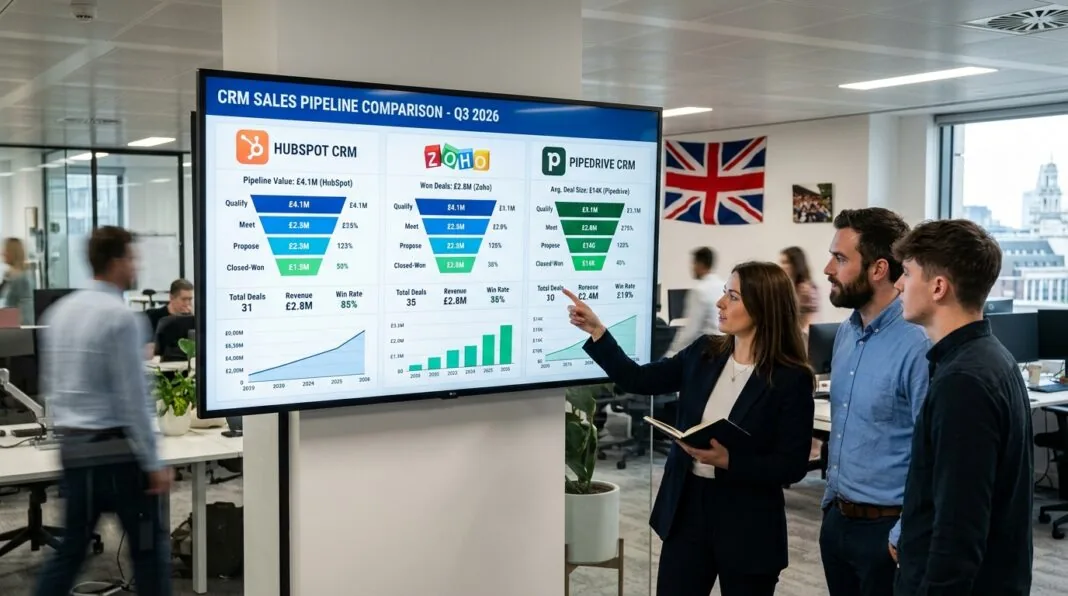
| Platform | Starting Price (GBP) | Free Plan? | Best For | Setup Time | Ease of Use |
|---|---|---|---|---|---|
| HubSpot | £0 (free forever) | Yes | Startups & growth-focused teams | Hours | Very easy |
| Zoho CRM | £11/user/month | Yes (limited) | Budget-conscious, customization needs | Hours | Moderate |
| Pipedrive | £12/user/month | 14-day trial | Sales pipeline focus | Hours | Very easy |
| Freshsales | £20/month | Yes | Lead scoring & automation | Hours | Easy |
| Capsule CRM | £15/user/month | Free (2 users) | Simplicity & UK support | Minutes | Very easy |
| Salesforce Starter | £50/month | Trial only | Ambitious growth & complex workflows | Days | Moderate |
The 6 Best CRMs for Small Business UK: Detailed Reviews
1. HubSpot — Best Overall for Growth-Focused Teams
HubSpot wins for most UK small businesses. Here’s why.
The free plan is genuinely useful. Unlimited contacts, deal tracking, basic reporting, and a contact timeline that shows every interaction. No credit card required. You get email tracking, a meeting scheduler, and enough automation to handle basic follow-ups. It’s not a stripped-down trial—it’s a real CRM.
When you grow, you layer in paid “Hubs.” The Sales Hub adds advanced automation, pipeline management, and team reporting. The Marketing Hub introduces email sequences and lead scoring. You only pay for what you use.
For UK businesses, HubSpot has EU data hosting, which handles GDPR without any grey area. It integrates with Xero, Stripe, and every email platform. The interface is clean. Your team will use it without resistance.
Pros:
- Genuine free plan with unlimited users
- Scales from startup to enterprise
- Excellent integrations (Xero, Stripe, Gmail, Outlook)
- GDPR-compliant data hosting in EU
- Best-in-class reporting and dashboards
- AI chatbot builder
Cons:
- Pricing jumps significantly from free to paid ($50+/month for Professional tier)
- Marketing automation lives in a separate “Hub” and costs extra
- Can feel feature-heavy for simple use cases
UK Pricing (2026):
- Free: £0/month (unlimited users)
- Starter: £15-30/month per user
- Professional: £800-1,200/month
- All prices exclude 20% VAT
Best For: Startups, growing sales teams, companies that want to start free and scale gradually.
2. Zoho CRM — Best Value for Budget-Conscious Businesses
Zoho CRM is the underrated champion. You get enterprise-level features at a fraction of Salesforce’s price.
The Standard plan costs £11/user/month. For that, you get contact management, deal tracking, workflow automation, email integration, advanced reporting, and AI lead scoring (their AI, called Zia, learns your sales patterns and surfaces the highest-value leads). Many competitors charge £40-50 for the same features.
The dashboard is deeply customizable. You can build views specific to your role, your team, or your workflow. It doesn’t feel generic.
Where Zoho shines is customization. If your sales process is complex—if you have multiple deal types, custom fields, or approval workflows—Zoho can handle it without coding. That’s valuable for professional services firms and B2B agencies.
Pros:
- Exceptional features-per-pound value
- Powerful customization without coding
- AI lead scoring included on Standard plan
- Integrates with Xero (critical for UK accounting)
- Free plan available with core features
- Workflow automation
Cons:
- Interface is denser than HubSpot (steeper learning curve)
- Free plan is limited (3 users max)
- Customer support is outsourced (response times vary)
UK Pricing (2026):
- Free: £0/month (up to 3 users)
- Standard: £11/user/month (billed annually)
- Professional: £25/user/month
- All prices in GBP
Best For: B2B services, professional services firms, companies that need heavy customization at a low price.
3. Pipedrive — Best for Visual Sales Pipeline Management
Pipedrive’s core strength is simplicity. The pipeline view is drag-and-drop. You see deals stuck in negotiation, deals ready to close, deals that need follow-ups. No complex reporting or hidden menus. Salespeople actually like using it.
The interface is fast. No loading delays. No unnecessary features cluttering the screen. Your team can add a contact, log a call, move a deal, and send an email in seconds. That speed matters for small teams.
AI features were added in 2026. The assistant suggests next steps for each lead. It flags deals that haven’t moved in weeks. It helps your team stay focused on what matters.
For UK teams integrating with accounting software, Pipedrive works with most tools via Zapier, though it’s not as native as Xero integration in HubSpot or Zoho.
Pros:
- Fastest, most intuitive pipeline interface
- Deal “rotting” alerts prevent forgotten leads
- AI sales assistant with practical suggestions
- Mobile app is excellent
- Fast customer support (even on paid plans)
- Transparent, predictable pricing
Cons:
- Limited marketing automation (you’ll need LeadBooster add-on)
- Reporting is basic compared to HubSpot or Zoho
- No AI-powered predictive analytics
- Xero integration requires a third-party app
UK Pricing (2026):
- 14-day free trial
- Essential: £12/user/month
- Advanced: £23/user/month
- Professional: £49/user/month
- Prices in GBP
Best For: Sales teams that live in their pipeline, appointment-based businesses, real estate and recruitment firms.
4. Freshsales — Best for Lead Scoring & Automation
Freshsales is built for teams that want automation without the complexity. It’s an all-in-one sales and marketing CRM from Freshworks.
Lead scoring is the standout feature. It automatically scores leads based on engagement. If someone opens your email, visits your website multiple times, and downloads a resource, Freshsales surfaces them as a hot lead. Your sales team knows exactly who to prioritize.
Email sequences are built in. You write a template, set conditions (“if no response in 2 days, send a follow-up”), and automation takes over. No separate tool. No integration headaches.
The interface is modern and clean. Setup is genuinely fast—hours, not days.
Pros:
- Excellent, intuitive lead scoring
- Built-in email sequences and automation
- Clean, modern interface
- All-in-one (no separate marketing tool needed)
- Good reporting dashboards
Cons:
- Pricing can get expensive quickly with add-ons
- Slightly less powerful than HubSpot for complex marketing
- Smaller community and fewer third-party integrations
- Xero integration not native
UK Pricing (2026):
- Free plan: £0/month (up to 3 users, basic features)
- Starter: £20/month
- Professional: £49/month
- Growth: £99/month
Best For: Service businesses, SaaS companies, agencies that rely on lead scoring and automation.
5. Capsule CRM — Best for Simplicity & UK Support
Capsule is a British-born CRM from Manchester. That matters more than you’d think.
Setup takes minutes, not hours. The interface is clean. You see your contacts, your tasks, your opportunities. Nothing else. No overwhelming feature menus. No hidden settings. It’s CRM stripped down to essentials.
For a solo founder or small team of 2-3 people, Capsule is perfect. You can organize your contacts, track follow-ups, and manage deals without learning a complex system.
UK-based support is included. If something breaks at 9 AM in Manchester, you get help at 9 AM. Not at 2 PM when a US support team wakes up. That’s valuable.
It integrates with Xero, Google Workspace, and Stripe. Clean integrations, not bolted-on third-party connectors.
Pros:
- Incredibly simple to use and set up
- UK-based company and support
- Clean, minimal interface
- Integrates smoothly with Xero, Google Workspace
- No feature bloat
- Fair pricing
Cons:
- Less powerful than HubSpot or Zoho
- Limited automation compared to competitors
- No AI features
- Smaller team means fewer updates
- Not suitable if you need advanced customization
UK Pricing (2026):
- Free: £0/month (up to 2 users)
- Starter: £15/user/month
- Growth: £30/user/month
Best For: Consultants, small professional services, anyone overwhelmed by complex software.
6. Salesforce Starter Suite — Best for Ambitious Growth & Complex Workflows
Salesforce is the industry standard for mid-market and enterprise. The Starter Suite brings it down to a price point for ambitious small businesses.
If you anticipate rapid growth, complex sales processes, or multiple teams using the CRM (sales, service, and marketing), Salesforce grows with you without requiring a migration.
Setup is more involved. You’ll likely need a partner or consultant to configure it. But once it’s in place, Salesforce is bulletproof. It won’t break when you grow.
For 2026, Salesforce added AI copilot features that write emails, summarize calls, and suggest next actions.
Pros:
- Scales infinitely as you grow
- Highly customizable without coding
- Industry standard (good for hiring, partnerships)
- Einstein AI (advanced predictive analytics)
- Excellent reporting and dashboards
- Strong security and compliance
Cons:
- Steep setup and learning curve
- Requires ongoing configuration and maintenance
- Expensive (Starter Suite at £50/month is entry-level)
- Can feel over-engineered for simple needs
UK Pricing (2026):
- Starter Suite: £50-75/month (minimum 1 user, 10,000 records)
- Most SMEs end up on Professional tier: £150-250/month
Best For: Fast-growth companies, complex sales processes, B2B businesses expecting to scale significantly.
How to Choose the Right CRM for Your Business
Key Evaluation Criteria
Pricing & ROI Calculator
Don’t just look at the monthly cost. Calculate total cost of ownership.
HubSpot free plan: £0/month Zoho Standard (5 users): £55/month Pipedrive Essential (5 users): £60/month Salesforce Starter: £50/month minimum
But here’s what matters: if your team saves 5 hours per week with a CRM, that’s 260 hours annually. At £30/hour, that’s £7,800 in reclaimed time. Any CRM that costs less than £2,000 per year pays for itself 3+ times over in the first year.
Most UK small businesses see ROI within 3 months.
Ease of Setup & Learning Curve
Ask yourself: how quickly do I need this live?
HubSpot, Pipedrive, Freshsales, Capsule: Hours to go live Zoho CRM: 1-2 days (more setup options) Salesforce: 2-4 weeks (requires expert configuration)
For most small businesses, a CRM that’s live in hours wins. You’ll get adoption from your team faster, and you’ll start capturing customer data immediately.
Sales Automation Features You Actually Need
Don’t get seduced by feature lists. Ask: which automation saves us the most time?
Essential:
- Email tracking (see when your email is opened)
- Task automation (auto-create follow-up tasks if no response)
- Pipeline automation (auto-move deals based on conditions)
- Email sequences (auto-send follow-ups)
Nice-to-have:
- AI lead scoring
- Predictive analytics
- AI call coaching
Most of these are standard. The differentiator is whether they’re built-in or require add-ons.
Scalability: Can It Grow With You?
If you’re hiring 3 more salespeople in the next year, make sure your CRM scales without a migration.
HubSpot: Scales infinitely (modular design means you add features as needed) Zoho: Grows smoothly; higher tiers add customization Pipedrive: Works well for teams of 2-50; beyond that, it’s limiting Capsule: Best for under 10 people Salesforce: Built to scale to 10,000+ users
UK Compliance & Data Residency
GDPR isn’t optional. Your CRM must prove it’s compliant.
Check:
- Where data is stored (must be UK or EU data centre)
- Encryption (in transit and at rest)
- Backup and disaster recovery
- Data processing agreements (DPA)
HubSpot, Zoho, Pipedrive, Freshsales, and Capsule all pass GDPR requirements. Salesforce definitely does. Just confirm with each vendor when you’re evaluating.
Integration Compatibility
The CRM you choose must talk to Xero and Sage (your accounting software).
Direct integration (built-in):
- HubSpot + Xero (native)
- Zoho CRM + Xero (native)
- Pipedrive + Xero (via Zapier, not native)
Email (Gmail, Outlook): All platforms integrate natively.
AI Capabilities in 2026
AI is now table stakes. Here’s what each platform offers:
- HubSpot: AI chatbot builder, content suggestions, email subject line optimization
- Zoho (Zia): Lead scoring, sales forecasting, conversation intelligence
- Pipedrive: Deal suggestions, pipeline health analysis
- Freshsales: Lead scoring, engagement analytics
- Capsule: None (not a focus for this platform)
- Salesforce Einstein: Advanced predictive models, call summaries, email drafting
For most small businesses, the AI features built into HubSpot or Zoho are more than enough.
CRM Setup & Implementation: What to Expect
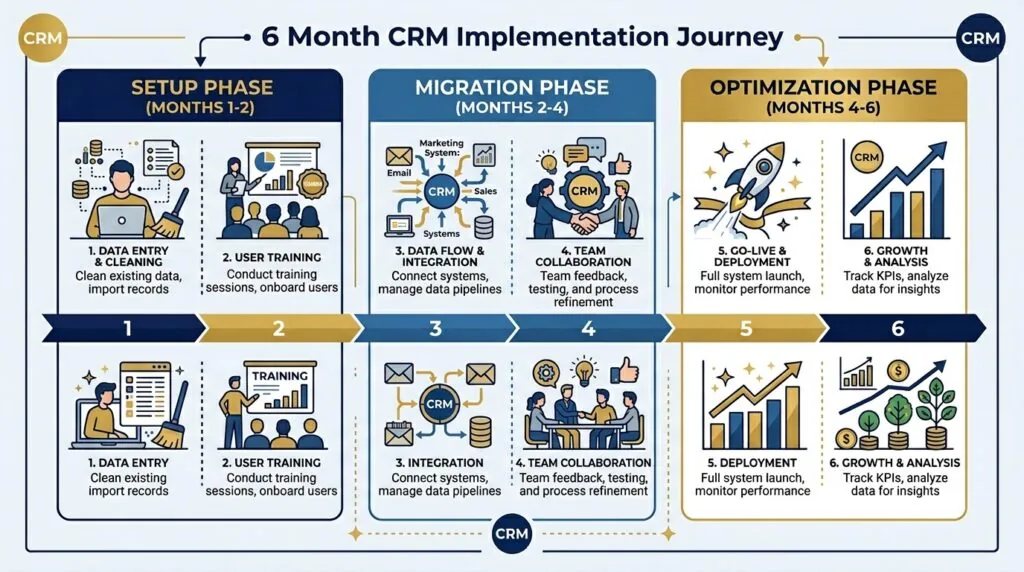
6-Month Implementation Timeline
Most small businesses take 6 months to fully adopt a CRM. This isn’t a failure—it’s realistic.
Months 1-2: Selection & Setup
- Choose your platform
- Set up contacts and basic data
- Train your team on the basics
- Configure your sales pipeline stages
Months 2-4: Data Migration & Team Training
- Import your existing customer data
- Clean up duplicate records
- Build your email sequences and automation
- Run deeper training sessions
- Create playbooks for using the CRM
Months 4-6: Optimization & Full Adoption
- Monitor usage and get feedback
- Adjust pipeline stages based on real usage
- Add advanced features (if needed)
- Full team adoption and reporting
The timeline varies. A simple setup might take 3 months. A complex migration from multiple spreadsheets might take 8 months. The key is patience—rushing the adoption phase leads to low usage and wasted money.
Common Implementation Mistakes to Avoid
- Overcomplicating the setup. Don’t create 20 custom fields in month one. Start simple, add complexity as you learn.
- Poor data quality. Garbage in, garbage out. Spend time cleaning your data before migrating. Duplicates, incomplete phone numbers, and old contacts slow adoption.
- Not training your team. A CRM is only valuable if your team uses it. Invest in training. Show them how it saves time, not how many features it has.
- Trying to do everything yourself. For Salesforce or complex Zoho setups, hiring a consultant for 2-4 weeks saves months of frustration.
- Focusing on reporting too early. In months 1-3, focus on adoption. Reporting comes later.
CRM Compliance & Security for UK Businesses
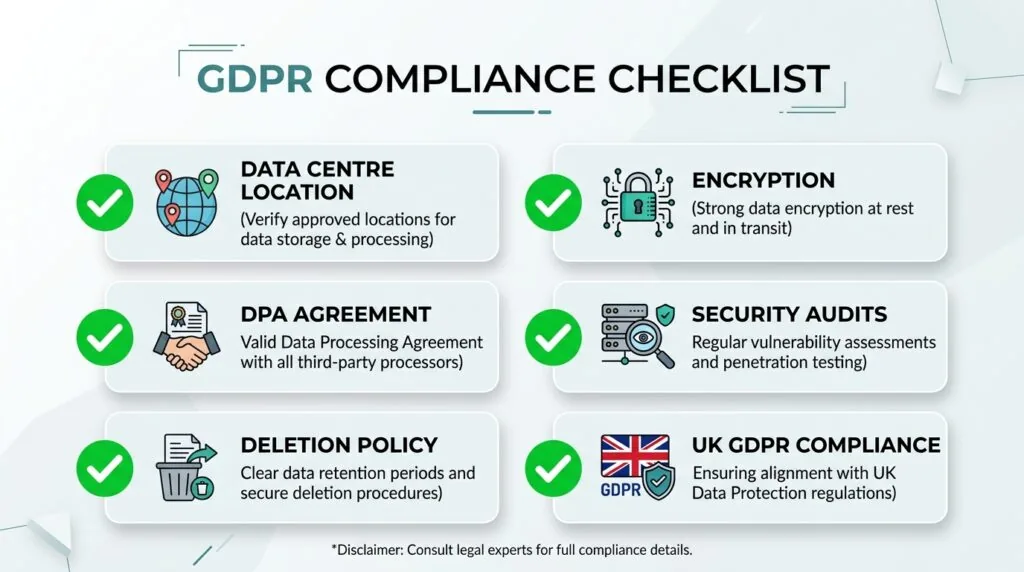
GDPR Compliance Checklist
Before signing any contract, confirm:
✓ Data is stored in UK or EU data centre ✓ Encryption is AES 256-bit (industry standard) ✓ Vendor has signed a Data Processing Agreement (DPA) ✓ Regular security audits are documented ✓ Data deletion happens within 30 days of request ✓ Vendor complies with UK GDPR (not just EU GDPR)
All major CRM platforms pass this checklist. The question is whether the vendor has documented proof. Ask for their security compliance document before you commit.
Data Residency & Where Your Data Lives
“Data residency” means where your customer information is physically stored.
For UK businesses, this matters for two reasons. First, GDPR compliance is stricter if data stays within the EU. Second, you want fast performance—data stored physically closer to you loads faster.
HubSpot: EU data centre (Frankfurt) Zoho: EU data centre option available Pipedrive: EU data centre Freshsales: EU data centre Capsule: UK-based (your data stays in the UK) Salesforce: UK data centre option
Essential Integrations for UK Accounting
Your CRM must sync with your accounting software. Two-way sync prevents duplicate data entry and keeps your numbers accurate.
Xero integration priority:
- HubSpot: Direct, two-way sync (customers, invoices, contacts)
- Zoho: Direct, two-way sync
- Capsule: Direct, one-way sync (Xero → Capsule)
- Pipedrive: Via Zapier (not native, more setup required)
- Freshsales: Via Zapier (not native)
If you use Sage instead of Xero, the integration options are more limited. Check compatibility before committing.
Advanced CRM Features: AI & Automation in 2026
AI Lead Scoring & Predictive Analytics
Lead scoring answers: which prospects should my sales team call first?
Old way: gut feeling or manual review New way: AI watches engagement patterns and predicts which leads will close
Zoho’s Zia does this. HubSpot’s AI does this. It surfaces the 3 hottest leads in your pipeline daily. For a team handling 50+ leads, this alone saves 2-3 hours per week.
Automated Follow-ups & Sequencing
Your sales team forgets to follow up. CRMs fix this.
Example workflow:
- Lead comes in
- Auto-email sent: “Thanks for your interest, here’s more info”
- No response after 2 days? Auto-email #2: “Quick question—is this relevant?”
- No response after 5 days? Auto-email #3: “One last chance to chat”
- No response? Move to “lost” status
Freshsales and HubSpot excel at this. You build the sequence once. It runs forever.
AI Call Coaching & Sales Insights
In 2026, some CRMs record your calls and transcribe them. Then AI analyzes the conversation:
- How long did the customer talk vs. the salesperson? (80/20 rule applies)
- Did you address their objection?
- Which phrases led to “yes” and which to “no”?
- What could you improve?
Zoho’s Zia does this. Salesforce Einstein does this. It’s becoming standard, not exotic.
Churn Prediction & Customer Retention
AI can predict which existing customers are likely to leave. This lets you intervene before they do.
Zoho flags high-risk customers. HubSpot can too. Instead of guessing, you know exactly who to call.
Frequently Asked Questions
What’s the best free CRM?
HubSpot. Unlimited users, no expiration date, no credit card required. It’s a genuine, full-featured CRM—not a limited trial. Zoho’s free plan is second, but it caps at 3 users.
How much does a CRM cost for a team of 5?
- HubSpot free: £0
- HubSpot Starter (5 users): £75-150/month
- Zoho Standard (5 users): £55/month
- Pipedrive Essential (5 users): £60/month
- Freshsales Starter (5 users): £20/month (flat rate, not per user)
The most common price point is £50-150/month for a 5-person team with basic features.
Can I migrate my data from spreadsheets?
Yes. All platforms have data import tools. It takes a few hours to prepare your spreadsheet (clean duplicates, map fields), then 30 minutes to upload.
The harder part is training your team to stop using the spreadsheet. That’s a culture change, not a technical one.
Is CRM implementation really 6 months?
No—not if you don’t make it complicated. You can go live in weeks with HubSpot or Pipedrive. The 6-month timeline includes full optimization and team adoption. But you’ll start capturing data and closing deals in month one.
Which CRM integrates best with Xero?
HubSpot and Zoho have native, two-way integration with Xero. Your invoices sync automatically. Your customer list syncs. Your revenue syncs. No manual work. (See our guide on how to integrate CRM with accounting to learn more.)
Do I need a CRM if I’m a solo founder?
Not immediately. Spreadsheets work for 0-50 contacts. But once you hit 50+ leads, manual tracking becomes a liability. Capsule CRM’s free plan (2 users) or HubSpot’s free plan (unlimited users) makes sense at that point.
What happens if I switch CRM providers later?
Most platforms let you export your data. It’s not locked in. The pain is reconfiguring automation and retraining your team. Plan to avoid switching within 2-3 years if possible.
Final Recommendation: Which CRM Should You Choose?
For startups & bootstrapped teams: Start with HubSpot free. You’ll get months of runway without paying anything. When you’re ready to add automation and scaling features, upgrade to Starter tier. Total cost for a year: £0-500.
For growing sales teams (5-20 people): HubSpot Starter or Zoho Standard. Both offer good automation, integrations, and room to grow. Cost: £50-200/month depending on team size.
For sales-focused businesses (real estate, recruitment, appointment-based): Pipedrive. Its visual pipeline is unbeatable. Cost: £60-120/month for a small team.
For budget-conscious businesses with complex needs: Zoho CRM. Feature-richness per pound is unmatched. Cost: £50-150/month for a team.
For simplicity and UK support: Capsule CRM. Zero learning curve, local support, fair pricing. Cost: £30-100/month for a team.
For ambitious growth expecting to scale significantly: Salesforce Starter Suite. It costs more upfront, but you’ll never outgrow it. Cost: £50-300+/month depending on usage.
The honest truth: There’s no single “best” CRM. The best CRM is the one your team will actually use. Pick something simple enough that adoption isn’t a struggle. Pick something that integrates with your existing tools (especially Xero or Sage). Pick something you can afford for at least a year. Then commit to it.
Most small businesses see measurable improvement—more leads followed up, higher close rates, better pipeline visibility—within 90 days. The ROI is real. The question is which platform fits your business, your budget, and your team’s tolerance for learning new software.
Start with a free trial. Have your team use it for a week. See if it clicks. The best CRM is the one they actually open every morning.