


Small UK businesses need reliable cloud storage that keeps files safe, teams collaborating, and costs under control. In 2026, the right choice depends on your existing tools and priorities like GDPR compliance. Most teams already using Microsoft 365 do best with OneDrive for Business. Others prefer Dropbox for simplicity or Google Drive for real-time editing.
What Is Cloud Storage and Why UK Small Businesses Need It Now
Cloud storage lets you save files on remote servers instead of local hard drives. You access everything from any device with an internet connection. Changes sync automatically.
For UK small businesses, this solves several daily headaches. Remote and hybrid working became standard after 2020. Teams no longer email large files back and forth or lose work when a laptop fails. Version history means you can restore previous file states easily. Real-time collaboration lets multiple people edit the same document without conflicts.
Security matters more than ever. Ransomware attacks hit businesses hard. Good cloud providers offer ransomware recovery, encryption, and audit logs. GDPR compliance stays essential — you need providers with UK or EU data residency options to avoid headaches with data transfers.
Business owners also want scalability. Start small and add users or storage without buying new servers. Many solutions bundle with productivity tools, cutting overall software costs.
When setting up your business structure, understanding expenses like these tools helps with tax efficiency — check our guide on business expenses you can claim in the UK.
Essential Buying Factors for UK Businesses
Focus on these areas before choosing:
- Pricing and value: Look at per-user monthly costs plus any hidden fees for egress (downloading data) or extra storage.
- Security & GDPR: AES-256 encryption, zero-knowledge options for sensitive data, SOC 2/ISO 27001 certifications, and UK data centres.
- Integrations: Seamless connection with Microsoft 365, Google Workspace, accounting software, or CRM tools.
- Ease of use: Desktop sync folders, mobile apps, and admin controls suitable for non-technical owners.
- Support and reliability: 24/7 options, uptime guarantees (99.9%+), and UK-based help if possible.
- Collaboration features: Real-time editing, commenting, task assignment, and sharing controls.
- Compliance extras: Audit trails, data residency, and recovery options.
Most small teams (under 10 people) do well with 1-5TB total storage to start. Larger needs or heavy video work push toward unlimited or higher-tier plans.
In-Depth Reviews of Top Providers

Microsoft OneDrive for Business / SharePoint
OneDrive integrates deeply with Microsoft 365. Most UK small businesses already use Outlook or Teams, making this the default winner for many.
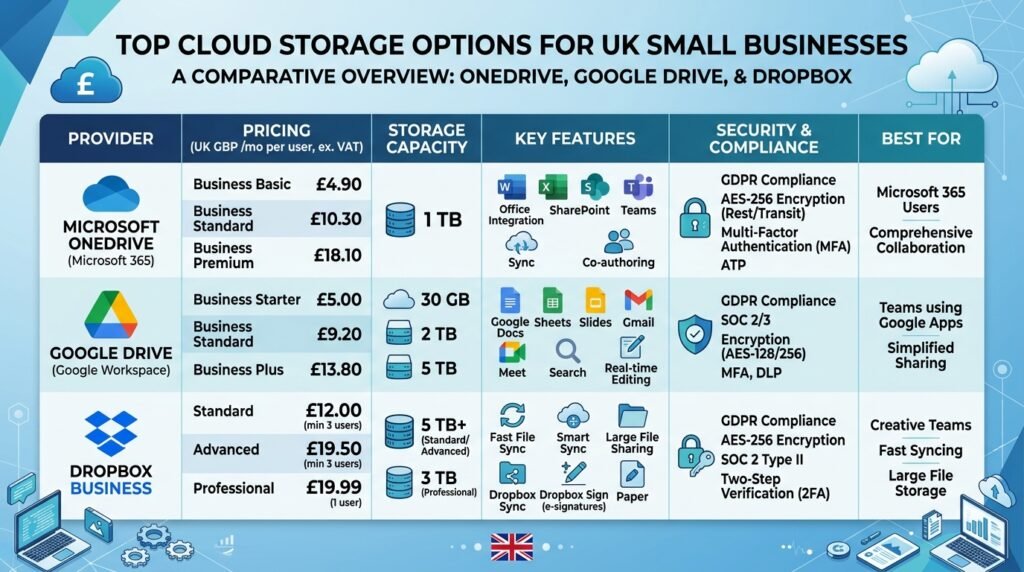
Pricing (approximate, annual billing): Starts around £3.80–£4.60 per user/month for 1TB storage in Business Basic plans. Higher tiers add desktop Office apps and Teams.
Strengths: Excellent sync, 250GB max file size, strong ransomware protection, deep SharePoint team sites, and admin controls. Version history up to 180+ days in many plans.
Drawbacks: Less ideal if your team lives in Google tools. Some find the interface busy.
Best for: Microsoft users, accountants, consultants, and any business already paying for 365.
Google Drive (via Google Workspace)
Great for teams that prefer Gmail and Docs. Real-time collaboration shines here.
Pricing: Business Starter around £4–£6 per user/month with 30GB+ pooled storage (scales up).
Strengths: Fast search, excellent mobile apps, seamless Docs/Sheets integration.
Drawbacks: Storage limits tighter on lower plans. Some UK users prefer Microsoft for compliance depth.
Best for: Creative teams, marketing agencies, Google-centric workflows.
Dropbox Business
Standalone leader known for reliable sync. Less tied to one productivity suite.
2026 pricing: Standard plan around £12 per user/month for 5TB team storage (3+ users).
Strengths: Simple shared folders, strong file recovery (180 days), PDF editing and e-signatures built-in, good for mixed-device teams.
Drawbacks: More expensive as a standalone tool. Fewer deep productivity integrations.
Best for: Teams avoiding big suites or needing straightforward file sharing.
Box for Business
Enterprise-leaning option with strong governance.
Strengths: Advanced security, workflows, and e-signatures. Good for regulated industries.
Drawbacks: Pricier for very small teams. Interface can feel heavier.
Privacy-Focused Alternatives (Sync.com, Livedrive, etc.)
Livedrive and Sync.com appeal for UK/EU data focus and zero-knowledge encryption.
These suit businesses handling sensitive client data (solicitors, health-related services) where maximum privacy matters.
Choosing the right tools pairs well with understanding your business setup — see our comparison of sole trader vs limited company in the UK.
Head-to-Head Comparison
| Provider | Starting Price (per user/mo) | Storage (entry) | Best For | GDPR/UK Focus | Key Integration |
|---|---|---|---|---|---|
| OneDrive | ~£4–£5 | 1TB/user | Microsoft users | Strong | 365/Teams |
| Google Drive | ~£4–£6 | 30GB+ | Google Workspace | Good | Docs/Sheets |
| Dropbox | ~£12 | 5TB team | Simple sharing | Good | Broad |
| Box | Higher | Varies | Governance | Strong | Workflows |
| Livedrive/Sync | Varies | Flexible | Privacy | Excellent | Basic |
Prices approximate for 2026 UK; always check current offers.
Our Recommendations by Business Type
- Solo or 1-5 people, Microsoft setup: Start with Microsoft 365 Business Basic. It covers most needs cheaply.
- Creative or marketing teams: Google Workspace + Drive.
- Mixed tools or file-heavy work: Dropbox Standard.
- High privacy needs (legal, finance): Sync.com or Livedrive for sovereignty.
- Growing fast: OneDrive/SharePoint for scalability.
Calculate total cost of ownership. Factor in time saved on admin and reduced risk of data loss.
Getting Started: Setup, Migration & Best Practices
- Assess current files and usage.
- Choose based on your main productivity tools.
- Migrate in phases — most tools have built-in importers.
- Set up team folders and permissions early.
- Enable 2FA and train staff on sharing rules.
- Test recovery processes.
Monitor usage for the first month. Many providers offer free trials.
Proper record-keeping matters for HMRC — learn more about organising business expenses and receipts.
Frequently Asked Questions
What is the best cloud storage for small business in the UK in 2026?
For most, it’s Microsoft OneDrive if you use 365, or Dropbox for standalone needs. Ecosystem fit beats raw features.
Is OneDrive secure enough for UK businesses?
Yes. It meets GDPR standards with strong encryption and recovery tools when properly configured.
How much storage does a small team need?
Start with 1TB per user or 5TB pooled. You can upgrade easily.
Can I keep data in the UK?
Yes — options like OneDrive (with UK regions), Livedrive, and others support EU/UK data residency.
Conclusion
The best cloud storage for your UK small business aligns with how you already work. Microsoft 365 users should lean into OneDrive. Others benefit from testing Dropbox or Google options. Prioritise security, ease of use, and real value over marketing claims.
Take time to trial 2-3 options with your actual team. The right choice will save hours every week and protect your data long-term.
Ready to pick? Start with a trial today and match it to your workflow.