


If you’ve just hired your first employee, you need to register as an employer with HMRC before their first payday. That’s the starting point. Everything else — tax codes, payslips, RTI submissions — builds from there.
This guide walks through the full process: registration, what to gather before you run payroll, the actual pay run, and the ongoing deadlines that keep you compliant. No jargon you don’t need. Just the steps.
What Running Payroll Actually Means
Payroll is the process of paying your employees and reporting that pay to HMRC. In the UK this happens through PAYE — Pay As You Earn. PAYE is HMRC’s system for collecting Income Tax and National Insurance directly from wages, before the employee ever sees the money.
If you employ anyone, even part-time, even just yourself as a company director, you’re operating PAYE. There’s no size threshold that exempts you.
Quick fact: A single-director limited company with no other staff still counts as an employer. If that director takes a salary above the Lower Earnings Limit, payroll must be run for them, just as it would for any other employee. If you’re weighing salary against other ways to take money out of your company, it’s worth reading how to pay yourself as a limited company director alongside this guide, since the two decisions affect each other.
Before Your First Payday: Registering as an Employer
You must register as an employer with HMRC before you pay anyone for the first time. You can do this up to two months in advance, and you should leave time, because it isn’t instant.
Registration is done online through HMRC’s employer registration service. Once approved, you’ll receive two references:
- PAYE reference number — identifies your payroll scheme
- Accounts Office reference — used when you pay HMRC what you owe
Keep both somewhere safe. You’ll need them every time you submit payroll data or make a payment.
Processing time: Allow up to five working days for your PAYE reference to come through, sometimes longer during busy periods. Don’t wait until the week before payday to start this.
If you haven’t yet decided on your business structure, that decision affects how you register. A sole trader registers differently to a limited company, so it’s worth confirming you’ve completed registering your business in the UK before you tackle the employer registration step.

Choosing How to Run Payroll
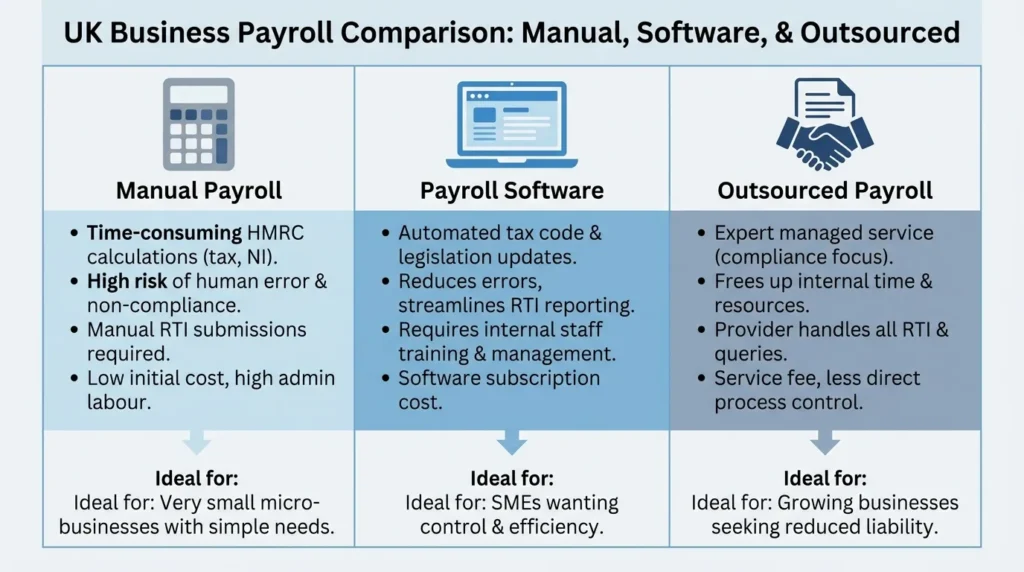
You have three options. Pick based on headcount, time, and budget.
Manually. Workable for one or two employees if you’re confident with the calculations. HMRC’s Basic PAYE Tools is free software designed for employers with nine or fewer staff. It calculates deductions and submits RTI reports for you, but you’re still doing the data entry every pay period.
Payroll software. Most small businesses land here. Tools like Xero Payroll, QuickBooks Payroll, Sage, and BrightPay automate the tax and NI calculations, generate payslips, and file directly with HMRC. Pricing usually scales with employee count, often somewhere between £3 and £10 per employee per month depending on the provider and features.
Outsourcing. Hand it to an accountant or payroll bureau. This costs more — typically £25 to £50 per month for a handful of employees — but removes the admin entirely. Worth considering if payroll isn’t where you want to spend your time, or if your pay structure is complicated (commission, multiple pay rates, frequent starters and leavers).
There’s no universally right answer. Under five employees with simple, fixed salaries: software is usually enough. Complex pay structures or zero spare admin time: outsourcing earns its cost.
Information You Need Before Running Payroll
Gather this for every employee before their first pay run:
- Full name, address, date of birth
- National Insurance number
- Tax code (from a P45, or a starter checklist if they don’t have one)
- Start date
- Bank details for payment
- Salary or hourly rate, and contracted hours
- Pension eligibility details
Missing or incorrect data here is where most first-time payroll errors start. A wrong tax code, in particular, means an employee is either overtaxed or undertaxed from day one, and correcting it later means amending submissions.
You’ll also need to assess workplace pension eligibility. Auto-enrolment applies to almost every employer, regardless of size. If an employee is aged between 22 and State Pension age and earns above £10,000 a year (the qualifying earnings threshold, reviewed annually), you must automatically enrol them into a workplace pension scheme and contribute on their behalf. Employees who don’t meet the criteria can still opt in. You’ll need to choose a pension provider, set minimum contribution levels, and reassess eligibility roughly every three years through re-enrolment.
How to Run Payroll: Step by Step
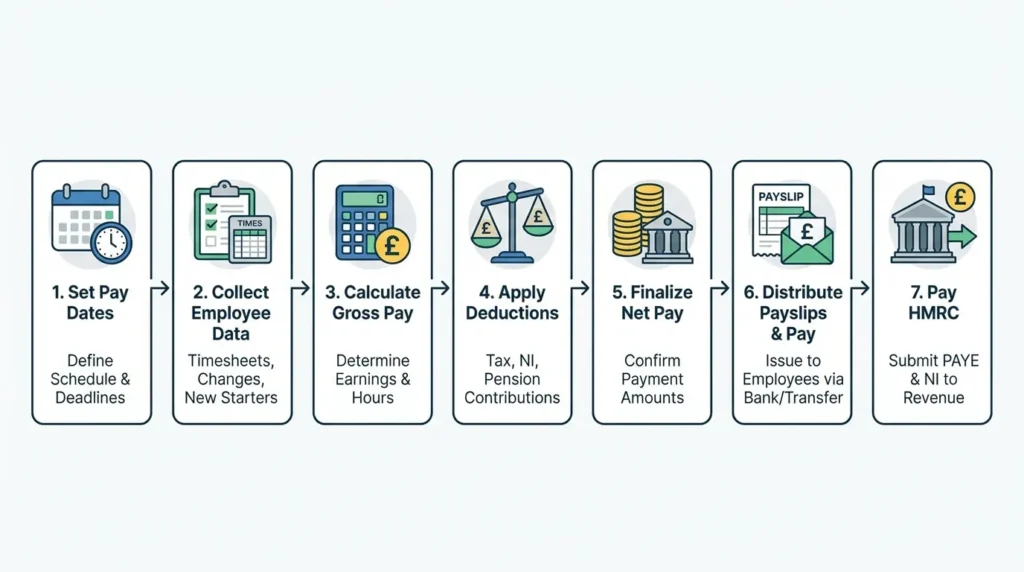
Once registration is done and employee data is gathered, the actual pay run follows the same sequence every period.
Step 1: Set and agree pay dates
Decide how often you’ll pay — weekly, fortnightly, or monthly are most common for small UK businesses. Monthly, paid around the end of the month, is standard for salaried staff. Whatever you choose, the date needs to be consistent and agreed with employees up front.
HMRC’s tax month runs from the 6th of one month to the 5th of the next, not the calendar month. This affects which tax month a payment falls into, particularly near month-end paydays.
Step 2: Calculate gross pay
This is pay before any deductions. For salaried staff it’s usually a fixed monthly figure. For hourly staff, multiply hours worked by the agreed rate, then add anything else due that period — overtime, commission, bonuses, holiday pay.
Worked example: An employee on an annual salary of £30,000, paid monthly, has a gross pay of £2,500 for that pay period (£30,000 ÷ 12). If they also earned £150 in overtime that month, gross pay for the period becomes £2,650.
Step 3: Calculate deductions
From gross pay, deduct:
- Income Tax — based on the employee’s tax code and the current tax bands
- National Insurance — employee NI is due once earnings exceed the weekly/monthly threshold
- Student loan repayments, if applicable
- Pension contributions, if the employee is enrolled
- Any other agreed deductions (e.g. salary sacrifice schemes)
Continuing the example above: on a standard 1257L tax code, an employee earning £2,650 in a month would have Income Tax and employee National Insurance deducted automatically by payroll software, based on current HMRC rates. You’re also separately liable for employer National Insurance on top of gross pay, once earnings exceed the secondary threshold. If you want the exact current rate and threshold for employer NI before running your numbers, this breakdown of employer National Insurance rates covers it in full.
Payroll software does these calculations automatically once you’ve entered the employee’s tax code and pay details, which is the main reason most small businesses use it rather than working everything out by hand.
Step 4: Produce payslips
Every employee must receive a payslip on or before payday. Digital payslips are fine. It needs to show gross pay, all deductions, and net pay clearly, in a consistent format each period.
Step 5: Submit your Full Payment Submission (FPS)
Under Real Time Information, you must send HMRC an FPS on or before the day you pay your employees, every single pay period. This reports what each employee was paid and what was deducted. Most payroll software submits this automatically once you confirm the pay run.
If you didn’t pay anyone in a particular tax month, you need to send an Employer Payment Summary (EPS) instead, to tell HMRC nothing is due.
Step 6: Pay your employees
Transfer net pay on the agreed date, using the bank details you collected earlier.
Step 7: Pay HMRC what you owe
Pay the Income Tax, National Insurance, and any other deductions you’ve collected, plus your employer NI contribution. The deadline is the 22nd of the month if you pay electronically, or the 19th if paying by post. If your average monthly liability is under £1,500, you may be eligible to pay quarterly instead.
Ongoing Payroll Tasks and Deadlines
Running payroll isn’t a one-off setup. Once it’s live, these tasks repeat every tax month:
- Record pay and deductions for each pay period
- Submit FPS on or before each payday
- Submit EPS if no one was paid in a given tax month
- Pay HMRC by the 19th (post) or 22nd (electronic)
- Keep payroll records for at least three years
Falling behind on RTI submissions doesn’t just risk a penalty. Late or missing reports can affect employees’ Universal Credit calculations, since the Department for Work and Pensions uses real-time payroll data to assess benefit entitlement.
Penalties to know about
| Issue | Typical consequence |
|---|---|
| Late or missing RTI submission | Monthly penalty starting at £100, scaling with employee count |
| Late payment to HMRC | Penalty based on how often and how late payments are made |
| Poor record-keeping | Penalty of up to £3,000 |
| No payroll reports submitted for 120 days (new employer) | HMRC may close your PAYE scheme |
If you’re already managing other HMRC deadlines for the business, it’s worth keeping payroll penalties in the same mental bucket as the ones covered in this guide to late Self Assessment penalties — different scheme, same principle: HMRC penalises lateness more than it penalises honest mistakes that get corrected.
Year-End Payroll Tasks
At the end of each tax year (5 April), there are extra obligations:
- Give every employee a P60 by 31 May, summarising their total pay and deductions for the year
- Send your final FPS for the tax year
- Check for new tax code notices from HMRC before the new tax year starts
- Update payroll software for the new tax year’s Income Tax bands, NI thresholds, and National Minimum Wage / National Living Wage rates, which typically change from 1 April
Doing this in advance, rather than scrambling in the first week of April, avoids the most common new-tax-year errors: paying someone on last year’s rates, or running the first pay period of the year with outdated thresholds.
Running Payroll as a Single Director
If you’re a limited company director with no other staff, you still need a PAYE scheme if you’re taking a salary above the Lower Earnings Limit. The process is the same as for any other employee: register as an employer, calculate gross pay, deduct tax and NI, submit FPS, pay yourself, pay HMRC.
Many single-director companies pay a low salary up to or near the NI threshold, then take additional income as dividends, since dividends aren’t subject to NI and are taxed differently to salary. That’s a tax-planning decision, not a payroll mechanics one, and it’s worth thinking through properly rather than defaulting to a number you’ve seen quoted online. For the detail on how salary and dividends interact, see this guide on paying yourself as a limited company director.
Whatever salary level you choose, the payroll process itself — FPS, payslips, deadlines — applies in full, even though you’re the only person on it.
Payroll Software vs Outsourcing: Which Should You Choose?
| Factor | Software fits better when… | Outsourcing fits better when… |
|---|---|---|
| Employee count | 1–10 employees | 10+ employees, or complex pay structures |
| Time available | You can spend 1–2 hours per pay run | You want zero hands-on admin |
| Budget | You want the lowest ongoing cost | You’re willing to pay more to remove the task entirely |
| Confidence | You’re comfortable checking calculations | You’d rather a professional carry the compliance risk |
| Pay complexity | Fixed salaries, simple deductions | Variable pay, multiple pension schemes, frequent starters/leavers |
There’s no wrong choice here, only a mismatch between what you pick and how much time you actually have to give it each month.
Common Payroll Mistakes Small Businesses Make
- Registering as an employer too late, or after the first payday has already happened
- Using an out-of-date or incorrect tax code, often from not checking a starter checklist properly
- Missing the RTI submission deadline because the FPS wasn’t filed on the same day as payday
- Inconsistent cut-off dates, so late changes like overtime or leave don’t make it into the right pay run
- Not updating software at the start of a new tax year, so the first pay run uses old NI thresholds
- Forgetting to assess pension eligibility for new starters
- Poor record-keeping, which becomes a real problem the moment HMRC asks a question
Most of these come down to timing and consistency rather than complicated calculations. A fixed cut-off date and a checklist for each new starter solves the majority of them.
FAQs
Can I run payroll without software? Yes, using HMRC’s free Basic PAYE Tools if you have nine or fewer employees. You’ll do more manual data entry, but it handles the calculations and RTI submissions.
How much does payroll cost for a small business? Software typically runs £3–£10 per employee per month. Outsourcing to a bureau or accountant is usually £25–£50 per month for a small team, sometimes priced per payslip instead.
Do I need to run payroll if I only have one employee? Yes. Headcount doesn’t change the obligation. Even a single employee, including a sole director, requires PAYE registration and the same ongoing reporting as a larger team.
What happens if I pay HMRC late? You may be charged a penalty, and persistent lateness increases the penalty rate. Pay by the 22nd if paying electronically, or the 19th by post, to avoid this.
Getting Payroll Right From the Start
Running payroll for a small UK business comes down to the same loop every period: register once, gather employee details once, then repeat calculate, report, pay on a fixed schedule. The deadlines don’t move, so building a routine around them — a set cut-off date, a checklist for new starters, software that updates itself each tax year — removes most of the risk.
Get the registration and the first pay run right, and the rest is repetition.