
If your business already pays for Google Workspace, Google Meet is very likely good enough to drop a standalone Zoom subscription — unless you run large client-facing webinars, need advanced breakout-room controls, or your team is simply used to Zoom’s interface. For UK operations teams, the decision now also hinges on a factor most comparisons miss entirely: Zoom’s UK data centre went live in 2026, while Google Workspace still has no UK-specific storage region. This guide works through the cost, compliance, and workflow differences that actually matter for a UK business making this call in 2026.
For a broader shortlist beyond these two, our round-up of video conferencing software for UK small businesses covers other contenders worth a look.
The Core Philosophies: Browser-First vs. App-First UX
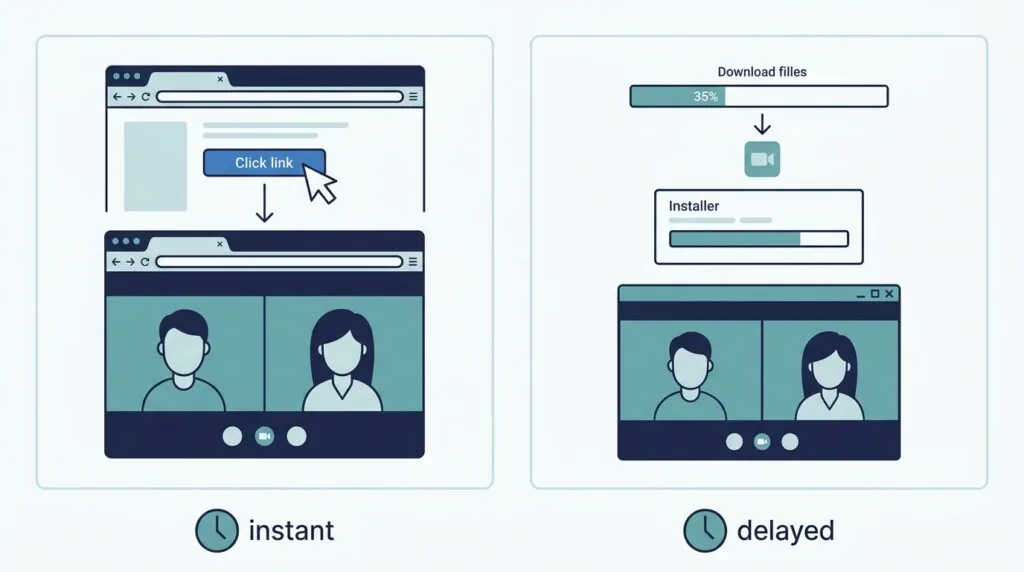
Google Meet is built to run entirely in a browser tab. Zoom Workplace is built around a native desktop and mobile client, with browser access offered as a fallback rather than the default experience. That single design choice explains most of the friction differences between the two platforms.
Joining Friction: Client Downloads vs. Browser Accessibility
Google Meet requires no application download to join a meeting — a participant clicks the link, and the call opens in Chrome, Edge, Safari, or Firefox. Zoom can also be joined via browser, but the prompt to “download and run Zoom” appears by default, and some enterprise networks block the client install entirely. For a UK business that runs frequent external client calls, especially with public-sector or regulated-industry contacts on locked-down devices, this is a real point of friction. If your external contacts are non-technical, or you can’t guarantee they’re joining from an unrestricted device, Meet’s link-and-go model tends to produce fewer late starts.
Can Google Meet replace Zoom for client-facing meetings? For most straightforward external calls, yes — the browser-based join process removes the single biggest source of client friction. Where Zoom still has an edge is in larger client webinars, branded virtual backgrounds, and more granular waiting-room controls, so businesses running frequent public-facing broadcasts may still want Zoom alongside Meet rather than instead of it.
Meeting Codes and Access: “Admit” Prompts and Security
Both platforms use a host-controlled “waiting room” or “admit” mechanic to stop uninvited guests joining — a direct response to the “Zoom-bombing” incidents of the early pandemic years. Zoom’s version is a dedicated waiting room with a visible admit queue; Google Meet’s version is a knock request that appears as a notification inside the call. Functionally they achieve the same outcome, but Zoom gives hosts more granular control over which specific participants can screen-share or unmute once admitted. Whichever platform you use, pair it with baseline account security: two-factor authentication on host accounts is the single most effective control against a compromised meeting link.
Security, Data Residency, and UK GDPR Compliance
Does Zoom or Google Meet comply better with UK GDPR? Both are UK GDPR-compliant and hold ISO/IEC 27001 and SOC 2 Type II certifications, so neither fails a basic compliance check. The practical difference is data residency: Zoom now offers a dedicated UK-hosted infrastructure option at no extra cost on paid plans, while Google Workspace lets Business Plus and Enterprise customers pin data to a European region but has no UK-specific storage location. For businesses in health, finance, or the public sector where UK-only data residency is a hard requirement, that gap currently favours Zoom.
Zoom’s Regional UK Infrastructure (Local Hosting)
This is the detail most existing comparison guides miss, and it changed in 2026. Zoom’s local UK infrastructure is now live, hosting more than twenty Zoom services — including Meetings, Phone, Chat, Webinars, and AI Companion — inside UK data centres. New paid UK customers get it by default at no additional cost; existing paid customers are being migrated on a rolling basis. It gives UK-only meeting zones and local dial-in numbers, which matters directly for the Cyber Essentials and GovAssure audit cycles that public-sector and NHS-adjacent suppliers now face. If your procurement checklist has a “data must stay in the UK” line item, this is the feature that answers it, and it’s worth confirming with your account team whether your organisation has been migrated yet.
Google Workspace’s Data Protection Protocols
Google Workspace covers UK GDPR obligations through a Cloud Data Processing Addendum and Standard Contractual Clauses for any data that leaves the UK or EEA. Business Plus and Enterprise customers can select a European storage region for Gmail and Drive data at rest, which satisfies most international-transfer concerns, but there is currently no option to pin data specifically to UK-only infrastructure the way Zoom now offers. For most SMEs outside regulated sectors this distinction won’t change the buying decision, but it’s the first question an information governance lead will ask, so it’s worth having the answer ready. Businesses that want a dedicated compliance layer on top of either platform may also want to look at GDPR compliance tools built for smaller UK teams, and pair whichever platform you choose with the wider cybersecurity practices any UK small business should have in place.
One regulatory change worth tracking: the Data (Use and Access) Act 2025 introduced a mandatory internal complaints process for data protection requests, effective from June 2025, with further ICO guidance expected through 2026. Neither Zoom nor Google Meet handles this for you — it’s a process your business needs to have in place regardless of which platform you choose.
Deep Feature Breakdown: Where the Differences Lie
Recording Management: Google Drive Folders vs. Zoom Local/Cloud Storage
This is the administrative-friction gap that most reviews skip entirely, and it’s often the deciding factor for busy operations teams. When a Google Meet call ends, the recording is automatically processed and dropped into a Meet Recordings folder inside the host’s Google Drive — no manual step required, and it inherits whatever sharing permissions the admin has set. Zoom recordings, by contrast, either save locally to the host’s hard drive (on the free plan) or land in the Zoom cloud portal, where someone then has to manually download, rename, and file them into whatever shared storage your business actually uses. For a team recording ten or more client calls a week, that manual sorting adds up to real admin hours over a year. If your business already stores files in Google Drive, Meet’s automatic sync is a genuine time saving; if you’re comparing storage options more broadly, it’s worth weighing against other cloud storage providers built for UK small businesses.
Gallery View & Screen Layouts
Both platforms offer a tiled gallery view and an active-speaker view. Zoom supports more simultaneous tiles in its gallery grid and gives hosts more control over pinning specific participants; Google Meet’s layout is simpler but changes automatically based on who’s presenting, which suits teams that don’t want to manage view settings mid-call.
Audience Engagement: Polls, Breakout Rooms, and Q&A
| Feature | Zoom Workplace | Google Meet |
|---|---|---|
| Breakout rooms | Yes, with manual or automatic assignment | Yes, on Business Standard and above |
| Polls | Built-in, available on Pro and above | Built-in via Google Forms integration |
| Q&A tool | Available on webinar-capable plans | Available on Business Standard and above |
| Live captions | Yes, multiple languages | Yes, multiple languages |
Zoom’s breakout-room tools are generally considered more mature, with more automation options for reshuffling groups. If shortening unproductive meetings is more of a priority than feature depth, our guide on ways to shorten meetings in UK small businesses is a useful companion read regardless of which platform you land on.
Live Streaming and Large-Scale Broadcasts
Zoom’s paid plans include native streaming to YouTube and Facebook direct from the meeting controls, plus a dedicated Zoom Webinars add-on for anything over standard participant caps. Google Meet supports in-domain live streaming to up to 100,000 internal viewers on Enterprise plans, but external public streaming isn’t a native Meet feature in the way it is with Zoom. Businesses running public webinars or large external broadcasts will still lean on Zoom here.
AI Battle: Google Gemini vs. Zoom AI Companion
Both companies bundled their AI assistants into standard paid pricing during 2025 and 2026, which makes older comparison articles claiming “Google charges extra for AI” out of date. Zoom AI Companion — meeting summaries, live transcription, and smart chapter markers — is included at no additional cost from the Pro tier upward. Google Gemini is included across Gmail, Docs, Sheets, Slides, and Meet from Business Standard upward, with the entry-level Business Starter plan limited mainly to Gemini in Gmail. Neither vendor currently charges a separate AI add-on fee on these core tiers, a genuine shift from the pricing structures both used through 2024.
For businesses that want AI meeting notes without committing to either ecosystem’s higher tiers, third-party tools such as Otter.ai work across both Zoom and Meet and are worth comparing on cost alone. Teams weighing this against Microsoft’s ecosystem should also check current Microsoft 365 Copilot pricing for UK small businesses, since Copilot remains a paid add-on rather than a bundled feature — the opposite approach to both Zoom and Google here.
UK Pricing and Total Cost of Ownership (TCO) in GBP (£)
Google Workspace Business Tiers (Ex-VAT Costs)
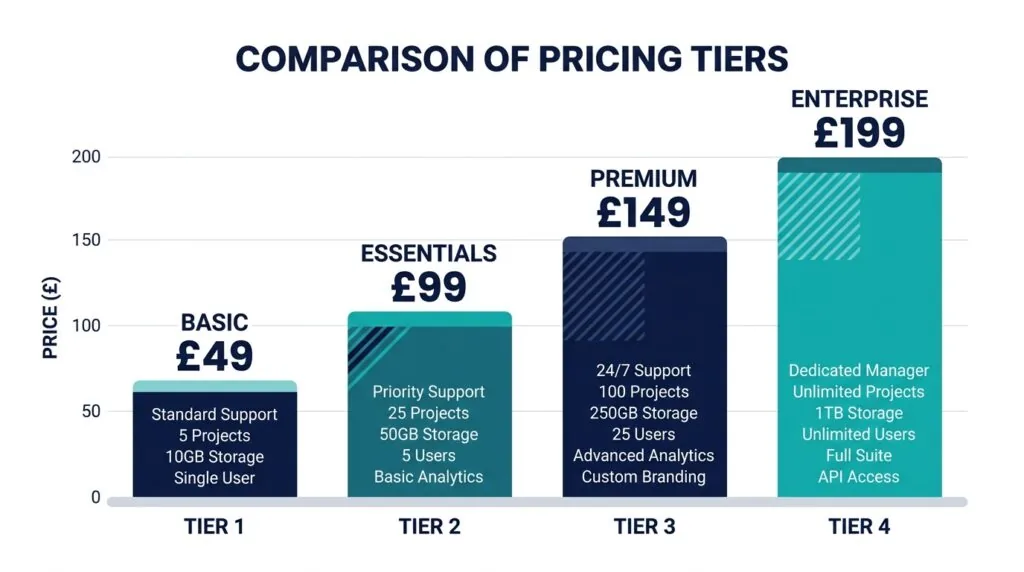
| Plan | Price (annual commitment) | Meet participants | Recording | AI included |
|---|---|---|---|---|
| Business Starter | £5.90/user/month | 100 | No | Gemini in Gmail only |
| Business Standard | £11.80/user/month | 150 | Yes | Full Gemini across apps |
| Business Plus | £18.40/user/month | 500 | Yes + eDiscovery | Full Gemini across apps |
| Enterprise Standard | £22.60/user/month | 1,000 | Yes + advanced security | Full Gemini + data protection |
Zoom Workplace Licensing & Standalone Cost Realities
| Plan | Price (annual commitment) | Participants | Meeting length | AI Companion |
|---|---|---|---|---|
| Basic | Free | 100 | 40 minutes (group) | No |
| Pro | £11.99/user/month | 100 | 30 hours | Yes |
| Business | £15.99/user/month | 300 | 30 hours | Yes |
| Enterprise | Custom | 1,000+ | 30 hours | Yes |
The Tech Stack Duplication Cost Trap
This is the calculation most UK SMEs never actually run. If your business is already on Google Workspace Business Standard (£11.80/user/month, which includes Meet with recording and full Gemini), a separate Zoom Pro licence at £11.99/user/month effectively doubles your video-conferencing spend to roughly £23.79 per user, per month — for two overlapping toolsets. For a 20-person team, that’s an extra £2,877 a year spent on a feature you’re already paying for elsewhere. The trap catches businesses that adopted Zoom out of habit during 2020–2021 and never revisited whether Google Meet has since caught up. Before renewing a standalone Zoom licence, check whether your actual usage — webinars, breakout-room complexity, external client friction — genuinely justifies the duplicate cost, or whether it’s simply inertia. For general ways to trim recurring software spend, see our tips on cutting costs across a UK small business.
Summary Verdict: Which Tool Belongs in Your UK Business?
Freelancers and micro-businesses: Google Meet, bundled into a Business Starter or Standard subscription you likely already have, covers nearly everything a solo operator or two-person team needs.
Growing UK SMEs (10–50 staff): Audit whether you’re paying for both platforms first. If you’re on Google Workspace Business Standard or Plus, Meet’s recording and Gemini AI probably replace Zoom Pro outright. Keep Zoom only if you run frequent external webinars or complex breakout-room training sessions.
Regulated and public-sector-adjacent businesses: Zoom’s live UK data centre currently gives it a data-residency edge that Google Workspace can’t yet match at the storage-region level. If UK-only hosting is a hard procurement requirement, confirm your Zoom account has been migrated to the new infrastructure, or ask Google’s team for their current UK residency roadmap before signing a multi-year contract.
Large corporate teams: Enterprise tiers on both platforms are broadly comparable in features; the deciding factor is usually which ecosystem — Google Workspace or Microsoft 365 — already anchors your document and email workflow, since that’s the harder migration to unwind later.
Frequently Asked Questions
Is Google Meet cheaper than Zoom for a UK business?
Usually, yes, if you’re already paying for Google Workspace — Meet comes bundled in at no extra cost, whereas Zoom is typically an additional standalone subscription on top.
Does Zoom have a UK data centre?
Yes. Zoom’s UK infrastructure went live in 2026 and is available to new paid UK customers by default, with existing customers being migrated on a rolling basis.
Can I use Google Meet and Zoom together without double-paying?
Yes, but check your actual usage first. Many UK SMEs pay for both without needing to — see the tech-stack duplication cost trap above before renewing either contract.
Does Google Workspace include AI features at no extra cost?
Yes, as of 2026 Gemini is bundled into Business Standard and above with no separate add-on fee, a change from the pricing structure Google used through 2024.