
If someone steals your password today, will they get into your email? For most UK small businesses, the honest answer is yes. That single fact is why two-factor authentication has gone from a “nice to have” to a certification requirement in 2026.
What is Two-Factor Authentication (2FA) and Multi-Factor Authentication (MFA)?
Two-factor authentication is a login process that asks for two different types of proof before granting access to an account: your password, plus a second check like a one-time code, an app approval, or a fingerprint. If a criminal only has your password, 2FA stops them at the door.
The Difference Between 2FA and MFA
2FA and MFA are often used interchangeably, but they aren’t quite the same thing. 2FA always uses exactly two factors. MFA is the broader term and can involve two or more. Every 2FA setup is a form of MFA, but not every MFA setup is limited to two steps — some high-security systems add a third layer, such as a physical key on top of a password and an app code.
For a typical small business, this distinction rarely matters day to day. What matters is that a single factor — a password alone — is no longer considered acceptable protection for business accounts.
The Three Factors: How Verification Works
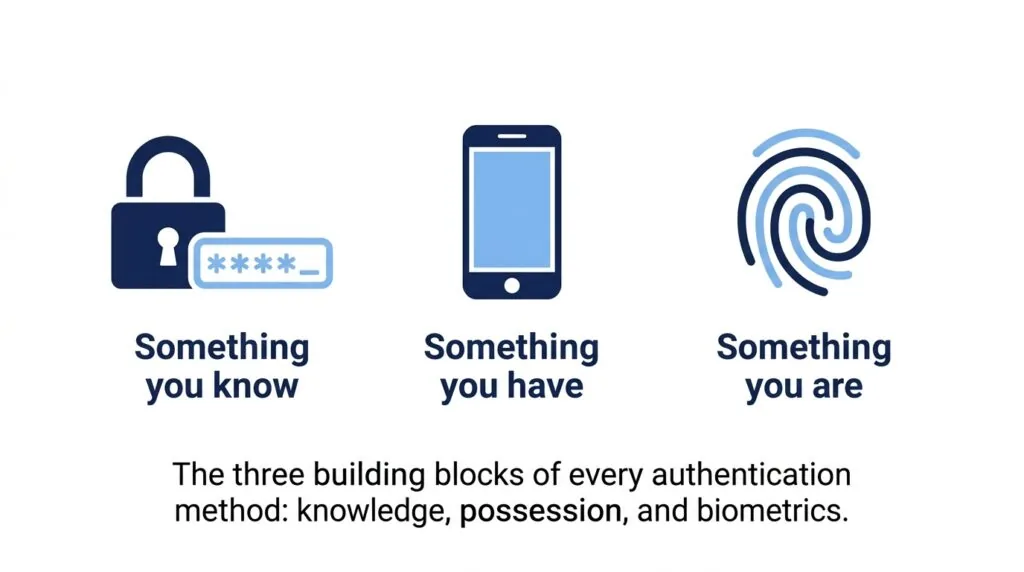
Every authentication method draws from one of three categories:
- Something you know — a password, PIN, or security question
- Something you have — a phone, authenticator app, or hardware key
- Something you are — a fingerprint, face scan, or other biometric
Effective 2FA always pairs something you know with something you have or something you are. That’s what makes stolen passwords far less useful to an attacker.
Why UK Small Businesses Must Prioritise 2FA in 2026
Small businesses are being breached at a scale that makes 2FA a baseline defence, not an optional upgrade. Government data and Microsoft’s own research both point to the same conclusion: the single account without a second login step is where most attacks succeed.
The Rising Costs of UK Cyber Attacks
According to the government’s Cyber Security Breaches Survey 2025/2026, published by the Department for Science, Innovation and Technology (DSIT) and the Home Office, 43% of UK businesses reported a cyber security breach or attack in the past 12 months. That figure has barely moved in three years, which tells you these attacks aren’t a passing trend — they’re a constant background risk for any business running online accounts.
The costs land hardest on smaller firms without a dedicated IT team to absorb the disruption, the lost billable time, or the client trust that a breach can damage. For a wider view of how these risks fit into your overall security posture, our guide to cybersecurity for small business in the UK covers the basics beyond login security.
The Phishing Epidemic: Why Passwords Alone Fail
Phishing remains the most common route into a UK business account, and it works because passwords are easy to hand over without realising it. An employee clicks a convincing fake login page, types their password, and the attacker now has full access — unless there’s a second step in the way.
This is exactly why passwords alone are no longer treated as sufficient by the NCSC or by Microsoft. Microsoft’s own research shows that multi-factor authentication blocks more than 99% of automated account-compromise attempts, even when the attacker already has a valid password. That single statistic is the strongest argument you’ll find for switching 2FA on today rather than next quarter.
The UK Compliance and Certification Mandate
2FA isn’t just good practice anymore — for many UK businesses it’s now a certification requirement, and in some cases a data protection expectation too.
UK GDPR and Data Protection Compliance
UK GDPR requires businesses to apply “appropriate technical measures” to protect personal data. It doesn’t name 2FA specifically, but the Information Commissioner’s Office (ICO) consistently points to MFA as a baseline expectation for protecting accounts that hold customer or employee data. If you’re building out a wider compliance toolkit, it’s worth pairing this with dedicated GDPR compliance tools for small businesses to cover data handling beyond login security.
Cyber Essentials v3.3 (Danzell Update) and the MFA Auto-Fail Policy
Is MFA mandatory for Cyber Essentials in 2026? Yes. From 27 April 2026, Cyber Essentials assessments are marked against the new Danzell question set and version 3.3 of the NCSC’s Requirements for IT Infrastructure. Under this update, multi-factor authentication is a mandatory control for every cloud service in your assessment scope where MFA is available. If an assessor finds a qualifying cloud service without MFA enabled, that’s an automatic fail of the assessment — no partial credit, regardless of how strong your other controls are.
This is a meaningful tightening from previous years, when MFA was expected mainly on administrator and cloud accounts rather than checked with a strict pass/fail trigger. If your Cyber Essentials renewal falls after the April 2026 changeover, an old MFA setup that “mostly” covers your team is no longer good enough — every in-scope account needs it switched on and enforced, not just offered as an option. Reviewing this alongside your broader UK small business regulations checklist is a sensible way to catch this before your renewal date arrives.
Practical 2FA Methods: Choosing the Right Option for Your SME
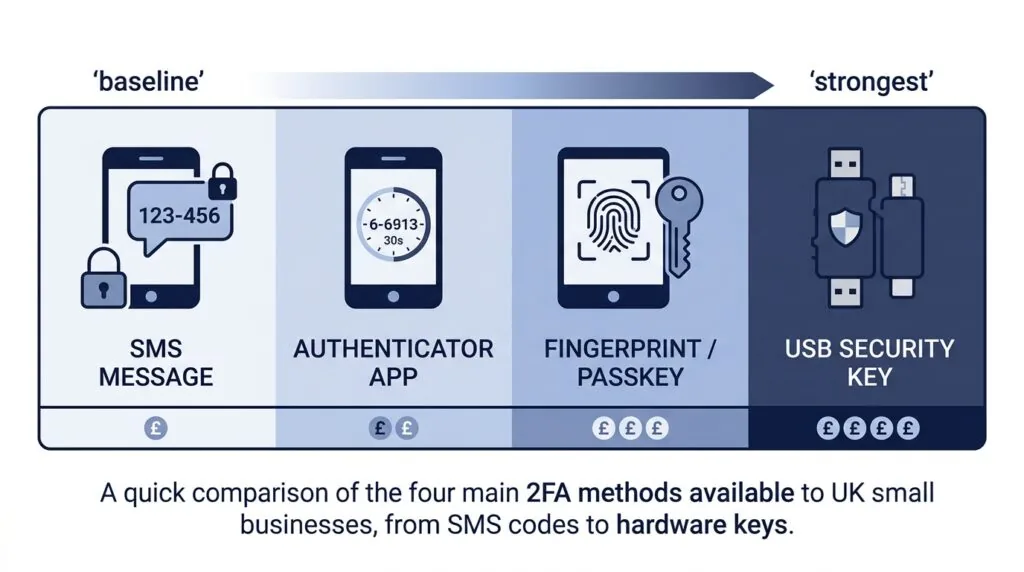
There’s no single “best” 2FA method — the right choice depends on your budget, your team’s technical comfort, and what you’re protecting. Here’s how the main options compare.
| Method | Security level | Cost | Best for |
|---|---|---|---|
| SMS / voice codes | Baseline | Free–low | Very small teams needing a fast, no-training start |
| Authenticator apps | Strong | Free | Most SMEs — the practical default |
| Passwordless / passkeys | Very strong | Free–low | Businesses wanting fewer support headaches long-term |
| Hardware security keys | Strongest | £20–£50 per key | Admins, finance staff, and high-risk accounts |
SMS and Voice Codes (The Minimum Baseline)
SMS codes are better than nothing, but they’re the weakest widely used option. They can be intercepted through SIM-swapping scams, where a criminal tricks a mobile provider into transferring your number to a device they control. Use SMS only where nothing else is available, and treat it as a temporary bridge rather than your long-term setup.
Authenticator Apps (Google, Microsoft, Authy)
For most small businesses, an authenticator app is the practical sweet spot. Apps like Microsoft Authenticator, Google Authenticator, and Authy generate a new six-digit code every 30 seconds using a method called Time-based One-Time Password (TOTP), and they work without needing phone signal. They’re free, quick to set up across a small team, and they close off almost all of the risk that SMS carries.
Passwordless Authentication and FIDO2 Passkeys
Passkeys remove the password from the process entirely, using a fingerprint, face scan, or device PIN tied cryptographically to the specific website or app. Because there’s no password to steal, phish, or reuse, passkeys are resistant to the fake-login-page attacks that catch out even careful employees. Microsoft 365 and Google Workspace both support passkeys now, and adoption is being actively promoted under the Cyber Essentials 2026 changes as the direction the scheme wants organisations to move toward.
Hardware Security Keys (YubiKeys)
A physical key, such as a YubiKey, plugs into a USB port or taps via NFC and provides the strongest protection available, because it can’t be phished, guessed, or intercepted remotely. The tradeoff is cost and the risk of losing the key. For most small teams, hardware keys make the most sense reserved for a handful of high-risk accounts — the business bank login, the domain registrar, and admin accounts on Microsoft 365 or Google Workspace — rather than the whole staff.
Step-by-Step 2FA Implementation Plan for UK SMEs
Rolling out 2FA doesn’t need to be disruptive if you follow a clear order. Here’s a practical four-step plan.
- Identify and audit critical accounts. List every account that touches money, customer data, or your domain: email, banking, accounting software, cloud storage, and your website admin panel. These get 2FA first.
- Enforce MFA via Microsoft 365 and Google Workspace. Both platforms let admins turn on “security defaults” or a conditional access policy that requires MFA for every user, rather than leaving it as an individual opt-in. This one setting change closes most of the gap that Cyber Essentials now checks for.
- Tackle employee pushback and MFA fatigue. Explain the “why” in plain terms before the rollout, not after complaints start. Watch for MFA fatigue too — attackers sometimes bombard a user with repeated approval requests hoping they’ll tap “approve” out of frustration. Train staff to reject and report any unexpected prompt rather than approving it to make it stop.
- Establish lost device and account recovery protocols. Set up backup codes stored securely (not in a shared spreadsheet) and a documented process for what happens when someone loses their phone or leaves the company. This second point matters more than most guides admit: if a departing employee’s authenticator app is the only recovery method for a shared account, you have a gap. Build offboarding into your process — our guide on hiring your first employee is a useful companion piece if you’re formalising onboarding and offboarding steps for the first time.
A note on BYOD. Many small businesses rely on staff using personal phones for authenticator apps, since buying company devices for everyone isn’t realistic on a tight budget. This is generally fine, but be explicit with staff that the authenticator app itself doesn’t give the business access to their personal phone or messages — it only generates a code. Put this in writing, and confirm in your offboarding checklist that departing staff remove company accounts from personal authenticator apps before their last day. If you’re managing a growing remote or hybrid team, pairing this with reliable cloud storage for small business keeps sensitive files off personal devices entirely, which reduces how much BYOD risk you’re carrying in the first place.
Frequently Asked Questions (FAQ)
What is two-factor authentication? Two-factor authentication is a security process where you prove who you are using two different types of evidence — typically a password plus a code, app approval, or biometric check — before an account grants access.
Is 2FA mandatory under UK GDPR?
UK GDPR doesn’t name 2FA specifically, but it requires “appropriate” technical safeguards for personal data, and the ICO treats MFA as a baseline expectation for protecting accounts that store customer or staff information.
Is MFA mandatory for Cyber Essentials in 2026?
Yes. Since the Danzell question set and v3.3 requirements took effect on 27 April 2026, MFA is mandatory on every in-scope cloud service where it’s available, and missing it triggers an automatic fail of the assessment.
What’s the best 2FA app for Microsoft 365?
Microsoft Authenticator integrates most directly with Microsoft 365 and supports passwordless sign-in, but Google Authenticator and Authy also work reliably if your team already uses them for other accounts.
What is the difference between 2FA and MFA?
2FA uses exactly two authentication factors, while MFA is the broader term covering two or more. In practice, most small business setups use 2FA, which is itself a form of MFA.
Can employees use their personal phones for 2FA?
Yes, this is common and generally safe, since the authenticator app only generates a code and doesn’t give the business access to the rest of the device. Put a written policy in place covering offboarding so departing staff remove company accounts from personal apps.