

Running a small business usually means running five or six subscriptions at once. A project tool here, a wiki there, a separate AI chat window for drafting emails. Notion AI’s pitch is simple: pull all of that into one workspace and let AI work across it instead of you copying and pasting between tabs.
What is Notion AI and How Does it Work?
Notion AI is an AI layer built into Notion’s workspace, wiki and database product. It can answer questions using your own workspace content, generate and edit documents, autofill database fields, and — since February 2026 — run as autonomous agents that complete tasks on a schedule without you prompting them each time.
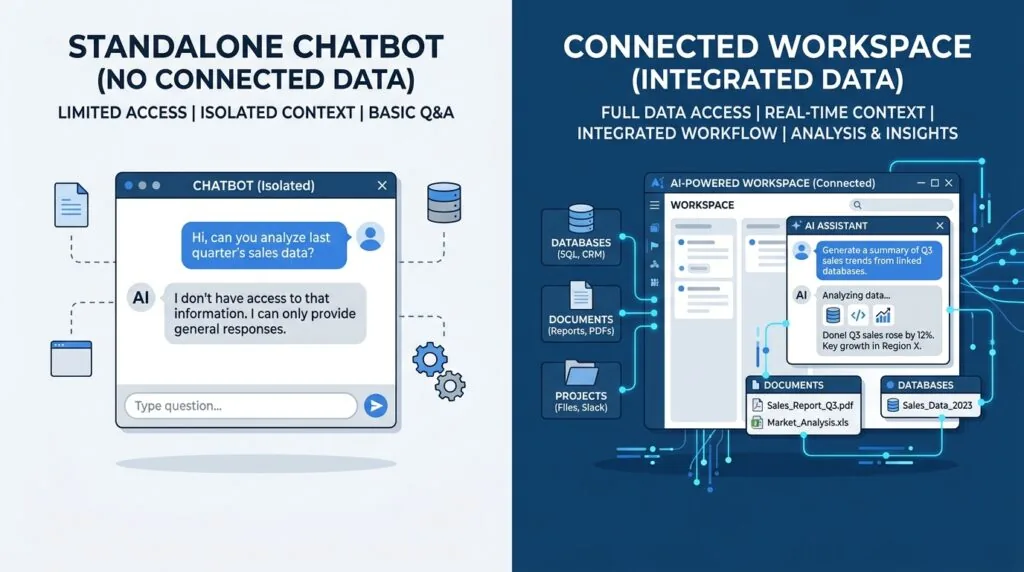
The key distinction is context. A general chatbot only knows what you paste into it. Notion AI already sits on top of your SOPs, client records and project notes, so it can answer “what’s our refund policy” or “summarise this client’s history” without you feeding it documents first.
The Integrated Workspace Advantage vs. Standalone AI Tools
Standalone tools like ChatGPT or Claude are more capable writers and reasoners in isolation, but they don’t remember your business unless you re-supply context every session. If you’re already comparing dedicated AI writing tools for UK business, the honest trade-off is this: Notion AI is weaker at raw writing quality but stronger at operational memory, because it reads and writes back into the same databases your team already works in.
Core Notion AI Features for Small Business Operations
1. Q&A and Enterprise Search (The Virtual Assistant)
Ask a question in the AI sidebar and Notion AI searches your workspace — and, on Business plans, connected apps like Slack, GitHub and Google Drive — to pull back a sourced answer. This replaces the “which document was that in again?” problem that eats up admin time. Teams already running a customer service AI chatbot can use this internally, pointed at staff, not customers.
2. AI Database Autofill & Content Enrichment
Autofill reads a database row and generates values for other fields automatically. Basic Autofill (simple tagging, categorising, summarising) is included free on Business and Enterprise plans. More complex, multi-step fills — for example, researching a new lead and populating five fields from web and workspace context — use Custom Agent Autofill, which draws on your Notion credit balance.
3. Custom Agents & Task Automation
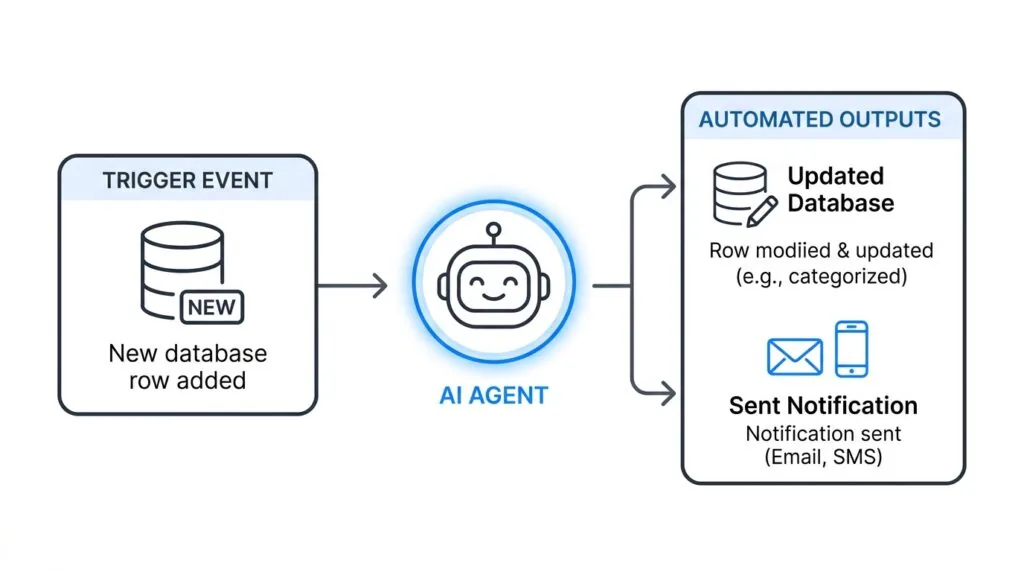
Launched in February 2026, Custom Agents are named, persistent AI workers that run on a schedule or a trigger — a new database row, a meeting note being captured, a message in a watched Slack channel — without anyone prompting them. A small operations team might run one agent that triages inbound enquiries and another that compiles a daily briefing every morning at 8am.
4. SOP and Knowledge Base Generation
Notion AI can draft a first version of a standard operating procedure from a rough set of notes or a recorded process, then keep it updated as linked pages change. It won’t replace a proper review, but it removes the blank-page problem that stops most small teams from documenting anything at all.
Notion Pricing in the UK: Understanding the Real Costs (2026)
Direct answer: Full Notion AI — including Notion Agent, AI Meeting Notes and Enterprise Search — is only unlocked on the Business plan. Free and Plus give you a limited trial only. This changed when Notion killed its old $8–$10/month AI add-on and folded AI into Business pricing.
One thing worth flagging: Notion’s UK pricing page lists costs in US dollars by default, not GBP. Your card issuer converts at the prevailing exchange rate and adds UK VAT, so the amount on your statement will drift slightly with FX movements — treat the figures below as close estimates, not fixed GBP prices.
Free Plan vs. Plus vs. Business Plan (£ GBP)
| Plan | Price (billed annually) | Approx. GBP* | Notion AI Access |
|---|---|---|---|
| Free | $0/member/month | £0 | Limited trial only |
| Plus | $10/member/month | ~£8/member/month | Limited trial only |
| Business | $20/member/month | ~£16/member/month | Full access: Notion Agent, AI Meeting Notes, Enterprise Search |
| Enterprise | Custom | Custom | Everything in Business, plus zero data retention with LLM providers |
*Approximate, based on typical GBP/USD conversion; actual charge depends on your card provider’s exchange rate plus VAT.
For a five-person team, that’s roughly £80/month on Business before any Custom Agent usage — worth weighing against a dedicated CRM platform if client management is your main need, since Notion’s databases are flexible but not purpose-built for pipeline tracking.
The Custom Agents Credit System Explained
Custom Agents were free to trial through early May 2026. They now run on Notion credits, purchased as an add-on to a Business or Enterprise plan at $10 per 1,000 monthly Notion credits, with no rollover of unused credits. A single agent running a daily scheduled task typically uses a modest, predictable amount; agents that process large volumes of records or make frequent web/tool calls burn through credits faster. There’s no published flat “cost per agent” — usage-based credit consumption means the real cost depends entirely on how the agent is built and how often it fires.
Step-by-Step: Setting Up Notion AI as Your Business Operating System
Step 1: Create a Central Command Dashboard
- Build one page that links out to every core database: clients, projects, finances, SOPs.
- Use Notion’s dashboard blocks to surface key charts and overdue items at a glance.
- Pin it to the top of your sidebar so it’s the first thing anyone opens.
If you want a lighter-weight starting point before committing to Business pricing, a free small business dashboard template is a reasonable place to prototype the structure first.
Step 2: Establish Your SOP Library
- Create a dedicated SOP database with properties for department, owner, and last-reviewed date.
- Use Notion AI to draft a first version from voice notes or a rough outline.
- Set a Custom Agent to flag any SOP untouched for more than 90 days for review.
Step 3: Automate Client and Project Databases
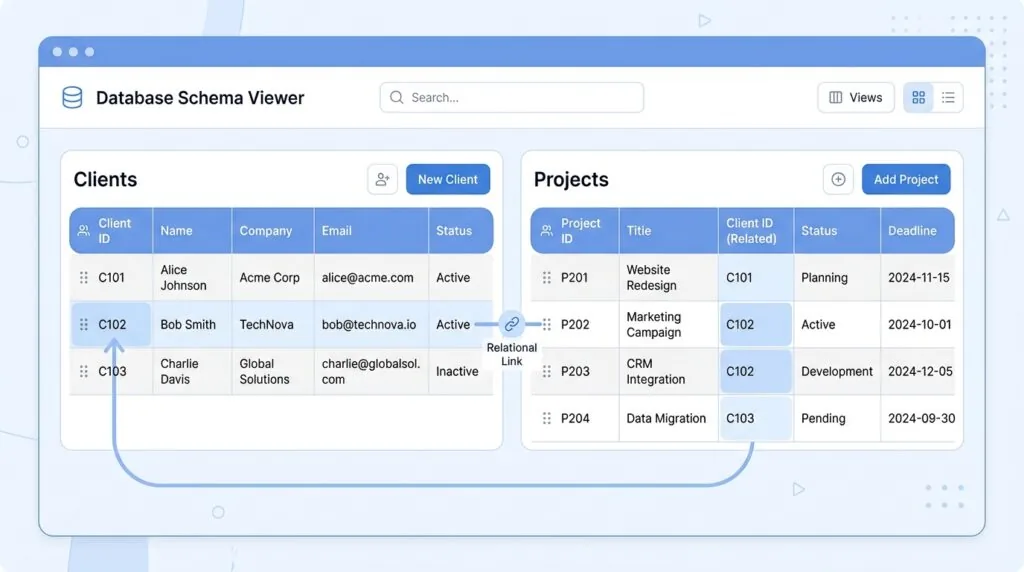
- Build separate but linked databases for Clients and Projects using relation properties, so a project page automatically pulls in client contact details and history.
- Turn on AI Autofill for simple enrichment fields (industry, priority tag, next action).
- Where the relationship is genuinely complex — multi-stage sales pipelines with forecasting — a dedicated tool will usually outperform a Notion database; compare against free project management tools before building everything in Notion by default.
GDPR, Privacy, and Security for UK Small Businesses
Direct answer: Notion AI can be used in a GDPR-compliant way, but the level of compliance protection depends on your plan. Notion’s own Data Processing Addendum applies to Business and Enterprise workspaces. Content sent to Notion’s AI subprocessors — including OpenAI and Anthropic — is held under a 30-day retention window on Free, Plus and Business plans; only Enterprise workspaces get zero data retention with those providers. Notion states it does not use customer content to train its own or third-party models unless a customer opts in.
For UK businesses specifically, remember that your data still crosses borders to reach US-based subprocessors. That’s a restricted transfer under UK GDPR, which requires a valid transfer mechanism — the UK International Data Transfer Addendum or the ICO’s Addendum to the EU Standard Contractual Clauses — sitting behind Notion’s DPA. It’s worth confirming this is in place before putting client personal data through AI features, rather than assuming “GDPR compliant” on a marketing page covers it. If you handle a lot of sensitive client data, it’s worth reviewing dedicated GDPR compliance tools alongside Notion’s own settings rather than relying on one platform alone.
Data Retention and LLM Training Safeguards
| Plan | AI Data Retention | Model Training Use |
|---|---|---|
| Free / Plus | 30-day retention with LLM subprocessors | Not used to train models by default |
| Business | 30-day retention with LLM subprocessors | Not used to train models by default |
| Enterprise | Zero data retention with LLM subprocessors | Not used to train models by default |
A common mistake: assuming the Free or Plus plan gives you the same compliance protection as Business. It doesn’t — the DPA only meaningfully applies once you’re on a paid plan with AI in active use, so staff quietly using personal Notion accounts with work data on Free or Plus is a real GDPR gap worth closing early. It’s also worth pairing this with basic cybersecurity practices for small business, since access control matters as much as vendor compliance.
Is Notion AI Worth It? Pros, Cons, and Alternatives
Pros: Genuinely useful context-aware answers, meaningful admin time saved on SOP drafting and database upkeep, one bill instead of several, Custom Agents handle real repetitive work once configured properly.
Cons: Full AI requires the £16-ish/seat Business plan minimum, Custom Agent credit costs are unpredictable until you’ve run them for a month, and it’s still not a dedicated CRM or project tool — it’s a flexible database that can approximate one.
Alternatives worth comparing: If project tracking is your main pain point rather than knowledge management, ClickUp or Trello may suit better out of the box. For teams already leaning heavily on Notion for general organisation before AI entered the picture, it’s worth reading how to organise a small business in Notion first, since the AI layer only pays off once the underlying structure is solid.
Frequently Asked Questions
Is Notion AI worth it for small businesses?
Yes, if you’re already consolidating tools and have enough team members to spread the Business plan cost. It’s less clear-cut for solo founders, where a standalone AI chat tool is often cheaper.
How much is Notion AI in the UK?
Full AI access requires the Business plan, roughly £16/member/month billed annually (charged in USD with FX conversion), plus optional Custom Agent credits at $10 per 1,000 credits.
Is Notion GDPR compliant?
Notion offers a Data Processing Addendum for Business and Enterprise plans, with contractual limits on AI subprocessors training on your data. Free and Plus plans don’t carry the same DPA coverage.
How do I use Notion AI to write SOPs?
Create an SOP database, feed Notion AI a rough outline or voice note per process, then review and assign an owner and review date before publishing it.