

You can use AI in Google Ads by switching on automated bidding, feeding campaigns clean conversion data and good creative, and then reviewing search terms and results every week. The AI does the bidding and matching. You supply the goals, the guardrails and the quality control.
What AI in Google Ads Actually Means
AI in Google Ads is the set of machine learning tools that automate bidding, ad matching, creative testing and targeting. Google uses signals such as device, location, time of day, search query and past behaviour to decide which ad to show and how much to bid in each auction.
Automation vs generative AI
Two different things sit under the “AI” label.
Automation makes decisions for you. Smart Bidding adjusts your bid in every auction. Broad match and AI Max decide which searches to match. Performance Max chooses where your ads appear.
Generative AI creates things. It writes headline and description variations and can generate or edit images from your website content and your instructions.
Most advertisers use both at once.
Where AI sits in the account
AI works at four levels: bids, keywords and matching, creative, and placement. Each level has a control you can use to limit it. For example, you can add negative keywords, brand exclusions and asset instructions. Keep this in mind, because the controls matter as much as the features.
The Main Google Ads AI Features
The main Google Ads AI features are Smart Bidding, responsive search ads, broad match with AI Max for Search, Performance Max, Demand Gen and ads in AI-powered search results. Each suits a different goal.
| Feature | What it does | Best for |
|---|---|---|
| Smart Bidding | Sets bids per auction toward a CPA or ROAS goal | Any account with steady conversions |
| Responsive search ads | Tests combinations of your headlines and descriptions | Search campaigns |
| Broad match + AI Max | Matches ads to relevant searches beyond exact keywords | Finding new queries |
| Performance Max | Runs ads across Google channels from one campaign | Ecommerce and lead generation |
| Demand Gen | Shows visual ads on YouTube, Discover and Gmail | Building demand |
Smart Bidding
Smart Bidding includes strategies such as Maximise Conversions, Maximise Conversion Value, target CPA (tCPA) and target ROAS (tROAS). It needs conversion data to work. Without it, the system is guessing.
Responsive search ads and AI-generated assets
You give Google up to 15 headlines and 4 descriptions. It tests combinations and learns which perform. Use the asset report to see which lines work, then replace the weak ones. Always read AI-generated suggestions before approving them. Check them for accuracy and for claims you cannot back up.
Broad match and AI Max for Search
Broad match lets Google show your ad on searches related to your keywords, not only exact matches. AI Max for Search builds on this with extra matching and text tools, including options such as final URL expansion. It can find searches you would not have thought of. It can also find irrelevant ones, so check the search terms report often. Feature names and settings change quickly, so check Google’s current documentation before relying on any single option.
Performance Max
Performance Max runs across Search, YouTube, Display, Discover, Gmail and Maps from a single campaign. It uses your assets, audience signals and conversion goals. It gives you less visibility than a standard Search campaign, so it works best when your tracking is accurate.
Demand Gen
Demand Gen uses visual formats to reach people before they search. Use it when you want to build awareness, not capture existing demand.
Ads in AI Overviews and AI Mode
Google has been expanding ads shown alongside AI-generated search answers. You do not usually need a separate campaign for this. Eligible campaigns can appear there depending on their settings and your market. Check Google’s help pages for current availability in the UK.
How to Set Up AI in Google Ads, Step by Step
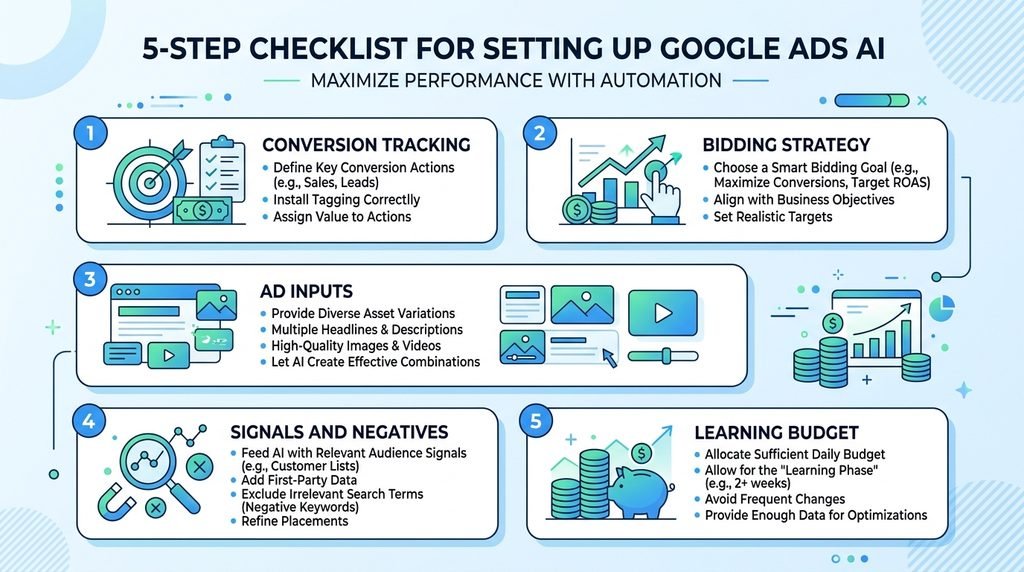
To set up AI in Google Ads, fix your conversion tracking, choose a matching bidding strategy, write strong inputs, add signals and negatives, and give the campaign a fair learning budget. Do them in this order.
- Fix conversion tracking.
- Pick a bidding strategy.
- Write strong inputs.
- Add audience signals and negative keywords.
- Set a learning budget and leave it alone.
Fix conversion tracking first
Smart Bidding learns from your conversions. If you track clicks on a page that nobody values, the AI will chase the wrong thing. Track phone calls, form submissions and sales. Use enhanced conversions where you can, and link Google Ads to GA4. Our GA4 guide for UK small businesses covers the setup.
Choose the right bidding strategy
Start with Maximise Conversions if you have little history. Move to a target CPA or target ROAS once you have enough data. A common rule of thumb is around 30 conversions in the past 30 days before setting a target. It is a guideline, not a Google guarantee. If you set a target too tight too early, delivery drops.
Write strong inputs
The AI cannot fix vague messaging. Write headlines that name the service, the place, the price signal or the offer. Add real proof, such as years trading or a review score. Then point each ad to a landing page that matches the search.
Add audience signals and negative keywords
Audience signals tell Performance Max where to start looking. Use your customer list and past converters. Add negative keywords for jobs, free, DIY and other terms that do not match what you sell. Add brand exclusions if you do not want to pay for people who already know you.
Set a learning-period budget
Automated bidding needs time. Expect roughly one to two weeks of learning, and longer if your sales cycle is slow. A common heuristic is a daily budget of around ten times your target CPA. If your budget is far below that, expect uneven results. Avoid big changes during learning, because each change can restart it.
Using AI Tools Outside Google Ads
You can use outside AI tools to write ad copy, brainstorm keywords and analyse reports, while Google handles the bidding. This saves time without giving up control.
Chat assistants for ad copy and keyword ideas
Tools like ChatGPT and Gemini are useful for first drafts. Give them your service, location, price range and tone, then edit hard. Our ChatGPT for business UK guide shows how to write prompts that give usable results. Never paste customer data into a public tool.
Reporting and analysis
Export your search terms and asset data and ask an assistant to group them by theme. It will spot patterns faster than a manual scan. Check any numbers it gives you against the original export.
Third-party management platforms
Tools such as Optmyzr and Adalysis add rules, alerts and bulk changes on top of Google’s own systems. They suit people managing several accounts. For a single small account, Google’s built-in tools are usually enough. See our roundup of the best AI tools for small business in the UK for wider options.
Which Approach Suits Which UK Business?
The right approach depends on how you make money. Local services, ecommerce and B2B firms need different setups.
Local service business
A plumber or electrician should start with a Search campaign, Maximise Conversions and calls as the main conversion. Use location targeting and negatives like “jobs” and “training”. Set up your Google Business Profile as well, because local trust signals help your ads.
Ecommerce
An online shop usually does well with Performance Max and a clean product feed in Merchant Center. Set tROAS once you have conversion value data. If you are still choosing a platform, our Shopify vs WooCommerce comparison may help.
Lead generation and B2B
B2B firms often get few conversions, so Smart Bidding struggles. Use a mid-funnel conversion, like a demo request, and import offline conversions from your CRM so the AI learns which leads become customers. For more on this, see our guide to AI lead generation in the UK.
Mistakes That Waste Budget
The most common mistakes are poor tracking, tight targets too early, no negatives, constant tinkering and trusting the dashboard without checking lead quality.
- Counting the wrong conversions. Page views and button clicks inflate results and mislead the AI.
- Setting a target CPA too low. The system stops bidding and your ads barely show.
- Ignoring the search terms report. Broad match and AI Max can drift without review.
- Changing things daily. This keeps resetting the learning period.
- Judging success by volume only. Ten junk leads are worse than two good ones.
- Copying AI text without checking it. This leads to inaccurate or unprovable claims.
How to Keep Control and Measure Results
You keep control by choosing the goal, setting guardrails and reviewing a short list of metrics every week. AI should work inside limits you have defined.
Metrics to monitor
Watch cost per acquisition, return on ad spend, conversion rate, impression share and search terms. Also check lead quality with your sales team. If you can, test incrementality by comparing results with and without a campaign in a set area or period.
Guardrails
Use negative keyword lists, brand exclusions, location settings and a budget cap. Keep a weekly review routine: check search terms, assets and spend, then make one planned change. Keep a log so you know what changed when results move.
UK-Specific Considerations
In the UK, you must handle consent, data protection and advertising claims correctly. Google requires Consent Mode v2 for personalised advertising to users in the EEA and the UK, so check your cookie banner passes consent signals correctly.
Currency, VAT and budgets
Google Ads budgets are charged in your account currency, and VAT may apply depending on your business status. Check your billing settings and ask your accountant if you are unsure.
ASA/CAP rules and UK GDPR
The ASA enforces the CAP Code, which covers misleading claims in ads, including AI-written ones. You are responsible for every claim, whoever or whatever wrote it. Cookie and tracking rules fall under UK GDPR and PECR. Our UK GDPR compliance checklist can help you cover the basics.
Future regulatory changes
The UK does not have a single AI Act like the EU. Rules are developing, and privacy rules for tracking have been updated recently. Our explainer on the UK AI Act and small business tracks what matters. Review your setup every few months.
Frequently Asked Questions
Can AI run my Google Ads for me?
AI can handle bidding, matching and creative testing, but it cannot set your goals, judge lead quality or check your claims. Treat it as an assistant that needs weekly supervision.
Is AI Max worth using?
AI Max can help you find extra relevant searches, particularly if your keyword list is narrow. Test it with a clear budget and review the search terms. Switch it off if the traffic is irrelevant.
How much should I spend to let AI campaigns learn?
A common rule of thumb is a daily budget of about ten times your target CPA, and enough conversions to train the system. Smaller budgets can work, but results will be less stable.
What is the best AI tool for Google Ads?
For most small advertisers, Google’s built-in tools are enough. Add outside tools like ChatGPT for copy drafts, or a platform like Optmyzr if you manage several accounts.
Do ads appear in Google AI Overviews?
Eligible campaigns can appear alongside AI-generated answers, depending on settings and market. You generally don’t need a separate campaign. Check Google’s help pages for UK availability.
Conclusion
Using AI for Google Ads works when you give it clean data, clear goals and regular supervision. Start with tracking, choose a sensible bidding strategy, add negatives and review every week. If you want to go broader, read our guide on how to use AI to grow a small business in the UK, then test one change at a time.