
A Google Business Profile (GBP) puts your business on Google Maps and in local search results. Get the setup wrong and you risk an instant suspension. Get it right and you show up when someone nearby searches for what you sell.
What Is a Google Business Profile (And Why UK Businesses Need It)?
A Google Business Profile is a free listing that controls how your business appears on Google Search and Google Maps. It shows your opening hours, contact details, reviews, photos, and location (or service area) to anyone searching nearby.
GBP was previously called Google My Business (GMB), rebranded in 2021 – hence the two names still floating around online.
For UK businesses, a verified profile is what makes you eligible for the local 3-pack: the three map results Google shows above standard search results for queries like “electrician near me.”
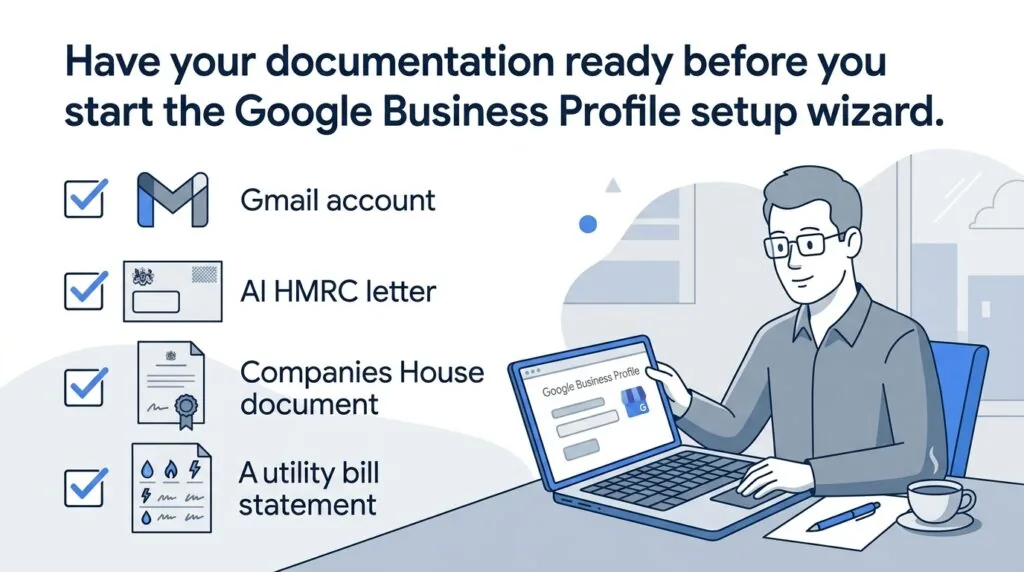
The UK Pre-Setup Checklist: What You Need Before You Start
Gather these before you open business.google.com/create to cut delays and reduce the risk of a rejection.
- A dedicated Google account – a business Gmail address, not a personal one, so ownership stays clean if you hand the profile to a manager later.
- Your exact legal or trading name, matching your website, invoices, and filings.
- UK documentation – an HMRC self-assessment letter, a Companies House filing, or a recent business utility bill showing your registered address.
- Confirmation of your business structure. If you haven’t decided between a sole trader or a limited company setup, settle that first, since Google matches your profile name to your registered identity.
- A UK phone number and a live website, which Google checks against public records during verification.
Step 1: Claiming an Existing Profile vs Creating a New Listing
Google auto-generates listings from public data, so your business may already exist on Maps without you having claimed it.
- Search your business name plus your town, or check Google Maps directly.
- If a listing appears, select it and look for “Claim this business” or “Own this business?”
- If nothing appears, go to business.google.com/create to start fresh.
Claiming an existing listing is usually faster than starting new, since Google already holds some public data on it, which can unlock lighter-touch verification.
Step 2: Choosing Your Business Classification (The Anti-Suspension Step)
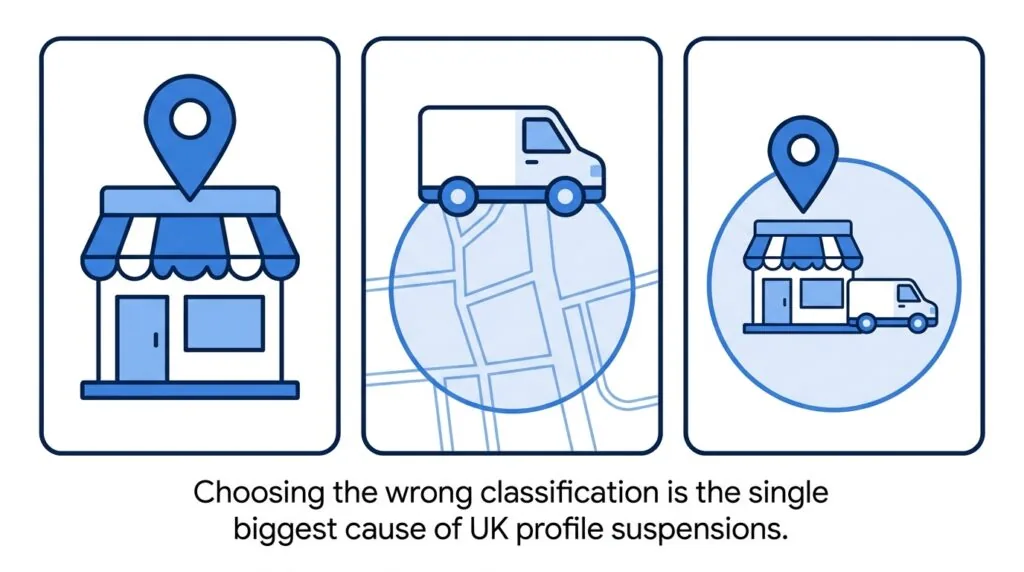
This is the step most guides gloss over, and it’s the one that causes the most UK suspensions. Google needs to know whether customers visit you, whether you go to them, or both. Pick the wrong option and Google’s automated review can flag the listing as inaccurate within hours.
| Classification | Who it’s for | Address shown on Maps? |
|---|---|---|
| Storefront | Shops, salons, offices customers walk into | Yes, full public address |
| Service Area Business (SAB) | Plumbers, electricians, mobile traders, home-based consultants | No, address is hidden; only the service area (postcodes/towns) is shown |
| Hybrid | Businesses that see customers at premises and also travel to them | Yes, address shown, plus a defined service area |
Storefront Businesses (Physical Location)
Choose this only if you have a genuine, staffed location with signage customers can visit. A P.O. box, virtual office, or an address you don’t operate from will get flagged during verification.
Service Area Businesses (SABs – No Public Address)
If you’re a mobile trader or home-based consultant who doesn’t take customers to your address, select “I deliver goods and services to my customers” and hide your address. Google’s own guidance is explicit: SABs operating from home shouldn’t display it publicly. A residential address left visible on a listing marked as a service area is one of the most common triggers for an automated suspension.
Hybrid Businesses
If you run a shop or clinic but also offer callouts or deliveries, choose hybrid. You’ll show your full address and also define the postcodes or towns you serve.
Step 3: Completing the Google Business Setup Wizard
Adding Your Official Business Name
Enter your official trading name exactly as it appears on your website and, where relevant, your Companies House record. Adding unofficial keywords (like “Best Plumber London”) breaches Google’s guidelines and is a common flag for review.
Selecting Your Primary Category
Choose the single category that most accurately describes your core service. This affects which searches you show up for, so avoid vague categories if a more specific one exists.
Defining Service Areas and Postcodes
For SABs and hybrid businesses, add the towns or postcodes you actually cover, generally within about a two-hour drive of your base. Listing areas you don’t genuinely serve looks like spam to Google’s review systems.
Inputting UK Contact Details (Phone and Website)
Use a local UK number rather than a call centre or international line, and link a live website – it’s one of the signals Google checks during verification.
Step 4: Navigating Stricter UK Verification Methods
Google decides which verification method you’re offered automatically, based on your business category, location, and how much public data already exists about you. You can’t choose your method, and some profiles need more than one.
| Method | How it works | Typical timeframe |
|---|---|---|
| Video recording | Record a short video inside the verification flow showing your premises, signage, and proof of operation | Usually within a few days |
| Postcard | Google posts a code to your business address | 5–14 days |
| Phone or text | An automated call or SMS delivers a code | Minutes |
| A code is sent to a domain-based business email | Minutes to 30 minutes | |
| Search Console | Instant verification if you’ve already verified your website domain in Google Search Console | Instant |
How to Complete Video Verification (The Default Method)
Video has become the method Google offers most UK businesses, particularly new listings and any profile with a recently changed address. Record it in one continuous take, inside the official verification flow, not as a separate upload.
- Film your exterior signage clearly, with your street number visible.
- Walk inside and show your workspace, till area, or tools of trade.
- For mobile trades, show branded vehicles, equipment, or a toolkit tied to the business.
- Show proof of activity – invoices, a business card, an appointment book – without capturing sensitive documents or faces.
- Submit inside the flow and wait for review, usually a few days.
If your video is rejected, Google shows a “Review issues” notice. Fix the specific reason given and resubmit, rather than starting a new profile, which risks a duplicate-listing flag.
Alternative Verification: Phone, Email, and Postcard Options
Postcard verification still exists but is offered far less often than it used to be, especially to SABs. Phone and email verification are usually reserved for businesses with an established digital footprint that already matches Google’s records.
How to Achieve Instant Verification via Google Search Console
If you’ve already verified your website domain in Google Search Console under the same Google account, some profiles qualify for instant verification on claiming. It’s worth registering your website with Search Console before you start GBP setup, since it can remove the wait entirely.
Step 5: How to Optimise Your Profile for Google Maps and the Local 3-Pack
Verification gets you listed. Optimisation gets you seen. Once you’re verified:
- Match your name, address, and phone number (NAP) exactly across your website, GBP, and any directories. Inconsistent NAP data is one of the most common reasons a profile underperforms.
- Use a local UK telephone number where you can, rather than a national or mobile-only line.
- Write service descriptions using the language customers actually search for, not marketing copy.
- Upload real photos of your premises, team, and completed work – stock images are easy for Google to flag as low quality.
- Set accurate opening hours and update them for bank holidays.
- Ask satisfied customers for reviews and reply to every one. This feeds into your wider local SEO for UK small businesses performance beyond just Maps.
- Track calls and enquiries that come from your listing somewhere properly, rather than letting them get lost – a simple CRM tool for small UK businesses makes this easy.
Troubleshooting: Why Did My UK Profile Get Suspended Instantly?
An instant suspension almost always comes down to an accuracy or eligibility mismatch against your business’s real-world, legally registered details, not a random penalty – another reason it pays to have your legal requirements for UK small businesses sorted before you list. The most common causes for UK suspensions:
- A residential address shown on a listing marked as a service area business. Switch to SAB and hide the address.
- A business name with added keywords or taglines. Edit it to match your official trading name exactly.
- An address that doesn’t match public records, like a virtual office. Use a genuine trading address, or switch to SAB if you work from home.
- Duplicate listings, often created when the same business is claimed twice under different accounts. Merge or remove duplicates before reapplying.
- Recent edits made shortly after verification, which can trigger an automatic re-review.
To reinstate a suspended listing, fix the underlying issue, then use “Request Reinstatement” in your dashboard or the Google Business Profile support form. Avoid creating a second listing while you wait – it usually makes things worse.
FAQs: Frequently Asked Questions on UK GBP Setup
How do I set up a Google Business Profile for a service area business in the UK?
Go to business.google.com/create, choose “I deliver goods and services to my customers,” then hide your address and enter the postcodes or towns you serve.
How do I verify a Google Business Profile without video in the UK?
You can’t choose your method directly. Verifying your domain in Search Console beforehand, or having strong existing public data, increases the chance Google offers phone, email, or instant verification instead.
Why is my Google Business Profile suspended instantly?
Usually a residential address showing on a service-area listing, a name with added keywords, or an address that doesn’t match public records. Fix the specific issue, then request reinstatement.
Do I have to display my home address on Google Maps in the UK?
No. If you’re a genuine service area business, Google’s guidelines say you should hide your address and show a service area instead.
Conclusion
A verified, accurately classified Google Business Profile is one of the fastest ways to win local visibility on Google. Get your classification right before you touch the setup wizard, prepare for video verification in advance, and keep your details consistent everywhere they appear online.