
Small business owners juggle too many hats. HR shouldn’t be one of them.
When you’re running a team of 10, 30, or 50 people, spreadsheets fall apart fast. Leave requests get buried. Compliance deadlines slip. New hires take weeks to onboard. And suddenly, an administrative burden that should take minutes a day is eating up hours of your week.
This is exactly why UK small businesses are switching to HR software.
A 2026 Federation of Small Businesses survey found that 42% of small firms struggle with HR compliance—from HMRC Real Time Information (RTI) submissions to pension auto-enrolment. The cost of these mistakes is steep: missed deadlines, fines, employee frustration, and lost productivity.
The right HR software fixes this. Not the enterprise bloat that requires consultants and implementation teams. But simple, UK-focused tools built for your size.
Why Small Businesses Need HR Software Now
Running HR manually made sense when you had five employees. Everyone fit around a coffee table. One spreadsheet worked fine.
But the moment you hit 10 or 15 staff, manual HR becomes a liability.
Here’s what breaks without software:
Employee records scatter across emails and paper files. No single source of truth. When HMRC audits you, what do you show them? Which spreadsheet version is current?
Leave requests come via email, text, WhatsApp. Your manager approves some orally. Others get forgotten. You accidentally pay someone for two weeks of holiday they didn’t take. Now there’s a dispute.
New hires wait weeks for paperwork. Employment contracts sit unsigned. Tax forms never get collected. Their first week is chaotic instead of welcoming.
Pension auto-enrolment deadlines creep up. You miss them. HMRC fines you £400 for each worker. For a 20-person team, that’s £8,000 you didn’t budget for.
Performance reviews don’t happen. No feedback system exists. You end up defending poor conduct decisions because there’s zero documentation.
HR software stops all of this. It centralizes data. It automates reminders. It enforces workflows. It keeps you compliant without a dedicated HR person.
And when April 2026 arrives with the Employment Rights Act changes—new pension contribution thresholds, parental leave adjustments, stricter contract requirements—your software updates automatically. You’re protected.
How to Choose HR Software for Your Business
Not every tool fits every business. A startup with 5 people needs something different from a 40-person team preparing to scale.
Here’s how to narrow it down.
Team Size & Growth Trajectory
Ask yourself honestly: how many people will you have in three years?
If you’re 5–15 employees and want to stay lean, Breathe HR makes sense. It’s designed for simplicity. You won’t use half the features in more expensive platforms.
But if you’re growing toward 50–100 people, you’ll outgrow Breathe within 18 months. Then you’re migrating to something like HiBob or Zelt, and that’s painful. You’re re-entering data, retraining staff, losing history.
Pick software that scales with you. It costs more upfront but saves migration headaches later.
Budget Per Employee Per Month
Price structures vary wildly. Most charge per user, some by company size.
Budget platforms start at £3–£5 per employee monthly. That’s affordable for a 10-person team (£30–£50/month). For 50 people, it’s £150–£250. Still reasonable.
Mid-market tools run £8–£15 per user. For 10 people, that’s £80–£150. For 50, it’s £400–£750.
Enterprise platforms? £20+ per user. Clearly not for you yet.
But—and this matters—don’t count just per-user cost. Factor in setup fees (often £1,000–£3,000), training, integrations with your payroll software (sometimes extra), and feature add-ons like recruitment or performance management.
A “cheap” platform at £4/user that charges £2,000 setup is often more expensive than a £7/user tool with free setup.
UK Compliance Requirements
This is non-negotiable.
HMRC compliance means RTI submissions (Real Time Information to HMRC), auto-enrolment pension management, statutory leave tracking (28 days minimum), and GDPR-compliant data storage.
Not all software is equally good at this. Sage HR and Breathe HR are UK-native and handle RTI automatically. BambooHR is US-built; UK features are secondary. You might need a workaround or third-party integration.
Ask each vendor: “Can you file RTI submissions on my behalf?” If the answer is vague, walk away.
Integration With Existing Tools
You probably use accounting software already. Xero, FreeAgent, Sage 50. Or a payroll provider.
Your HR software should plug into these seamlessly. If it doesn’t, you’re manually entering data twice—once in HR software, once in payroll. That’s where errors creep in.
Check integration availability before signing up. Some charge extra for connectors. Others include them. This adds up.
Implementation Speed & Support Quality
Setup takes time. Your data needs cleaning. Workflows need configuring. Staff need training.
Most platforms promise 4–8 weeks from start to payroll running live. But that assumes your implementation partner is responsive and your team cooperates.
If support is slow, setup drags. If they’re unresponsive, you’re stuck.
Ask for references. Call other small businesses using the software. How long did setup actually take? Was support helpful?
Mobile & Self-Service Capabilities
Your team needs to request leave, view their payslips, update their address—from their phone, on the go.
If your software only works on desktop, adoption suffers. People revert to emailing you instead. You lose the efficiency gains.
Check the mobile app. Is it native (iOS/Android) or just a mobile website? Can employees do everything on mobile or only view-only functions?
The 10 Best HR Software for UK Small Business
1. Breathe HR – Best for Cost-Conscious Microbusinesses
Best for: Startups, 5–20 people, tight budgets, simplicity over features.
Breathe HR is the most straightforward option on this list. It handles core HR tasks: employee records, leave requests, absence tracking, basic performance reviews. Nothing fancy. Nothing you don’t need.
Key Features:
- Centralized employee records and document storage (encrypted, ISO 27001 certified)
- Self-service leave requests and manager approval workflow
- Absence tracking and reporting
- Task reminders to keep you on track
- Mobile app for employee access
- Integration with payroll software
Pricing: Starts at £3–£4 per employee per month. Modular add-ons available.
Setup Time: 2–3 weeks for small teams.
Pros:
- Genuinely affordable. A 10-person team pays roughly £30–40/month
- Simple interface. Staff understand it immediately
- UK-native, handles compliance without fuss
- No long-term contracts or hidden fees
Cons:
- Limited customization for complex workflows
- Recruitment tools not built-in (separate add-on)
- No advanced reporting or analytics
- Not built for rapid scaling beyond 50 people
Best For: Micro-businesses and startups that just need structured HR. If you’re running lean and compliance is the goal, Breathe is unbeatable value.
2. Sage HR – Best for UK Payroll Integration
Best for: 10–50 people, using Sage payroll, needing seamless compliance.
Sage HR is UK-built and integrates natively with Sage 50 Payroll. If that’s your payroll system already, this is the obvious choice. No data entry duplication. No sync problems.
Key Features:
- Leave management and absence tracking
- Performance reviews and goal setting
- Automated payroll integration (RTI submissions built-in)
- Document management and e-signatures
- Employee self-service portal
- Modular add-ons: recruitment, timesheets, expenses, scheduling
Pricing: Starts at £5 per employee per month. Add-ons cost extra.
Setup Time: 3–4 weeks.
Pros:
- Seamless Sage payroll integration (huge time-saver)
- Excellent for UK compliance and RTI
- Flexible: build the package you need
- 30-day free trial, no contracts
Cons:
- If you don’t use Sage payroll, setup is more complex
- Less intuitive interface than competitors
- Customer support can be slow
- Performance management features are basic
Best For: Businesses already using Sage for payroll. The integration eliminates manual handoffs and compliance risk.
3. HiBob – Best for Fast-Growing Teams
Best for: 20–100 people, aiming to scale, wanting enterprise-grade features now.
HiBob is built for growing companies. It’s not as simple as Breathe, but it’s not complicated either. It’s the middle ground that grows with you.
Key Features:
- Native UK payroll (handles RTI, pension auto-enrolment, National Insurance calculations)
- Core HR and employee records
- Performance management and 360° feedback
- Learning and development tools (culture-focused)
- Skill tracking and development planning
- Advanced analytics and reporting
- Employee directory and org charts
- Integrations with 100+ business tools
Pricing: Mid-market pricing. Typically £8–£15 per user for core features plus payroll.
Setup Time: 6–8 weeks with HiBob’s implementation team.
Pros:
- Scales genuinely to 500+ people without needing to migrate
- Native UK payroll is excellent
- Strong on culture and engagement features
- Beautiful, modern interface
- Good reporting and analytics
Cons:
- More expensive than Breathe or Sage HR
- Steeper learning curve
- Implementation takes 2 months (longer setup time)
- Overkill for very small teams
Best For: Ambitious growth-stage companies that don’t want to switch HR systems in three years. The upfront cost saves migration pain later.
4. Zelt – Best for All-in-One Control
Best for: 10–100 people, wanting HR + payroll + performance in one system, UK-focused.
Zelt is newer but gaining traction fast among ambitious SMEs. It’s built specifically for UK small businesses that want real control over their HR without complexity.
Key Features:
- All-in-one: HR, payroll, performance, and benefits
- Centralized employee data
- Automated payroll runs with HMRC compliance
- Performance reviews, 360° feedback, goal tracking
- Leave and attendance tracking
- Engagement surveys
- Modern, clean interface
- Decent mobile app
Pricing: Depends on company size and features. Roughly £5–£10 per employee.
Setup Time: 3–5 weeks.
Pros:
- Genuinely all-in-one; no payroll provider hunting
- Good for UK compliance
- Modern interface and UX
- Scales decently
- Excellent customer service
Cons:
- Smaller company; support can be stretched
- Fewer integrations than larger platforms
- Less customization than HiBob
- Still building some features
Best For: Growing businesses that want payroll built-in and don’t want to juggle separate vendors. Good middle ground between Breathe and HiBob.
5. CharlieHR – Best for Simple, Fast Setup
Best for: 5–30 people, startups, wanting zero complexity.
CharlieHR is pure simplicity. Leave management. Absence tracking. Basic onboarding. Documents. That’s it. Literally nothing else.
Key Features:
- Leave request and approval workflow
- Absence tracking
- Onboarding checklists
- Document storage
- Basic employee records
- Self-service leave calendar
- Mobile app
Pricing: Around £4–£5 per employee monthly.
Setup Time: 1–2 weeks. Seriously fast.
Pros:
- Incredibly simple. Staff get it immediately
- Fast setup (1–2 weeks vs. 4–8 weeks)
- Affordable
- UK-native
- Good mobile experience
Cons:
- No payroll integration
- No performance management
- No analytics or advanced reporting
- Won’t grow with you beyond 30–40 people
Best For: Startups and very small teams that just need leave management sorted. If you’re under 15 people and simplicity is your priority, CharlieHR is perfect.
6. BambooHR – Best for Customization & Culture
Best for: 20–200 people, wanting deep customization, employee culture focus, (with UK workarounds).
BambooHR is built for the US market, but it works in the UK if you adapt. It’s powerful for employee records, onboarding, performance reviews, and culture tracking. Compliance is harder, though.
Key Features:
- Extremely customizable employee records
- Powerful onboarding and offboarding workflows
- Performance management and 360° reviews
- Employee directory and org charts
- Time-off tracking (but no payroll integration)
- Applicant tracking system (recruitment)
- Analytics and reporting
- Employee portal
Pricing: Around £6–£10 per user monthly.
Setup Time: 4–6 weeks.
Pros:
- Highly customizable for your specific workflows
- Strong on onboarding and culture
- Good reporting and analytics
- Large company; reliable support
- Works well for performance management
Cons:
- US-built; UK compliance is secondary
- RTI and payroll aren’t integrated; you need a separate payroll provider
- No native UK pension auto-enrolment automation
- Steeper learning curve than Breathe or CharlieHR
Best For: Growing businesses that prioritize culture and employee experience over payroll simplicity. You’ll need a separate payroll solution.
7. Factorial – Best for Workflow Automation
Best for: 15–200 people, needing robust automation, international operations.
Factorial is international but handles UK compliance reasonably well. It’s powerful for process automation—onboarding, document collection, absence management all flow automatically.
Key Features:
- Centralized employee records with automatic data collection
- Document management tied to every HR process
- Leave and attendance tracking
- Performance reviews and feedback
- Time tracking integration
- Payroll integration options
- Built-in “One” AI agent (answers questions, generates reports)
- Workflow automation
Pricing: Roughly £5–£8 per employee monthly.
Setup Time: 4–6 weeks.
Pros:
- Excellent workflow automation
- Good integration ecosystem
- Document management is exceptional
- AI features emerging
- Scales well
Cons:
- UK compliance support is not native (you need to verify it meets your requirements)
- Slightly steeper learning curve
- Customer support can be slow
Best For: Growing teams that care about efficient, automated processes. If you want documents automatically collected from new hires, Factorial shines.
8. BrightHR – Best for Simplicity + Payroll
Best for: 5–50 people, wanting simplicity with built-in payroll, retail/hospitality businesses.
BrightHR pairs leave management with basic payroll. It’s simple and integrates everything, but less powerful than full HR platforms.
Key Features:
- Leave and absence management
- Basic payroll integration
- Employee records
- Self-service portal
- Mobile app
- Simple reporting
Pricing: Around £4–£6 per employee monthly.
Setup Time: 2–3 weeks.
Pros:
- Simple and integrated
- Fast setup
- Affordable
- Good for shift-based businesses
Cons:
- Limited features beyond leave and payroll
- No performance management
- Minimal customization
- Won’t scale to 100+ people
Best For: Small, simple businesses that just need leave + payroll in one place. Good alternative to Breathe if you want payroll included.
9. Rippling – Best for All-in-One (If You Have Budget)
Best for: 30–500+ people, wanting everything in one system, growing fast, willing to invest.
Rippling is expensive but genuinely all-in-one: HR, payroll, IT management, benefits admin, everything. It’s for ambitious companies.
Key Features:
- Core HR and employee records
- Payroll (US and international, including UK)
- Benefits administration
- IT management (device provisioning, security)
- Performance management
- Compliance automation
- Advanced analytics
Pricing: £20–£30+ per employee monthly (premium tier).
Setup Time: 8–12 weeks.
Pros:
- Truly all-in-one; no vendor juggling
- Powerful automation
- Great for scaling companies
- Compliance automation excellent
Cons:
- Expensive for small budgets
- Long implementation
- Overkill for under 50 people
- Complex; needs dedicated HR person to manage
Best For: Fast-growing companies that have budget and want zero vendor management. Not for tight-budget startups.
10. Employment Hero – Best for AI-Powered Hiring
Best for: 5–100 people, hiring constantly, wanting AI-assisted recruitment.
Employment Hero is Australian but UK-compliant. It emphasizes smart hiring and payroll integration with an AI agent that assists with candidate screening.
Key Features:
- HR core + leave management
- Integrated payroll (RTI-compliant)
- AI hiring assistant
- Performance management
- Engagement surveys
- Employee self-service
Pricing: Starts at £4 per user monthly for core HR.
Setup Time: 3–5 weeks.
Pros:
- AI recruitment assistant is genuinely useful
- Payroll integrated
- Affordable
- Modern interface
Cons:
- Smaller company; support can be stretched
- AI features still developing
- Fewer integrations than larger platforms
Best For: Growing businesses hiring frequently and wanting to speed up candidate evaluation.
The Hidden Costs Nobody Talks About
Here’s where small businesses get surprised.
The advertised per-user price isn’t the real cost.
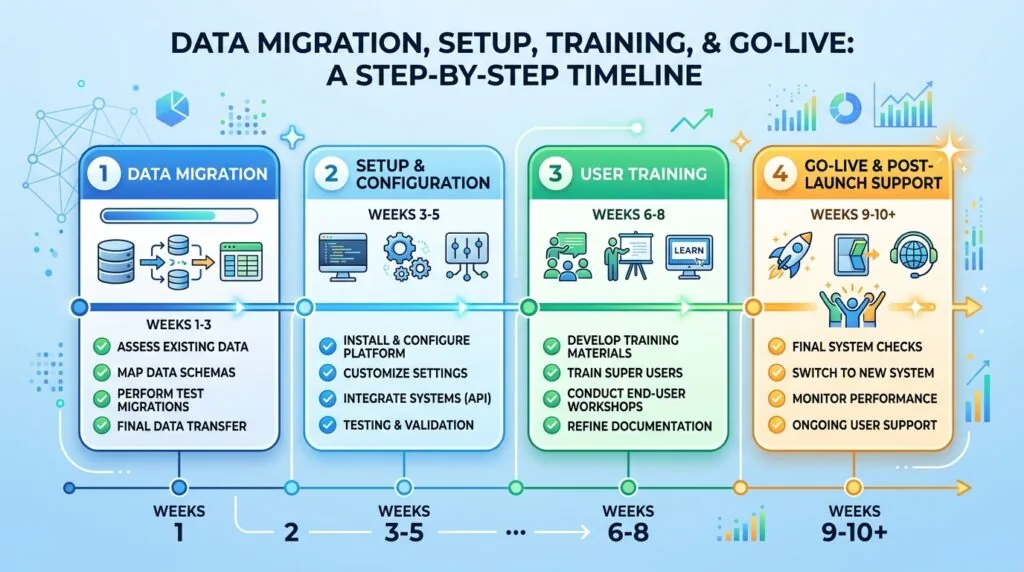
Setup & Data Migration
Moving from spreadsheets (or an old system) to new software takes time and accuracy.
Your data needs cleaning first. Duplicates removed. Inconsistencies fixed. Addresses corrected. Tax codes verified.
If you have messy data, this alone takes 40–60 hours of internal time. If you hire a consultant to do it, add £1,500–£3,000.
Then the actual migration. With some platforms, you upload a CSV. With others, data needs manual entry or custom importing.
Reality check: Budget 20–40 hours of staff time for data migration. That’s a week of work for someone. If you’re paying £15/hour, that’s £300–£600. Add implementation consultant fees, and you’re at £2,000–£4,000 total.
User Training & Support
Your team needs training. Not just “here’s the login,” but real training on how to use it.
Most vendors offer basic onboarding training (often 1–2 sessions). If you want deeper training or custom workflows explained, you pay extra. That’s typically £500–£1,500 per day for a trainer.
Plus: your staff will have questions after go-live. You either handle these internally (consuming your time) or pay support escalation fees.
Integration Costs
Your payroll provider. Your accountant software. Your pension provider.
Some HR platforms integrate seamlessly (free). Others charge per integration. Some require a separate integration layer (Zapier or Middleware) which adds £30–£100/month per connection.
If you’re connecting to 3 systems, that’s £90–£300/month extra. Over a year, that’s £1,080–£3,600.
Feature Add-Ons
The base price gets you core HR. But recruitment module? Extra. Performance management? Extra. Time tracking? Extra. Learning & development? Extra.
A £5/user base plan can become £12/user once you add realistic add-ons.
For 20 people: base £100/month becomes £240/month. That’s £1,400/year difference.
The Real Cost Calculation
Let’s use a real example. 20-person team. Year 1.
Breathe HR:
- Per-user cost: £4 × 20 × 12 = £960/year
- Setup + data migration: £2,000
- Training & support: £500
- Add-ons (payroll integration): £0 (they handle it)
- Year 1 Total: £3,460
- Year 2+: £960/year
HiBob:
- Per-user cost: £12 × 20 × 12 = £2,880/year
- Setup + migration: £3,000
- Training (included in implementation): £0
- Payroll integration: Included
- Year 1 Total: £5,880
- Year 2+: £2,880/year
HiBob looks £2,400 more expensive. But if you keep Breathe for three years then migrate to HiBob:
- Breathe: £3,460 + £960 + £960 + £3,000 (new setup) = £8,380
- HiBob straight away: £5,880 + £2,880 + £2,880 = £11,640
Hmm. Breathe still cheaper over three years. But there’s hidden time cost: the stress of outgrowing it, the messy data export, retraining staff on new software.
Bottom line: Don’t just compare monthly costs. Factor in setup, hidden add-ons, and the pain of switching later.
April 2026 Employment Rights Act: What’s Changing & Which Software Is Ready
New laws are coming April 2026. UK small businesses need to be ready.
The Employment Rights Act 2025 introduces:
- Parental leave changes: Parental leave now includes both parents having access (previously limited). Your software needs to track this separately from traditional maternity/paternity.
- Pension contribution threshold adjustments: The earnings threshold for auto-enrolment is shifting. Your software must recalculate who’s eligible automatically.
- Stricter employment contract requirements: Contracts must be provided within 2 days of starting work (currently no deadline). Better document management is essential.
- Day-one rights: From April 2026, employees have certain protections from day one, not day 26 (previously 2-year threshold for unfair dismissal).
Which software is ready?
Platforms with native UK payroll integration handle these automatically: Sage HR, HiBob, Zelt, Breathe HR (payroll partner).
Platforms built primarily for international use need verification: BambooHR, Rippling, Factorial. Check with them whether they’ve updated their UK modules.
Smaller platforms like CharlieHR and BrightHR handle leave and contracts but rely on your payroll provider to handle threshold changes.
Action: In March 2026, before April laws take effect, contact your HR software vendor and ask: “Are you compliant with April 2026 Employment Rights Act changes?” Get it in writing.
Implementation Checklist: 7 Steps to Successful Setup
Successful HR software adoption isn’t about picking the right tool. It’s about executing the setup properly.
Here’s the playbook:
Step 1 – Data Audit & Cleansing
Timeline: Weeks 1–2
Before you import anything, audit your current data.
Pull all employee records from spreadsheets, old systems, paper files. Consolidate into one place.
Check for duplicates. If you have “John Smith” and “Jon Smith,” which is correct? Fix it now.
Verify addresses, tax codes, National Insurance numbers. Bad data in = bad data out.
Test with a small subset (5–10 employees) first. Once you’re confident, import the full dataset.
Why this matters: Dirty data causes compliance failures later. HMRC doesn’t accept “we weren’t sure which record was right.”
Step 2 – Choose Core Features First
Timeline: Week 3
Implement the absolute essentials first: employee records, leave management, and basic payroll integration.
Everything else is secondary. Don’t try to set up performance reviews, recruitment, and learning modules in week one. You’ll never finish setup.
Get the core running. Everything works. Staff are confident. Then add modules later.
Step 3 – Integrate With Payroll & Accounting
Timeline: Weeks 3–4
Get your HR software talking to your payroll provider now. If they don’t sync, you’re manual-entering data twice.
Ask your vendor: “What’s required to integrate with [payroll provider]?” Some need setup within the vendor’s dashboard. Others are automatic.
If integration is complex, do this with your implementation partner’s help.
Step 4 – Customize Workflows & Permissions
Timeline: Week 4
Set up leave request workflows: who can request, who approves, what’s the deadline?
Define permissions: Can new starters see everyone’s salary? No. Can managers see their team’s leave? Yes.
Test with a small team first. A manager’s workflow that doesn’t work wastes everyone’s time.
Step 5 – Train Your Team
Timeline: Week 5
One person in the room knows the system. Everyone else is confused.
Run at least two training sessions: one for managers (approval workflows, reporting), one for all staff (leaving self-service).
Record sessions so people can watch later.
Create a simple one-page cheat sheet: “How to request leave.”
Step 6 – Run Payroll in Parallel
Timeline: Week 6–7
Before you go live, run one payroll cycle in both systems. Old system + new system, side-by-side.
Do the numbers match? If not, debug before payroll day.
Once you’re confident, cut over to the new system for actual payroll.
Step 7 – Review & Optimize After 3 Months
Timeline: Month 4+
Three months in, ask: “What’s working?” and “What’s frustrating people?”
Maybe the leave workflow requires too many approvals. Or the mobile app isn’t being used. Or managers don’t understand reporting.
Adjust settings based on real usage. This is normal. It’s not a sign you picked wrong; it’s optimization.
Mobile App Showdown
Your team works remote, hybrid, or on the road. They won’t sit at a desk to request leave or check payslips.
The mobile app matters.
Breathe HR: Native app. Fast. Employees can request leave, view calendars, check documents. Everything works.
Sage HR: Native app. Good. Less polished than Breathe but functional.
HiBob: Beautiful mobile app. All features work on phone. Likely the best mobile experience on this list.
CharlieHR: Native app. Simple and fast. Exactly what you need.
BambooHR: Strong mobile app. Directory, documents, time off all work.
Zelt: Good mobile app. Slightly slower than HiBob but functional.
Rippling: Mobile app. Works but less polished than its desktop version.
Employment Hero: Mobile app. Good for leave and payslips.
Bottom line: If your team is remote or field-based, prioritize platforms with strong mobile apps. HiBob, Breathe, and CharlieHR lead here.
Security & Compliance Deep Dive
Your HR software holds sensitive data: salaries, tax codes, medical info (for occupational health), home addresses.
If it’s breached, you’re liable.
ISO 27001 & Encryption
ISO 27001 is the gold standard for information security. It means independent auditors verified the company’s security practices.
Who has it: Breathe HR (certified), HiBob (certified), BambooHR (certified), Rippling (certified), Zelt (certified).
Who doesn’t clearly advertise it: CharlieHR (verify with them), Employment Hero (verify).
Encryption should be end-to-end and at-rest. Ask: “Is data encrypted in transit (HTTPS) and at rest (database-level encryption)?”
GDPR Compliance Proof
You own the data. The software vendor is a “Data Processor.” They must have a Data Processing Agreement (DPA) in place.
All legitimate vendors have these. But verify it covers your use case before signing up.
Key question: “If I ask for all data on employee John Smith, how quickly can you provide it?” GDPR requires responses within 30 days. Good vendors do it in days.
Data Breach Insurance & Backup
What if the vendor’s servers are hacked? Do they have cyber insurance? Will they cover your costs?
Ask. Most don’t explicitly cover this. Some do.
Also: where are backups stored? If UK servers go down, can they restore from a backup? How recent is the backup?
Role-Based Permissions & Audit Logs
Not everyone should see everything.
Your payroll manager shouldn’t see confidential performance reviews. A manager should see only their team’s data.
Check if the software offers granular role-based permissions (RBAC). And can you see an audit log showing who accessed what data and when?
Good platforms: HiBob, BambooHR, Rippling. All offer detailed RBAC and audit trails.
FAQ
Q: Can I export my data if I switch HR software later?
A: Yes, all reputable platforms provide data exports. Usually in CSV or Excel format. Verify export format before signing up. Some charge an export fee (ask). Once you have the file, you own it.
Q: Do I need a dedicated HR person to use HR software?
A: Not for small businesses. A business owner or office manager can handle it. Most platforms are designed for non-HR people. However, for complex compliance questions, consult an employment lawyer or accountant.
Q: What if I have fewer than 5 employees?
A: HR software is still worth it. Even 2–3 people benefit from organized records, automatic leave calendars, and compliance reminders. Breathe HR and CharlieHR are affordable at this scale.
Q: Can HR software handle remote and office staff together?
A: Yes. All modern platforms support mixed working arrangements. You can set location, working hours, and leave policies per employee.
Q: How often should I review my HR software choice?
A: Annually. Every year, assess: Is this still meeting our needs? Are we outgrowing it? Are there better options now? Most businesses stick with their first choice for 3–5 years before upgrading. That’s normal.
Q: What about free HR software?
A: Free options exist (Wave, Guidepoint, etc.) but lack robust security and UK compliance features. They’re suitable only for very new startups with zero compliance burden. As soon as you have payroll or RTI requirements, pay for proper software.
Final Verdict: Which HR Software Is Right For You?
There’s no single “best” platform. Only the best for your business right now.
If you’re:
- Microbusiness, 5–15 people, tight budget → Breathe HR. Simplicity, affordability, and solid UK compliance.
- Growing fast, 15–50 people, want to scale without switching later → HiBob or Zelt. You’ll outgrow Breathe within two years. Pay more now, avoid migration later.
- Already using Sage payroll → Sage HR. The integration eliminates manual work.
- Want everything in one place: HR + payroll + recruitment → Zelt or Rippling (if budget allows). Less vendor juggling.
- Prioritize employee culture and customization → BambooHR (accept you’ll need separate payroll).
- Hiring constantly → Employment Hero (for AI hiring assistance) or BambooHR (for ATS features).
- Remote-first team → HiBob (best mobile experience) or Breathe HR (simple mobile experience).
- Very small team, pure simplicity → CharlieHR. Fastest setup, least to learn.
The real decision framework:
- How many people will you have in 3 years? (Pick something that scales.)
- What’s your realistic budget per employee per month, including add-ons and setup? (Do the math.)
- Which current tools do you use? (Choose software that integrates.)
- Who will manage it internally? (Simple = fewer resources needed.)
- What’s your compliance risk? (Tight rules = native UK features essential.)
Answer those honestly, and the right platform becomes obvious.