
If your staff are pasting client emails, contracts, or financial figures into a personal ChatGPT account, you already have a data protection problem — not a hypothetical one. Shadow IT use of generative AI is now one of the most common routes to accidental data exposure inside UK small businesses, and it usually goes unnoticed until something leaks.
What Is ChatGPT for Business? (Navigating the Options)
ChatGPT Business — the plan OpenAI called “ChatGPT Team” until it renamed the tier in August 2025 — is OpenAI’s self-serve workspace for small and medium organisations. It costs from $20 per user per month on annual billing, and unlike the personal Free, Plus, and Pro tiers, it does not use your conversations to train OpenAI’s models by default. If you’ve read older guides that still refer to “ChatGPT Team,” they’re describing this same plan under its previous name.
Consumer Chat vs. Dedicated Workspace: The Critical Security Distinction
This is the single most important thing most competing guides gloss over.
On personal accounts (Free, Plus, and Pro), OpenAI’s default setting is to use your conversations to improve its models unless you individually switch this off in Data Controls. Each employee’s chat history belongs to their own account. There’s no admin console, no company-wide visibility, and no contract governing how that data is handled — because you, the business, aren’t the customer on the contract. The individual employee is.
On Business and Enterprise workspaces, the position flips. OpenAI does not train on your inputs or outputs by default, the relationship is backed by a Data Processing Agreement, and an administrator controls who has access, what gets logged, and what happens when someone leaves the company. That last point matters more than people expect: on a personal account, a departing employee walks out the door with every prompt and every client detail they ever typed into it.
ChatGPT Plus vs. Business vs. Enterprise: Finding the Right Tier
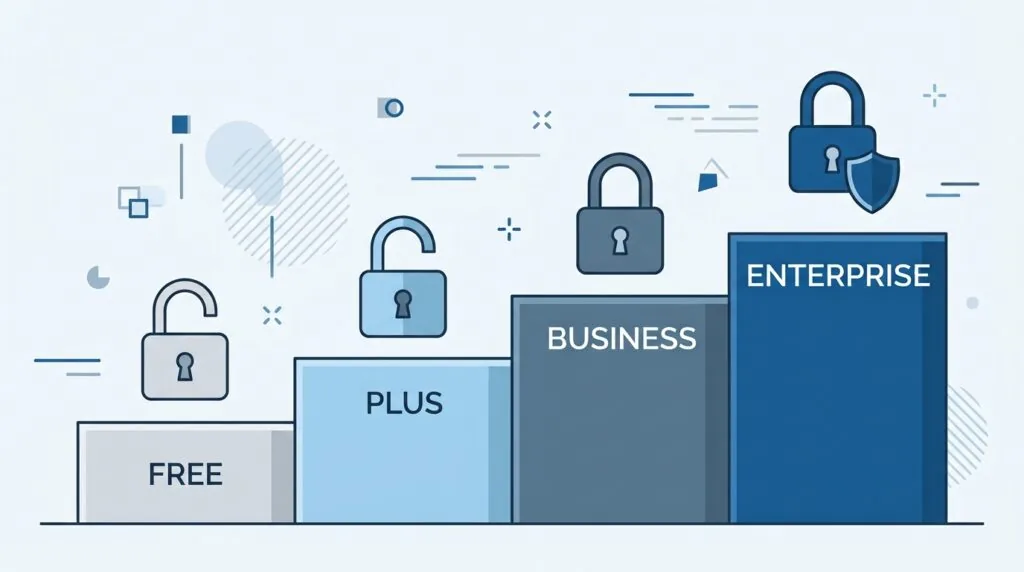
| Plan | Price | Best for | Trains on your data? | Admin & security controls |
|---|---|---|---|---|
| Free | £0 | Testing only, never for client data | Yes, by default (opt-out available) | None |
| Plus | $20/month, individual | Solo users — not a business tier | Yes, by default (opt-out available) | None |
| Business (formerly Team) | From $20/user/month billed annually, or $25/month billed monthly; 2-seat minimum | Most UK SMEs, roughly 2–149 staff | No, by default; covered by a DPA | Admin console, SAML SSO, MFA, SOC 2 Type 2 |
| Enterprise | Custom, sales-negotiated (no published rate) | Larger or regulated organisations, typically 150+ seats | No, by default; covered by a DPA | Full ISO 27001/27017/27018/27701 certification, SCIM, encryption key management, role-based access, UK data residency, dedicated support |
Two details most pricing round-ups miss entirely. First, OpenAI bills Business and Enterprise in US dollars — there’s no published GBP price list — so what lands on your card shifts with the exchange rate on the day, and VAT treatment differs depending on whether you’re billed as an individual (VAT typically added at checkout) or as a VAT-registered business (where the reverse-charge mechanism may apply, meaning you self-account for the VAT rather than being charged it directly). If you’re paying from a UK account, a multi-currency card through a provider like Wise Business can shave off the conversion fee your regular bank would otherwise apply.
Second, ISO 27001 certification — often cited as a baseline trust signal — only applies to the Enterprise tier. The Business plan carries SOC 2 Type 2 but not the ISO 27001/27017/27018/27701 bundle. If your own clients or your cyber insurer require ISO-certified suppliers as part of their due diligence, that’s a genuine reason to pay for Enterprise even below the 150-seat sweet spot, and worth flagging early rather than discovering it during a client audit.
For most UK SMEs under 150 staff, Business is the realistic entry point. Enterprise’s seat minimum and negotiated, non-public pricing put it out of easy reach for smaller teams, even though its certification and data residency options are stronger.
Is ChatGPT UK GDPR Compliant? Protecting Business and Client Data
ChatGPT itself is neither compliant nor non-compliant — compliance depends on which plan you use and how you configure it. Used on Business or Enterprise, with a Data Processing Agreement in place and staff kept off personal accounts, ChatGPT can be operated in a way that satisfies UK GDPR. Used on Free, Plus, or Pro personal accounts for anything involving customer or employee data, it almost certainly can’t.
The ICO Stance on Generative AI and UK Data Protection Laws
The Information Commissioner’s Office published its response to a five-part consultation on generative AI in December 2024, covering the lawful basis for training data, purpose limitation, accuracy, individuals’ rights, and who counts as a controller. That response was aimed mainly at model developers like OpenAI rather than business users of the tool — but the ICO’s current strategy, “Preventing harm, promoting trust,” names generative AI and agentic AI as active priority areas through 2026, which signals growing regulatory attention on how businesses deploy these tools, not just how they’re built.
The bigger shift for 2026 is the Data (Use and Access) Act 2025 (DUAA), which became law on 19 June 2025. It amends — rather than replaces — UK GDPR, the Data Protection Act 2018, and PECR. Its most significant change for AI is to the automated decision-making (ADM) regime under Article 22: a more permissive framework for decisions made solely by automated processing, paired with new safeguards, including a clearer right for individuals to request meaningful human review.
Here’s the nuance most competing guides skip entirely: day-to-day ChatGPT use in an SME — drafting emails, summarising reports, writing marketing copy — is not automated decision-making and isn’t directly governed by the DUAA’s ADM reforms. Those rules bite when you build ChatGPT into a workflow that automatically approves or rejects something about a real person — automatically screening job applicants, scoring credit applications, or triaging insurance claims without a person genuinely able to overturn the outcome. If that’s your use case, treat it as high-risk: the ICO’s own draft guidance on this point was blunt that sitting someone in the loop without real authority to change the decision doesn’t count as “meaningful” human involvement.
Watch this space through 2026 and into 2027. Regulations that came into force on 12 May 2026 require the ICO to prepare a statutory Code of Practice on AI and ADM — carrying the same legal weight as its existing Children’s Code. The draft guidance consultation closed on 29 May 2026, final guidance is expected in summer 2026, and the statutory code itself is expected in 2027. If any part of your ChatGPT use touches automated decisions about identifiable people, this is the regulation to track.
Implementing a Data Protection Impact Assessment (DPIA) for AI
A DPIA is mandatory under UK GDPR wherever processing is likely to result in high risk to individuals, and the ICO treats most generative AI deployments that touch personal data as clearing that bar. Do it before rollout, not after a leak forces the issue. At minimum, your DPIA should document:
- What personal data staff might realistically input — customer records, CVs, health information, financial details
- The purpose and lawful basis you’re relying on, usually legitimate interests, with the balancing test written down, not just assumed
- The risk to data subjects if that data leaks, is misused, or ends up in a training set
- The mitigations in place — workspace tier, admin controls, written usage policy, staff training
- Sign-off from whoever holds data protection responsibility in your business, whether that’s a formal DPO or the owner
Step-by-Step Security Checklist: Preventing Sensitive Data Leaks
- Move every staff member off personal Free and Plus accounts onto a managed Business or Enterprise workspace.
- Confirm a Data Processing Agreement is in place before any personal data touches the tool, and that it covers UK GDPR Article 28 processor obligations specifically.
- Turn off the legacy training toggle on any personal accounts staff were using before the formal rollout.
- Set workspace-level SSO, MFA, and role-based access so a departing employee loses access the moment they leave.
- Complete a DPIA before client or employee personal data goes anywhere near the tool.
- Name specific banned data categories in your usage policy — passwords, client contracts in full, health records, financial account numbers — rather than leaving it to individual judgement.
Pair this with your existing security stack rather than treating it as a separate project: if you haven’t already reviewed two-factor authentication for your UK small business or your broader cybersecurity setup, do that alongside the ChatGPT rollout rather than after it.
Practical Ways to Use ChatGPT in UK Businesses
Customer Support, Service, and CRM Automation
ChatGPT is genuinely useful for drafting response templates, summarising support tickets, and turning messy customer notes into clean CRM entries. The catch: don’t feed raw customer PII into prompts until your DPA and admin controls are confirmed. Build your first templates around anonymised or placeholder data, then swap in real details once the workspace is properly configured. If you’re comparing platforms for this, it’s worth reading up on CRM options for UK small businesses or dedicated AI chatbots for customer service alongside your ChatGPT rollout, since the two often work together rather than as substitutes.
SEO, Content Strategy, and Marketing Workflows
Content briefs, meta description drafts, ad copy variants, and competitor summaries are where most SMEs see the fastest return. It’s worth benchmarking ChatGPT against other AI writing tools for UK business before committing your whole content workflow to one platform, and pairing it with your email marketing software or social media management tools to actually publish what it drafts.
Internal Operations, Reporting, and Data Synthesis
Meeting summaries, policy drafts, onboarding documentation, and first-pass management reports are strong use cases once the workspace is locked down. If you’re already using a dedicated transcription tool, see how it compares to Otter.ai for business meetings — many teams run both, using ChatGPT to turn a transcript into a clean action-item summary. For anything involving payroll or financial figures, keep that data in your existing payroll system rather than pasting it into ChatGPT at all, regardless of tier.
A 4-Step Rollout Plan: From Shadow IT to Compliant Workspace
The fastest way to stop risky personal-account use isn’t a ban — bans get ignored. It’s making the compliant option easier to use than the risky one.
Step 1: Establish a Clear Written AI Usage Policy
Spell out, in plain language, what data can and can’t go into ChatGPT, which tools are approved for company use, who owns and maintains the prompt library, and what happens if the policy is breached. A one-page policy that’s actually read beats a ten-page one that isn’t.
Step 2: Establish Secure Workspaces (Business or Enterprise Sign-up)
Assign an administrator, buy the right number of seats for your headcount rather than over-buying, and configure SSO, MFA, and data retention settings before a single employee logs in under the new workspace.
Step 3: Run Team-Wide Prompt Training & Build an Internal Library
A short, hands-on session beats a written memo every time. Build a shared library of approved prompt templates for the tasks your team actually does — support replies, content briefs, report summaries — so people aren’t reinventing prompts from scratch, and aren’t tempted to fall back on their old personal account out of habit.
Step 4: Continuous Audits & Feedback Loops
Review admin console logs quarterly, revisit your DPIA whenever a new use case appears, and ask staff directly what’s working and what’s pushing them back toward workarounds. Rollouts fail quietly when nobody checks back in.
Prompting Frameworks Designed for Corporate Workflows
Generic prompts like “write an email to my client” waste the tool’s capability. Business use needs role assignment, explicit constraints, and a defined output format.
Prompt Template 1: Business Research & Analysis
You are a business analyst supporting a UK [industry] SME. I need a summary of [topic] focused on practical implications for a company with [size/context]. Structure your answer as: (1) a two-sentence direct summary, (2) three key findings with one supporting detail each, (3) one clear recommendation. Do not include information you’re not confident is accurate — flag anything uncertain instead of guessing. Keep the total response under 300 words.
Prompt Template 2: Compliant Marketing and Client Outreach Copy
You are a marketing copywriter for a UK small business in [sector]. Write [format — e.g., a follow-up email] aimed at [audience], in a [tone] voice. Do not reference any real client names, case details, or figures — use bracketed placeholders like [Client Name] and [Result] wherever specific data would normally go, so I can insert verified details myself afterwards. Keep it under [word count] and avoid exaggerated claims about results.
Both templates build in the constraint that prevents the two most common compliance mistakes: pasting real client data into the prompt, and letting the model invent specifics it presents as fact.

Common Mistakes UK SMEs Make When Rolling Out ChatGPT
- Assuming Business means fully certified. Business has SOC 2 Type 2 but not ISO 27001 — check which one your clients or insurers actually require before you commit to a tier.
- Rolling out with no written policy. Informal “just be sensible” guidance doesn’t hold up if something goes wrong, and it gives staff no clear line between acceptable and risky use.
- Pasting whole documents instead of extracts. Sharing a full client contract when you only need help rephrasing one clause multiplies the data exposed for no benefit.
- Forgetting to update the DPIA. A DPIA written for “drafting marketing copy” doesn’t cover a later decision to use ChatGPT for CV screening — that’s a materially different, higher-risk use that needs its own assessment.
- Buying Enterprise seats you don’t need. The 150-seat minimum and negotiated pricing make Enterprise expensive for smaller teams; most SMEs under that size get everything they need from Business.
Frequently Asked Questions
Is ChatGPT Plus compliant with UK GDPR?
Not reliably for business use. Plus is a personal account with training on by default (opt-out available manually) and no Data Processing Agreement covering business data. It’s fine for individual, non-sensitive tasks, but not for anything involving client or employee personal data.
How much does ChatGPT Business cost for a UK team?
From $20 per user per month billed annually, or $25 per user per month billed monthly, with a two-seat minimum. OpenAI bills in US dollars, so the exact GBP amount on your card depends on the exchange rate and your account’s VAT treatment.
Does OpenAI use my business data to train its models?
No, not by default, on Business, Enterprise, Edu, or API accounts — this is covered by a Data Processing Agreement. Personal Free, Plus, and Pro accounts are opted into training by default unless the individual user switches it off.
Can a small business legally use consumer ChatGPT accounts for work?
It’s legally risky rather than automatically unlawful. Without a DPA, admin controls, or a documented lawful basis, using personal accounts for client or employee data is difficult to defend under UK GDPR’s accountability principle if the ICO or a client ever asks how that data was protected.
Summary and Next Steps
The shift from unmanaged personal ChatGPT use to a proper business rollout isn’t complicated, but it does need to happen deliberately rather than by default. Get staff onto a Business or Enterprise workspace, put a DPIA and usage policy in writing, train people on prompts that don’t require pasting in sensitive data, and revisit the setup every quarter as your use cases grow. Do that, and you get the productivity gains without carrying the exposure that comes from leaving it to individual judgement. If you want a broader view of where AI fits into your compliance stack, our guide to GDPR compliance tools for UK small businesses is a good next stop.