

If you run a UK business website, you can add a working AI chatbot today without writing a single line of code. The harder part isn’t the setup — it’s choosing a platform that keeps your customer data in the UK or EU, training the bot so it doesn’t invent answers, and staying on the right side of GDPR and PECR rules.
What is an AI Chatbot (and How Does it Differ from Rules-Based Bots?)
An AI chatbot is software that uses natural language processing (NLP) to understand a visitor’s question and generate a relevant answer, rather than matching it to a fixed script. Modern versions are built on large language models like OpenAI’s GPT-4o and can be trained on your own business content using a method called Retrieval-Augmented Generation (RAG).
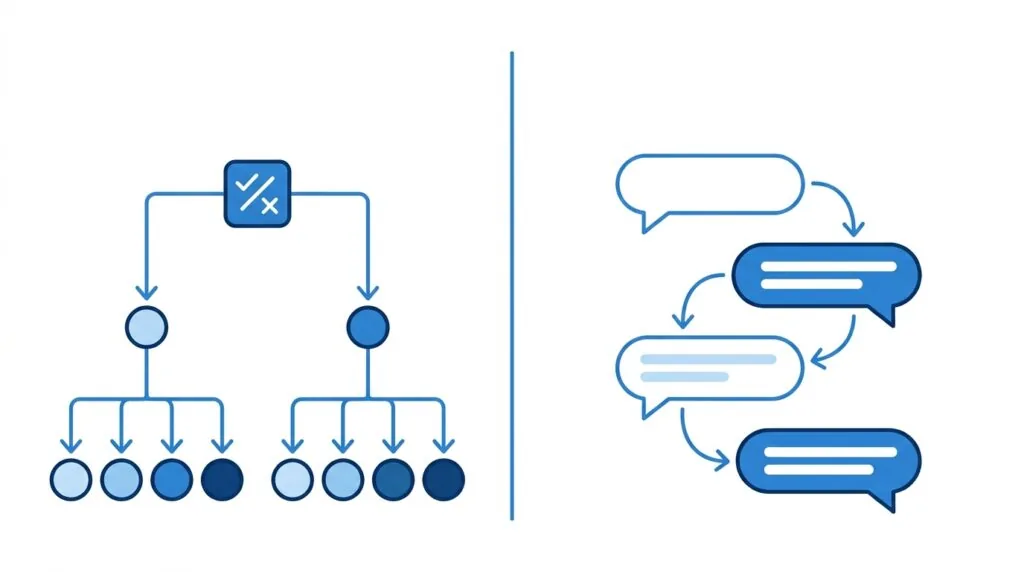
Conversational AI vs. Rigid Decision Trees
Older website bots work like a phone menu: “Press 1 for billing, press 2 for support.” They only handle questions the developer anticipated. A conversational AI chatbot reads the actual sentence a visitor types, searches your knowledge base for the closest matching content, and writes a natural reply. This means it can handle phrasing you never planned for — “do you deliver to Manchester on weekends?” instead of a preset menu option.
Chatbots vs. AI Agents (Agentic AI)
A chatbot answers questions. An AI agent takes action — it might check stock levels, book an appointment in your calendar, or update a CRM record on its own. Most small business website tools sold as “AI chatbots” in 2026 are somewhere in between: they answer questions confidently and can trigger a handful of simple actions, like sending a lead’s details to your inbox or a tool such as HubSpot or Salesforce.
Why UK Businesses Are Deploying Website Chatbots
UK businesses add chatbots mainly to cut response times outside office hours and to stop simple questions from clogging up staff inboxes. A well-trained bot can resolve routine queries instantly and pass anything complicated to a human.
24/7 Customer Triage and Ticket Deflection
Most support tickets are repetitive: opening hours, return policies, order status, pricing. A chatbot answers these instantly, at any hour, which means your team only sees the tickets that actually need a person. This is often called ticket deflection, and it’s the single biggest reason support-heavy businesses adopt chat widgets, alongside tools covered in our guide to live chat software for UK small businesses.
Seamless Lead Generation and Qualification
A chatbot can ask a visitor two or three qualifying questions — budget, timeline, location — before handing the conversation to sales. That means your team spends time on leads worth chasing, not on every form submission. Pair this with your existing CRM setup so qualified leads land directly with the right person.
Benchmarking Success: The GOV.UK Chat Case Study
The Government Digital Service, part of the Department for Science, Innovation and Technology (DSIT), trialled GOV.UK Chat to help people navigate government services using natural language rather than searching through pages. The trial demonstrated that a well-scoped AI assistant, trained on a defined set of source content, can answer public queries accurately while flagging uncertainty rather than guessing. It’s a useful reference point for small businesses: the trial’s success came from tightly controlling what the bot was allowed to draw on — the same principle that stops a business chatbot from hallucinating pricing or policy details.
How to Add an AI Chatbot to Your Website: The 5-Step Roadmap
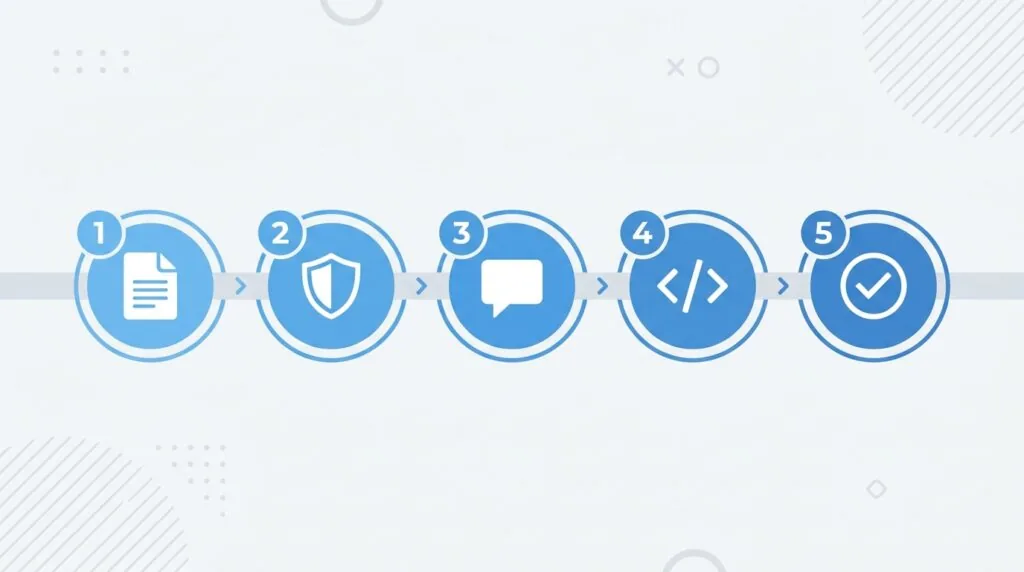
You can launch a working chatbot in under an hour by following five steps: preparing your content, choosing a compliant platform, setting the bot’s tone and boundaries, embedding the widget, and testing the handover process.
- Consolidate and sanitise your knowledge base
- Choose a GDPR-compliant, UK-friendly platform
- Define your AI persona, tone, and system prompts
- Embed the chat widget into your CMS
- Test the bot and set human handover boundaries
Step 1: Consolidate and Sanitise Your Knowledge Base
Before you touch any software, gather the content the chatbot will learn from: your FAQ page, returns policy, pricing sheet, and product descriptions. This is where most guides go quiet, and it’s exactly where chatbots go wrong. If you upload a messy PDF with pricing tables that don’t format cleanly, the bot will often misread the numbers and confidently state the wrong price. Before uploading anything:
- Convert PDF tables into plain text or simple bullet lists.
- Remove outdated pages, old promotions, and duplicate FAQs.
- Keep one single source of truth for prices and policies — never three slightly different versions across your site.
Clean input is the single biggest factor in whether a chatbot gives accurate answers or hallucinates.
Step 2: Choose a GDPR-Compliant, UK-Friendly Platform
Not every popular chatbot platform stores data in the UK or EU by default. Check this before signing up, not after.
| Platform | Data Residency Options | Best For | Notes |
|---|---|---|---|
| Dante AI | EU/UK data options available | Small businesses wanting quick RAG setup | Popular for training on uploaded documents and URLs |
| Tidio (Lyro) | EU hosting available | E-commerce, Shopify stores | Combines live chat with AI responses |
| Chatbase | US-hosted by default | Simple deployments, non-sensitive data | Check data processing terms carefully for UK GDPR use |
| Click4Assistance | UK-hosted, ISO-27001 certified | Businesses needing strict data residency | Popular with public sector and regulated industries |
| YourBot | UK-based | UK SMEs prioritising local support | Smaller platform, UK-first positioning |
Always confirm the platform’s data processing agreement (DPA) names its server locations explicitly, and check for ISO-27001 certification if you handle sensitive customer data. For a broader comparison of options, see our roundup of the best AI chatbots for UK customer service.
Step 3: Define Your AI Persona, Tone, and System Prompts
Most platforms let you write a “system prompt” — instructions that shape how the bot behaves. Keep it specific: state the business name, the tone (formal, friendly, concise), the topics it should never guess about, and what to say when it doesn’t know an answer. A good fallback response looks like this: “I’m not certain about that — let me connect you with a team member.” That single line prevents the most damaging kind of hallucination: a confident, wrong answer about pricing or legal terms.
Also set custom token limits so the bot gives focused answers rather than long, rambling replies that cost more per conversation and read poorly on mobile.
Step 4: Embed the Chat Widget into Your CMS
Once configured, the platform gives you a short JavaScript snippet — usually one script tag. Paste it into your site’s header or footer, depending on your CMS:
- WordPress: Add it via a header/footer plugin or your theme’s custom code section. No coding required beyond copy and paste.
- Shopify: Add the script through Theme Settings > Custom Code, in the theme.liquid file.
- Wix Studio: Use the built-in Custom Code panel under Settings.
If you’re still building your site from scratch, our guide on how to build a small business website in the UK covers where these code sections live on each platform. Set “allowed origins” (CORS) in the platform’s dashboard so the widget only runs on your domain — this stops someone else embedding your trained bot on their own site.
Step 5: Test and Set Handover Boundaries
Before going live, test the bot with real customer questions, including awkward ones it shouldn’t answer, like requests for a discount it isn’t authorised to give. Define clearly when it should hand over to a human: after a set number of failed answers, when a visitor asks for a refund, or when someone explicitly asks to speak to a person. Review conversation transcripts weekly for the first month to catch gaps in your knowledge base early.
Critical UK Compliance: GDPR, PECR, and ICO Guidelines
A website chatbot that collects names, emails, or phone numbers is processing personal data, which puts it squarely under UK GDPR and the Data Protection Act 2018. This is the section most competitor guides skip, and it’s the one most likely to cause real problems if ignored.
Data Residency and UK Storage
Ask any chatbot vendor exactly where conversation data and any documents you upload are stored. If the platform is US-based, check whether it holds a valid data transfer mechanism under UK GDPR, such as the UK’s International Data Transfer Agreement. Where possible, choose a UK or EU-hosted option, or one with ISO-27001 certification, especially if you handle regulated data like health, finance, or legal queries. Our ICO data protection fee guide explains your registration obligations as a data controller, which almost certainly apply once you’re collecting visitor details through chat.
PECR, Cookie Consents, and Privacy Disclosures
The Privacy and Electronic Communications Regulations (PECR) sit alongside GDPR and specifically govern cookies and electronic communications. If your chat widget sets a cookie to remember a conversation, it needs to appear in your cookie consent banner with a plain-English explanation. You should also:
- Update your privacy policy to state that a third-party AI processor handles chat data.
- Tell visitors clearly they’re talking to an AI, not a human — this is expected practice and increasingly a regulatory expectation.
- Avoid using chatbot data for automated profiling or marketing without separate, explicit consent.
If you’re unsure where your current setup stands, our GDPR compliance tools for small businesses guide and our overview of the UK AI Act’s impact on small business are worth reading before launch, since AI-specific regulation is tightening and early compliance is far cheaper than retrofitting it later.
Frequently Asked Questions (FAQs)
How do I add an AI chatbot to WordPress for free?
Most platforms offer a free tier that covers a limited number of monthly conversations. You paste a short script tag into your theme’s header or footer, or use a plugin — no coding required. Check the free tier’s conversation cap before relying on it long term.
Is my website chatbot GDPR compliant?
Only if you know where the data is stored, have a valid data processing agreement with the vendor, disclose the AI in your privacy policy, and cover any cookies it sets in your consent banner. None of this is automatic — you have to configure it.
How do I stop a website AI chatbot from hallucinating?
Feed it clean, well-formatted content, set a clear fallback response for uncertain questions, and restrict it to answering only from your uploaded knowledge base rather than open web knowledge.
Do I need coding skills to install an AI chatbot?
No. Copying and pasting a single script tag into your CMS is the standard install method across WordPress, Shopify, and Wix.
What does an AI chatbot typically cost?
Pricing usually falls into per-seat, per-conversation, or per-ticket models. Watch token limits closely — long, detailed answers use more tokens, and busy months can push you into a higher tier unexpectedly. Budget for this the same way you’d budget for any other AI tool in your business.