
Late payments cost UK small businesses time and money every single month. The fix usually isn’t a full accounting system — it’s a proper invoice, sent from software built for the job, instead of a Word document that looks like it was made in 2009.
This guide compares the invoicing tools that are genuinely free to use, explains what “free” actually means for each one, and helps you match a tool to how your business actually works.
What Counts as “Free” Invoicing Software?
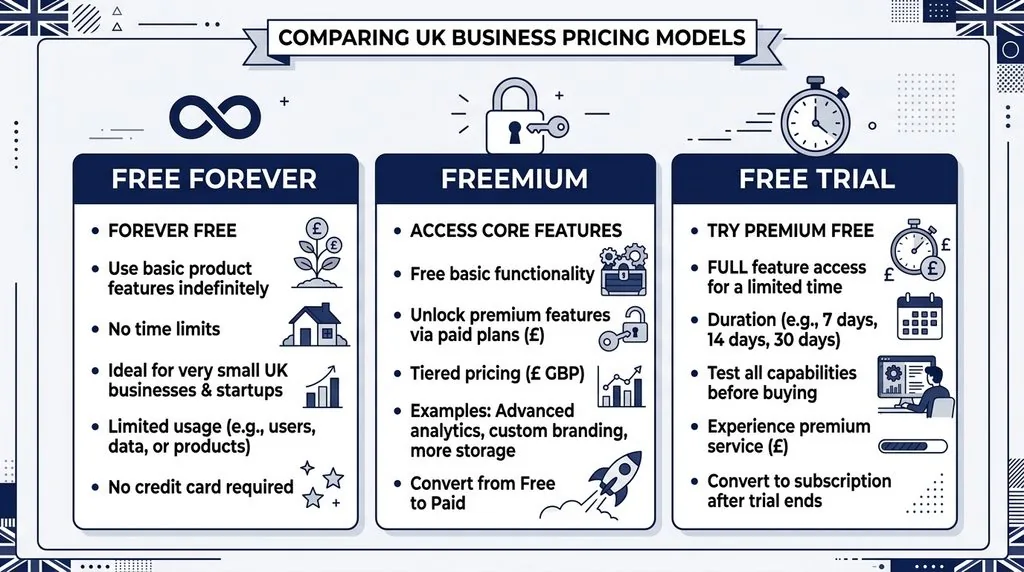
Free invoicing software falls into three different categories, and mixing them up is the most common mistake small business owners make when choosing a tool.
Free forever means the core invoicing features never require payment, with no trial clock running down. Zoho Invoice is the clearest example of this in the UK market.
Free trial means full features for a limited period — usually 14 or 30 days — after which you’re billed automatically unless you cancel.
Freemium means a genuinely free tier exists, but it’s capped. You might get a fixed number of invoices per month, limited clients, or a Square/Zoho branding watermark on every invoice you send.
None of these is automatically “better.” A sole trader sending three invoices a month doesn’t need the same tool as a small agency billing twenty clients. What matters is knowing which category you’re signing up for before you commit your client list and payment history to it.
What to Look for in Free Invoicing Software
The right free invoicing tool covers five things well: compliance, cost, payments, automation, and access.
- VAT and Making Tax Digital (MTD) readiness. Even if you’re not VAT-registered yet, a tool that supports VAT fields saves you switching software later.
- Invoice limits and branding. Check how many invoices the free plan allows per month or year, and whether the software’s logo appears on your invoices.
- Payment acceptance. Look for card payments, bank transfer links, or integration with a payment gateway — this is usually where the “free” fees actually live.
- Recurring invoices and reminders. Automated reminders for overdue invoices are one of the highest-value features for cash flow, and not every free plan includes them.
- Mobile access. If you invoice from a van, a site, or a client’s office, a proper mobile app matters more than a desktop dashboard ever will.
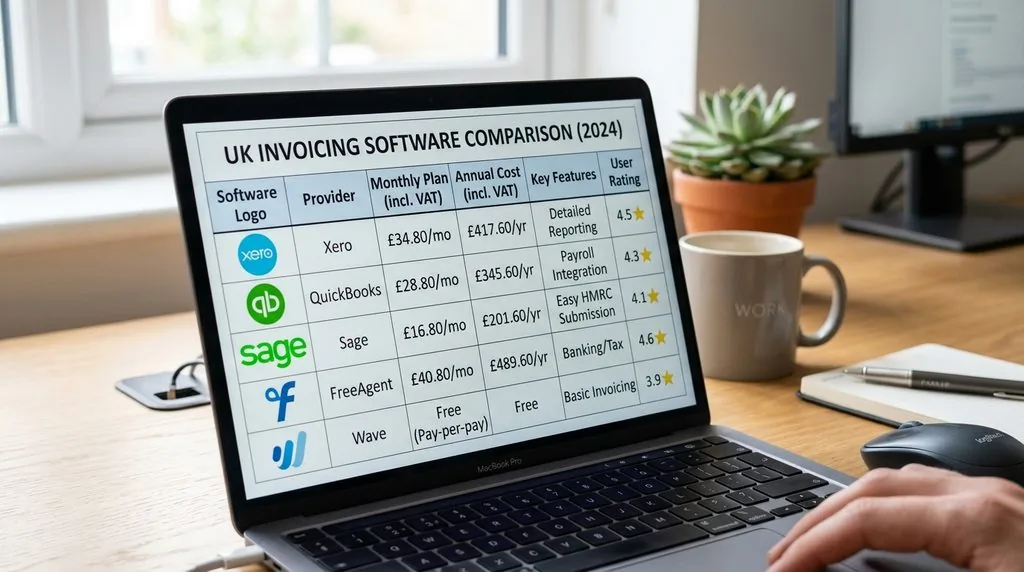
Best Free Invoicing Software for UK Small Businesses — Quick Comparison
| Tool | Free plan limit | Card transaction fee | MTD/VAT ready | Best for |
|---|---|---|---|---|
| Zoho Invoice | Unlimited invoices, free forever | 2.3%–3.45% (via add-on gateway) | Yes | Freelancers and small teams wanting full features free |
| Invoicely | Free plan capped at 5 invoices/month | Depends on connected gateway | Basic | Very early-stage sole traders |
| Square Invoices | Unlimited invoices, free | 2.5% UK cards, 4% non-UK | Via integration | Businesses that mostly take card payments |
| Wave | Free invoicing and basic accounting | Varies by payment method | Basic | Combining invoicing with light bookkeeping |
| FreeAgent | Free with certain UK bank accounts | N/A (bank transfer focus) | Yes, MTD-compliant | Sole traders wanting Self Assessment support |
| Invoice Ninja | Free self-hosted or hosted tier | Depends on gateway | Basic | Technically confident users wanting full control |
| PayPal Invoicing | Free, pay-per-transaction | 2.9% + 30p domestic | Basic | Existing PayPal users billing occasional clients |
| SumUp Invoices | Free, unlimited invoices | 2.5% | Yes (Sage-powered) | Businesses already using a SumUp card reader |
Pricing and fees change often. Always check the provider’s current pricing page before signing up, since transaction rates in particular shift with little notice.
The Best Free Invoicing Tools, Reviewed
Zoho Invoice — Best Fully Free, Forever Option
Zoho Invoice removed its price tag entirely after 13 years as a paid product, and it remains free with no invoice cap. You get customisable templates, VAT fields, recurring invoices, a client portal, time tracking, and expense tracking, all without a subscription.
The catch is payment processing. Zoho Invoice itself doesn’t charge you, but accepting online payments requires connecting a separate gateway like Stripe or PayPal, which then charges its own transaction fee. For businesses that mostly get paid by bank transfer, that’s a non-issue.
Best for: freelancers and small teams who want the most complete free feature set without a trial clock.
Invoicely — Best for Getting Started Fast
Invoicely is built around simplicity. The free tier caps you at five invoices a month, which suits a very early-stage sole trader testing the water before committing to a paid plan.
It supports multiple currencies and basic recurring billing, but the free tier lacks the deeper automation and reporting you’ll find in Zoho or Wave.
Best for: brand-new sole traders sending only a handful of invoices monthly.
Square Invoices — Best for Card Payments, No Monthly Fee
Square Invoices charges nothing to send unlimited invoices. You only pay when a client pays you — 2.5% for UK cards, rising to 4% for non-UK cards. There’s no contract and no monthly subscription on the free tier.
Funds typically land in your bank account the next working day. If you already use a Square card reader, invoicing sits in the same app, which keeps admin in one place.
Best for: businesses whose clients mostly pay by card rather than bank transfer.
Wave — Best Free Invoicing Plus Light Accounting
Wave combines free invoicing with basic bookkeeping, which suits businesses that want one tool instead of stitching invoicing and accounting software together.
It’s a US-built product, so UK-specific VAT handling is more limited than UK-native tools like FreeAgent or Zoho. It works well as a starting point, less well once VAT registration becomes relevant.
Best for: sole traders wanting invoicing and simple bookkeeping in one free tool.
FreeAgent — Best If Your Bank Includes It Free
FreeAgent is fully featured UK invoicing and accounting software, and it’s genuinely free if you bank with certain providers — NatWest, Royal Bank of Scotland, and Mettle among them. Outside of that, it’s a paid subscription.
It’s built specifically around UK tax rules, including MTD for Income Tax, which makes it a strong option for sole traders managing their own record keeping and Self Assessment.
Best for: sole traders and freelancers with a qualifying UK business bank account.
Invoice Ninja — Best Free Open-Source Option
Invoice Ninja offers a free hosted tier and a self-hosted version you can run on your own server at no cost. It covers recurring invoices, quotes, time tracking, and client portals.
The self-hosted route requires some technical comfort — it’s not a plug-and-play tool for most non-technical business owners, but it’s genuinely free with no invoice limits if you’re willing to set it up.
Best for: technically confident business owners who want full control and zero recurring cost.
PayPal Invoicing — Best for Existing PayPal Users
If you already run a PayPal Business account, invoicing is built in at no monthly cost. Clients pay via PayPal, card, or Pay Later, and funds clear instantly into your PayPal balance.
The trade-off is fees — 2.9% + 30p per domestic transaction is higher than most dedicated invoicing tools, plus currency conversion charges on international payments.
Best for: businesses already comfortable with PayPal who bill clients occasionally rather than constantly.
SumUp Invoices — Best Paired With a Card Reader
SumUp Invoices is free with no monthly fee and no cap on invoice numbers, charging 2.5% only when a client pays by card. It’s Sage-powered on the back end, which makes it Making Tax Digital-compliant out of the box.
It works best alongside a SumUp card reader for businesses that also take payments in person, though the invoicing features stand on their own too.
Best for: businesses that already use SumUp for card payments and want invoicing in the same app.
Free vs. Paid Invoicing Software — When to Upgrade
Free invoicing software works well until your business outgrows it. Here are the clearest signs it’s time to pay for a plan.
- You’re hitting the free plan’s monthly invoice limit regularly.
- You need multiple team members to access invoicing at once.
- You’re VAT-registered and need automated VAT return submission, not just VAT fields on an invoice.
- You need multi-currency invoicing for international clients, especially if you’re starting to export goods or services abroad.
- You want inventory tracking, project-based billing, or payroll built into the same platform.
If none of these apply yet, staying on a free plan is the sensible choice. Switching invoicing software later, once you have a client history, is more disruptive than starting with the right tool the first time — something worth weighing up as you think about how to scale your small business.
UK Invoice Compliance Checklist
A UK invoice must meet certain legal requirements, regardless of which software you use to create it.
Every invoice needs:
- A unique invoice number
- Your business name and address (a registered office address works fine if you don’t trade from a fixed premises)
- The customer’s name and address
- A clear description of the goods or services provided
- The date the invoice was issued and the payment due date
- The total amount owed, in pounds sterling
VAT-registered businesses must also include their VAT registration number, the VAT rate applied, and the VAT amount charged separately from the net total.
Making Tax Digital (MTD) requires VAT-registered businesses above the threshold to keep digital records and submit VAT returns using MTD-compatible software. If you’re not yet VAT-registered, MTD doesn’t apply to your invoicing directly, though it’s worth choosing software that supports it in case that changes. Good invoicing habits also tie into wider record keeping requirements sole traders are expected to follow for tax purposes.
Data protection matters too. If your invoicing software stores customer names, addresses, and payment details, you’re processing personal data under UK GDPR, which is worth bearing in mind alongside your ICO data protection fee obligations.
How to Choose the Right Free Invoicing Software for Your Business
Sole Traders and Freelancers
Start with Zoho Invoice or FreeAgent if your bank qualifies. Both cover invoicing and basic compliance without a subscription, which matters most in the first year of trading — a period covered in more detail in our guide to the first steps after registering a company.
Small Teams (2–10 People)
Look for a tool that supports multiple users on the free tier, or budget for a low-cost paid plan early. Zoho Invoice and Wave both scale reasonably well here, though team permissions are usually a paid feature once you grow beyond a couple of people.
Businesses Needing International or Multi-Currency Invoicing
Prioritise multi-currency support and check how each provider handles currency conversion fees, since these add up quickly on international payments. Comparing how you accept payment matters here too — our breakdown of Stripe vs PayPal for UK businesses is a useful next read if you’re deciding how clients will actually pay you.
Frequently Asked Questions
What’s the best truly free invoicing software in the UK?
Zoho Invoice is the most complete free-forever option for UK small businesses, offering unlimited invoices, VAT fields, and recurring billing with no subscription required.
Is Zoho Invoice really free forever?
Yes. Zoho Invoice removed its price tag in 2024 and continues to offer full invoicing features at no cost, though payment processing through a connected gateway carries its own transaction fees.
Do I need VAT-registered invoicing software as a small business?
Only if you’re VAT-registered. Below the VAT threshold, you can invoice without VAT fields, though choosing software that supports VAT from the start avoids switching tools later.
Can I create a UK invoice without signing up for software?
Yes. Most providers, including Zoho, offer a free invoice generator that creates a one-off PDF invoice without requiring an account, though it won’t save your invoice history.
What’s the difference between an invoice template and invoicing software?
A template is a static document you fill in manually each time. Invoicing software automates numbering, tracks payment status, sends reminders, and stores your client and invoice history automatically.
Bottom Line — Our Pick
For most UK small businesses, Zoho Invoice is the strongest starting point: genuinely free, no invoice cap, and built with VAT fields from day one. If your clients pay mostly by card, Square Invoices is a close second thanks to its simple pay-per-transaction model. Sole traders with a qualifying bank account should check FreeAgent first, since it bundles invoicing with Self Assessment support at no extra cost.
Whichever tool you choose, the goal is the same: invoice faster, look professional, and get paid without losing hours to admin every month.