

If your tasks live across email threads, a spreadsheet, and three WhatsApp groups, you already know why you’re reading this. Asana and Trello are the two names that come up most when UK small business owners search for a way to get organised. They solve the same problem in different ways, and picking the wrong one wastes months of onboarding effort.
The main difference is structural complexity and cost. Trello uses a visual, card-based Kanban board ideal for simple, linear projects. Asana provides a structured database with multiple views (timelines, lists, calendars) designed for complex projects with dependencies. Trello is cheaper; Asana offers deeper tracking and automation.
Asana vs Trello: At a Glance
| Trello | Asana | |
|---|---|---|
| Core structure | Kanban boards, lists, cards | Tasks, projects, multiple views |
| Free plan limit | 10 collaborators per workspace | 2 users |
| Entry-level paid plan | ~£3.70/user/month (Standard) | ~£8.20/user/month (Starter) |
| Best for | Simple, visual, linear workflows | Multi-step projects with dependencies |
| Automation | Butler (rule-based) | Asana AI Studio (agentic workflows) |
| UK GDPR readiness | DPA with UK/EU SCCs via Atlassian | DPA with UK/EU SCCs, EU data centres |
Prices are indicative GBP conversions of published USD rates; see the pricing section below for detail.
Core Philosophies: How Do They Organize Work?
Trello: Visual Simplicity and the Kanban Framework
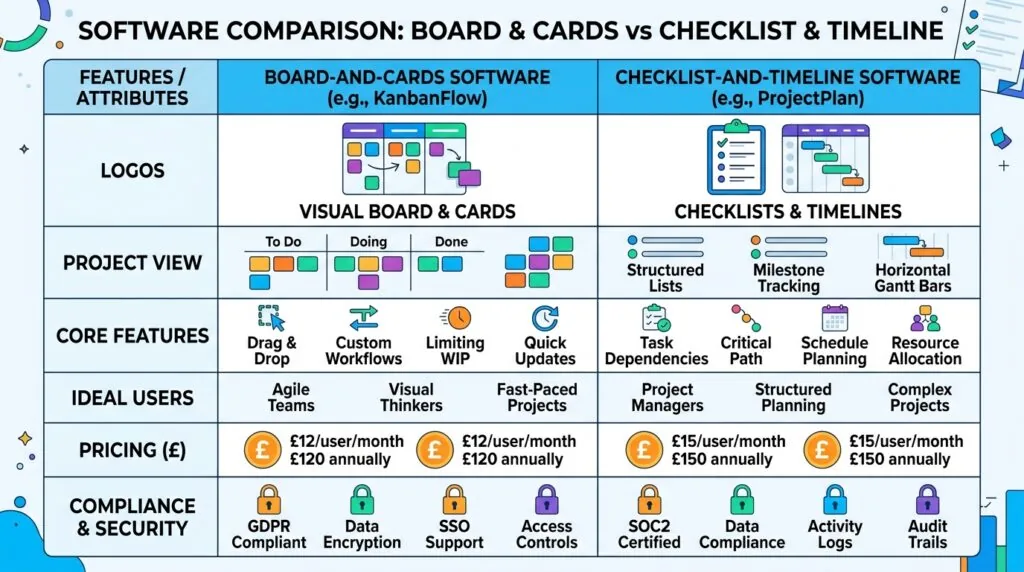
Trello is built entirely around the Kanban method. You create a board, add lists like “To Do,” “Doing,” and “Done,” and move cards between them as work progresses. Each card can hold a checklist, due date, attachment, and comments.
This is why Trello suits solo founders and small teams so well. There’s almost no learning curve. If you can drag a sticky note, you can use Trello. The trade-off is that Trello wasn’t designed to show how tasks depend on each other. A content calendar or product launch with ten interlocking steps quickly becomes hard to track on a board alone.
Asana: Structured Workflows and Task Hierarchy
Asana treats work as a hierarchy: goals sit above portfolios, portfolios contain projects, and projects contain tasks and subtasks. Every task can carry an assignee, due date, custom fields, and dependencies on other tasks.
That structure means Asana can show you a Gantt-style timeline, a workload view of who’s overloaded, and a calendar, all pulling from the same underlying tasks. It takes longer to set up properly, and a two-person team may find it more than they need. But once a project has more than five or six moving parts with real deadlines, Asana’s structure starts paying for itself.
Feature-by-Feature Comparison for Small Teams
Task Views & Flexibility (List, Board, Timeline, Calendar)
Trello’s free and Standard plans give you the board view and not much else. Calendar, Timeline, Table, and Dashboard views are locked behind the Premium plan. Asana includes List, Board, and Calendar views even on its free Personal plan, but Timeline (its Gantt chart equivalent) only unlocks on the Starter plan and above.
If your business runs projects with fixed deadlines and dependent steps, that Timeline view is often the deciding factor.
Automation & AI (Atlassian Intelligence vs Asana AI Teammates)
Most comparison articles say “both have automation” and leave it there. The actual gap is significant.
Trello’s automation runs through Butler, a rule-based system: “when a card is moved to Done, archive it after two days.” It’s simple, reliable, and easy for a non-technical team to set up, but it doesn’t reason about context. Trello’s 2026 additions bring Atlassian Intelligence features into paid tiers, mainly AI-assisted quick capture (turning a rough note into a structured card) and AI content generation.
Asana’s AI sits a level higher. On Starter and above, Asana AI can summarise project status, draft task descriptions, and flag risk on deadlines. Asana AI Studio (available on higher tiers) goes further, letting you build agentic workflows where AI handles multi-step actions across a project rather than a single trigger-and-action rule. For a UK agency managing several client accounts, that difference means less manual status-chasing.
Integrations & Power-Ups (The “Hidden Costs” of Trello)
Trello’s native features are lean by design, so Power-Ups fill the gaps: time tracking, custom fields, and reporting mostly arrive as Power-Ups, some of which carry their own subscription cost on top of your Trello plan. Budget for this before assuming Trello is the cheaper option end to end.
Asana includes more of this natively, including custom fields on paid plans, but its deeper native integrations with tools like Google Workspace, Slack, and Zapier are gated by tier too. Either way, if you’re already using Zapier to automate small business tasks, both tools connect cleanly.
Collaboration & Client Access (Working with Freelancers & VAs)
Trello’s free plan supports up to 10 collaborators per workspace, which comfortably covers a small team plus a couple of freelancers or a virtual assistant. Guests can be added to a single board without taking a full paid seat, useful when a client only needs visibility on one project.
Asana’s free Personal plan caps out at 2 users, so if you’re a solo founder plus one VA, it works. A third person, whether an employee or a UK freelancer, forces an upgrade to Starter. If you regularly bring in outsourced UK freelancers under IR35, factor their seat cost into your monthly budget from day one.
The Financial Reality: GBP Pricing & Free Tier Limits
Trello’s Budget Advantage (Standard & Premium Tiers)
Trello’s Standard plan costs $5 per user, per month, billed annually — roughly £3.70/user/month at current exchange rates. Premium runs $10 per user, per month annually, around £7.45/user/month, and adds Timeline, Calendar, Table, Dashboard, and Map views plus unlimited Butler automation runs. Enterprise starts at $17.50 per user, per month (about £13/user/month), decreasing as seat count grows, and adds SSO and organisation-wide admin controls.
Asana’s Scalability Premium (Starter & Advanced Tiers)
Asana Starter costs $10.99 per user, per month billed annually — around £8.20/user/month — rising to $13.49 if you pay monthly. Advanced runs $24.99 per user, per month annually, roughly £18.60/user/month, unlocking portfolios, Goals, and workload management. Enterprise pricing is custom.
Neither company bills natively in GBP. Both charge in US dollars, so what actually lands on your UK card statement shifts slightly with the exchange rate and your card provider’s conversion fee. VAT-registered UK businesses can typically reclaim VAT charged on these subscriptions; check with your accountant on how the reverse charge applies to your specific setup, especially if you’re managing this alongside Making Tax Digital record-keeping.
Free Plan Constraints: Which Actually Works for Free?
This is where most comparison guides get it wrong, and it matters for budgeting. Asana’s free Personal plan is capped at 2 users, not 10 or 15 as many older articles still claim. Trello’s free plan supports 10 collaborators per workspace.
Practically: a true solopreneur or a two-person operation can run Asana for free indefinitely. Anyone bringing on a third person, even part-time, hits a wall immediately. Trello’s free tier stretches much further for a small team before you need a card on file, though you’re capped at 10 boards per workspace and 250 Butler automation runs a month.
UK Compliance & Data Protection (UK GDPR & Security)
Both companies operate under UK GDPR obligations because they process personal data belonging to UK-based individuals, regardless of where their servers sit. Both offer a Data Processing Addendum (DPA) incorporating UK and EU Standard Contractual Clauses, which covers the legal basis for transferring data outside the UK.
Asana holds SOC 2 Type II certification and ISO 27001, and offers data residency options with data centres in Europe, letting Enterprise customers pin data storage to a specific region. Trello sits under Atlassian’s broader trust and compliance programme, which includes SOC 2 and a company-wide GDPR commitment, but data residency controls have historically rolled out unevenly across Atlassian’s product range — worth confirming directly with Atlassian which region your specific Trello workspace uses before storing sensitive client data.
Regardless of the tool, you remain the data controller. If a client’s personal data sits on your boards or tasks and something goes wrong, the responsibility to report it to the Information Commissioner’s Office (ICO) sits with your business, not the software vendor. If you handle a lot of client personal data, it’s worth pairing either tool with a proper look at GDPR compliance tools for small businesses.
Common mistake: putting client names, emails, or project details on a public Trello board. Public boards are indexed by search engines. If you’ve ever made a board public to share progress, check its privacy setting now.

The Final Verdict: Which Should Your UK Small Business Choose?
When to Onboard Trello
Choose Trello if you’re a solopreneur, a small e-commerce operation, or a team under 10 people running straightforward, linear workflows — a content pipeline, a simple sales process, or a small production schedule. You want something your team adopts in an afternoon, not a week, and you’re comfortable paying separately for Power-Ups if you need extras like time tracking later.
Example: A UK-based independent e-commerce seller managing a product launch calendar, supplier follow-ups, and a returns queue. Three boards, a handful of Power-Ups, done.
When to Onboard Asana
Choose Asana if your projects involve dependencies, multiple stakeholders, and hard deadlines that shift when one task slips — client services agencies, small consultancies, or any operation coordinating freelancers across several concurrent projects.
Example: A London-based digital design agency managing three client website launches at once, each with design, copy, development, and QA stages that depend on the previous stage finishing. Asana’s Timeline view and dependency tracking earn their cost here in a way a Kanban board can’t replicate.
If you’re scaling toward your first in-house hires rather than just freelancers, it’s also worth reading up on hiring your first employee in the UK alongside choosing your project management stack, since team structure affects which tool scales more comfortably.
Frequently Asked Questions (FAQs)
What is the main difference between Asana and Trello for small businesses?
The main difference is structural complexity and cost. Trello uses a visual, card-based Kanban board ideal for simple, linear projects. Asana provides a structured database with multiple views (timelines, lists, calendars) designed for complex projects with dependencies. Trello is cheaper; Asana offers deeper tracking and automation.
Is Asana or Trello better for a two-person UK business?
Either works free. Asana’s free plan caps at exactly 2 users, so it fits a two-person team precisely but leaves no room to grow without upgrading. Trello’s 10-collaborator free cap gives more breathing room if you plan to add a freelancer soon.
Does Trello or Asana cost more for a 5-person team?
Trello Standard costs around £3.70/user/month, roughly £18.50/month total for five people. Asana Starter costs around £8.20/user/month, about £41/month for five. Trello is the cheaper entry point; Asana’s price reflects its deeper feature set.
Are Asana and Trello UK GDPR compliant?
Both offer a Data Processing Addendum with UK and EU Standard Contractual Clauses to cover data transfers. Neither vendor’s compliance removes your responsibility as the data controller to handle personal data lawfully and report breaches to the ICO.
Can I switch from Trello to Asana later without losing data?
Yes. Both tools support CSV export and import, so boards and tasks can move across, though task dependencies and automation rules won’t transfer automatically and need rebuilding manually.